GuardSyn
GuardSyn, Extra Minecraft komutları Sağlar. NeoForge 1.21.8 Desteklidir. Yararlı Minecraft Java komutları Sağlar.
介绍
📖 User Guide: How to Use GuardSyn
If you are an operator or server admin, here is how you can use GuardSyn to protect your server:
1. Getting Started
-
/guardsyn: Use this command to verify if the mod is running correctly. It will confirm the system is active. -
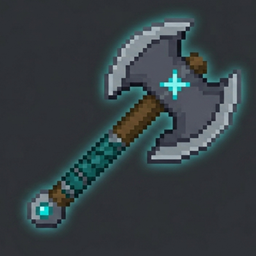
/guardsyn get: This will grant you the GuardSyn Selection Axe. This tool is essential for defining the borders of your protected zones.
2. Protecting Regions
-
Step 1: Hold the GuardSyn Selection Axe and Left-Click a block to define the first corner (Pos 1).
-
Step 2: Right-Click another block to define the second corner (Pos 2).
-
Step 3: Type
/guardsyn deny. This command locks the selected area. Now, no one without operator permissions can break or place blocks within that zone!
3. Automatic Features
-
PvP Death Announcements: You don’t need to type any commands for this! Once the mod is installed, it automatically tracks PvP encounters. Whenever a player dies, the server will display a color-coded message in the chat, detailing who won the fight and what gear they used.
💡 Admin Tips:
-
Make sure you have operator permissions (OP) to use these commands.
-
If you find an area is no longer needed to be protected, simply select new coordinates or reset the zone.
常见问题
GuardSyn 支持哪些 Minecraft 版本?
GuardSyn 支持 Minecraft Java 版 1.21.8,可用的加载器:NeoForge。下载时注意选择和你游戏版本一致的文件。
GuardSyn 怎么安装?
先用 PCL2 或 HMCL 启动器安装对应版本的 NeoForge,再把下载的 .jar 文件放进游戏目录的 mods 文件夹,重新启动游戏即可。开启了版本隔离的,mods 文件夹在 versions/版本名 下面。
评论
登录后评论和评分