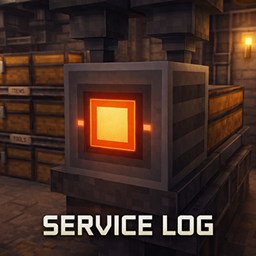
Service Log
A utility block that monitors the inventory placed behind it and displays its status in-game.
介绍
Service Log
Monitor nearby storage at a glance — without opening every container.
Service Log adds a compact, technical-looking panel block that reads the inventory placed directly behind it and shows its status in-world.
Perfect for players who build storage rooms, workshops, factories, machine areas, and automation setups and want a cleaner, more immersive way to track containers.

Why Use Service Log?
If you enjoy building organized bases, automation lines, or factory-style rooms, Service Log gives your storage systems a more readable and immersive feel.
Instead of checking containers one by one, you get a physical monitoring panel that fits naturally into your build and helps your logistics look alive.
Service Log is built to be:
- Compact
- Readable
- Immersive
- Practical
- Easy to integrate into both survival and creative builds
Features
- Monitors the inventory placed directly behind the block
- Adds a clean technical panel for storage and automation builds
- Improves visual clarity in workshops, machine rooms, and organized bases
- Great for factory-themed, industrial, and logistics-focused designs
- Lightweight utility block with both practical and decorative value
How It Works
Place the Service Log block with a supported inventory directly behind it.
When positioned correctly, the panel reads that inventory and displays its status in-world, giving you a fast and immersive way to monitor nearby storage without constantly opening containers manually.
Great For
Service Log fits especially well in:
- Storage rooms
- Chest walls
- Barrel-based storage setups
- Hopper lines
- Item routing systems
- Workshop interiors
- Factory-style builds
- Technical and industrial bases
- Decorative automation corridors
How to Use
- Craft and place the Service Log block
- Put a supported inventory directly behind it
- Chest
- Barrel
- Hopper
- Other supported inventories
- Face the block so the front panel is visible from the direction you want
- Use your storage system as normal
- Check the panel for quick in-world monitoring
Design Goal
Service Log is designed to make Minecraft storage and logistics feel more physical, readable, and integrated into the world.
Rather than relying only on menus, this mod adds a real block that visually represents monitoring inside your build — ideal for players who want their technical setups to look as good as they function.
Notes
- The monitored inventory must be placed directly behind the block
- Best used in organized storage and automation environments
- Intended as a lightweight utility and decorative enhancement for logistics-focused builds
In One Line
Service Log adds a compact in-world monitoring panel for containers placed behind it, making storage and automation builds cleaner, more immersive, and easier to read.
常见问题
Service Log 支持哪些 Minecraft 版本?
Service Log 支持 Minecraft Java 版 1.21.1,可用的加载器:NeoForge。下载时注意选择和你游戏版本一致的文件。
Service Log 怎么安装?
先用 PCL2 或 HMCL 启动器安装对应版本的 NeoForge,再把下载的 .jar 文件放进游戏目录的 mods 文件夹,重新启动游戏即可。开启了版本隔离的,mods 文件夹在 versions/版本名 下面。
Kaanatorium 的其他作品
查看全部 →
Shader Essentials
用这个整合包提升你的 Minecraft 冒险体验:优化性能、简化物品栏管理、助力探索,并提供实用的合成信息,让游戏玩起来更加流畅。

Shader Essentials 2
这款整合包能优化性能、简化物品栏管理、助你探索,并提供重要的合成信息,让游戏体验更加流畅。

Shader Essentials 3
Enhance your Minecraft adventures with a modpack that optimizes performance, streamlines inventory management, aids exploration, and provides essential crafting information for a smoother gameplay experience.

Blessed by Gems
Blessed by Gems adds ritual gameplay with four-rarity Gems that grant potion effects when sacrificed on matching Sacrifice Stones. Progress from Common to Epic tiers to unlock stronger abilities.
评论
登录后评论和评分