
Cobblemon Pokestop
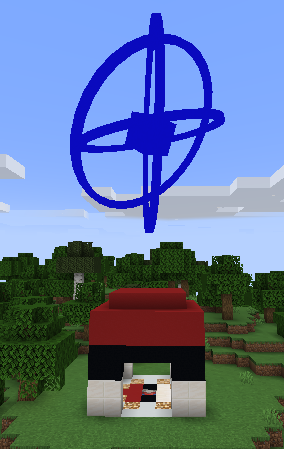
Cobblemon Pokéstop is a lightweight Fabric mod for Minecraft 1.21.1 that adds simple Pokéstop-style item drops, perfect for Pokémon-themed servers.
截图


介绍
📘 Cobblemon Pokéstop – Configuration Guide
This mod uses a single JSON configuration file to manage both the cooldown timer and the reward pool. You can customize these settings without needing to edit the source code.
Config File Location: config/cobblepokestop_config.json (This file is automatically generated when you launch the game for the first time.)
⚙️ Default Configuration
{
  "cooldownSeconds": 300,
  "rewards": [
    {
      "item": "minecraft:apple",
      "min": 1,
      "max": 5,
      "roll": 1
    },
    {
      "item": "cobblemon:poke_ball",
      "min": 1,
      "max": 5,
      "roll": 1
    }
  ]
}
📝 Parameters
Global Settings
- cooldownSeconds: (Integer) The time in seconds a player must wait before they can claim rewards from the same Pokéstop again.
- Default: 300 (5 minutes)
- Example: Set to 60 for a 1-minute cooldown.
Rewards List
- The “rewards” section allows you to define the items dropped by the Pokéstop.
- item: (String) The item ID in namespace:item_name format.
- Example: minecraft:bread or cobblemon:poke_ball.
- min: (Integer) The minimum quantity of items to drop per roll.
- max: (Integer) The maximum quantity of items to drop per roll.
- Note: The game will pick a random number between min and max. If you want a fixed amount, set both to the same number.
- roll: (Integer) The number of times the system attempts to give this item stack.
- Example: If you drop apples (min: 1, max: 5) and set roll: 2, the game will randomize the apple amount twice (e.g., getting 3 apples on the first roll and 5 on the second, totaling 8).
💡 Custom Example (Cobblemon Integration)
Here is an example configuration with a 1-minute cooldown that rewards items from the Cobblemon mod with randomized quantities:
{
  "cooldownSeconds": 60,
  "rewards": [
    {
      "item": "minecraft:bread",
      "min": 2,
      "max": 4,
      "roll": 1
    },
    {
      "item": "cobblemon:great_ball",
      "min": 1,
      "max": 1,
      "roll": 1
    },
    {
      "item": "cobblemon:poke_ball",
      "min": 1,
      "max": 5,
      "roll": 2
    },
    {
      "item": "cobblemon:exp_candy_m",
      "min": 1,
      "max": 2,
      "roll": 1
    }
  ]
}
How to Apply Changes
- Open config/cobblepokestop_config.json with a text editor.
- Modify the values as needed.
- Save the file.
- Restart the game (or the server) for the changes to take effect.
常见问题
Cobblemon Pokestop 支持哪些 Minecraft 版本?
Cobblemon Pokestop 支持 Minecraft Java 版 1.21.1,可用的加载器:Fabric。下载时注意选择和你游戏版本一致的文件。
Cobblemon Pokestop 怎么安装?
先用 PCL2 或 HMCL 启动器安装对应版本的 Fabric,再把下载的 .jar 文件放进游戏目录的 mods 文件夹,重新启动游戏即可。开启了版本隔离的,mods 文件夹在 versions/版本名 下面。运行环境:客户端和服务端都要装。
评论
登录后评论和评分