# Cursor Toggle
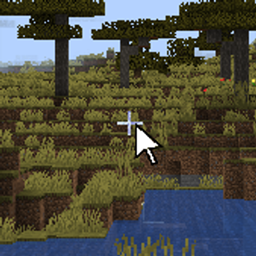
A client-side Fabric mod for Minecraft that lets you toggle the system cursor visibility with a keybind — without pausing the game.
一个 Minecraft Fabric 客户端 Mod,允许你通过快捷键切换系统光标的显示/隐藏,且不会暂停游戏。
## Features / 功能
– **Toggle cursor with a keybind** — Press Right Alt (default) to show/hide the system cursor at any time during gameplay.
按下右 Alt(默认)即可在游戏中随时显示/隐藏系统光标。
– **No game pause** — The game keeps running when the cursor is visible. No GUI or pause menu is triggered.
光标显示时游戏不会暂停,不会弹出任何 GUI 或暂停菜单。
– **Mouse input blocked** — While the cursor is visible, mouse movement, clicks, and scrolling are intercepted to prevent accidental camera rotation or interaction.
光标显示期间,鼠标移动、点击和滚轮事件会被屏蔽,防止视角意外转动或误操作。
– **Focus-loss protection** — When the cursor is shown and the window loses focus, the game won’t pause or open the menu.
光标显示模式下,窗口失焦不会触发游戏暂停。
– **Customizable keybind** — The toggle key can be changed in Options → Controls → Key Binds under the “Cursor Toggle” category.
快捷键可在 选项 → 控制 → 按键绑定 的”光标切换”分类中自定义。
## Use Cases / 使用场景
– Alt-tab to another window (browser, Discord, etc.) without pausing the game.
切换到其他窗口(浏览器、Discord 等)时不暂停游戏。
– Interact with overlays or second monitors while the game runs.
在游戏运行时操作叠加窗口或第二屏幕。
– AFK scenarios where you want the game running but need your cursor free.
挂机时需要释放鼠标操作其他内容。
## Requirements / 环境要求
| Item | Version |
|——|———|
| Minecraft | 1.20.4 |
| Fabric Loader | ≥ 0.15.0 |
| Fabric API | Any compatible version |
| Java | ≥ 17 |
## Installation / 安装
4. Launch the game.
## Default Keybind / 默认按键
| Action | Key |
|——–|—–|
| Toggle System Cursor | Right Alt |
You can rebind it in **Options → Controls → Key Binds → Cursor Toggle**.
## Building from Source / 从源码构建
“`bash
cd Cursor-Toggle
./gradlew build
“`
The compiled jar will be in `build/libs/`.
## How It Works / 工作原理
1. **Key registration** — Registers a keybind using Fabric’s `KeyBindingHelper`. Each tick checks if the key was pressed.
2. **GLFW cursor mode** — Toggles between `GLFW_CURSOR_NORMAL` (cursor visible) and `GLFW_CURSOR_DISABLED` (cursor grabbed) directly via LWJGL.
3. **Mixin: MouseMixin** — Intercepts `onCursorPos`, `onMouseButton`, and `onMouseScroll` in the `Mouse` class. When cursor is visible, all mouse input is cancelled to prevent camera movement.
4. **Mixin: MinecraftClientMixin** — Intercepts `onWindowFocusChanged`. When cursor is visible and the window loses focus, the event is cancelled to prevent the game from pausing.
## License / 许可证
[MIT](LICENSE)
## Author / 作者
**liuzeen1234**




评论
登录后评论和评分