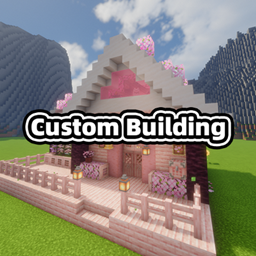
Plume’s Custom Building
Create your own building blueprint items from a datapack: structure, preview image, item texture, display name and tooltip.
介绍
Custom Building
Create your own building blueprint items entirely from a datapack. One JSON file describes a structure,
its preview image, its item texture, its name and its tooltips – reload the datapack and the blueprint shows
up in its own creative tab, ready to be placed in the world.
No resource pack, no model files, no code: if you can write a datapack, you can add a building.
Features
- Fully data driven blueprints – structure, preview image, item texture, display name and tooltip all
come from a single file underdata/<namespace>/custom_building/blueprint/. - Appears right after
/reload– no game restart, no resource pack. - A proper building panel, copied from MC-Prefab: a control panel on the left, the preview image on the
right, Preview / Cancel / Build along the bottom. - Choose the orientation before you build – cycle 北/东/南/西 and the panel remembers the last orientation
you used. - A translucent ghost preview in the world, rendered with the same technique Litematica uses: per section
vertex buffers, unlit quads at full brightness, drawn through the translucent block layer at 0.5 alpha.
What you see is exactly what gets placed.- Left click cancels the preview.
- Right click builds it right where the ghost stands.
- Sneak + mouse wheel turns it in place.
- Sensible failure messages, yellow, worded like MC-Prefab’s: protected blocks, unbreakable blocks,
spawn protection, missing structure file. Success is reported in green with a chime. - Forgiving texture paths – five different spellings of the same path all work,
textures/and.png
are added when missing, and an unconfigured texture falls back to the bundled default blueprint icon. - Forgiving structures – block ids this version does not know (a block from an optional mod, or one that
was renamed) become air instead of breaking the whole blueprint, and are listed once in the log. - Names and tooltips accept translation keys or plain text, including legacy
§colour codes. - Works on dedicated servers – the structure is streamed to each client on demand, so the preview works
even though the client never sees the datapack. - A written, in-game guide ships inside the creative tab, signed by the author.
- A built-in example (the initial house) so the tab is never empty.
Requirements
| Minecraft | Loader | Java | Download |
|---|---|---|---|
| 1.21.1 | NeoForge 21.1+ | 21 | custom_building-1.21.1-*.jar |
| 1.20.1 | Forge 47+ | 17 | custom_building-1.20.1-*.jar |
Client and server both need the mod for the preview and the build panel. Everything the mod adds is
server-authoritative: the server decides what is built, the client only renders.
Datapack reference
Where the files go
data/<namespace>/custom_building/blueprint/<name>.json     the blueprint definition
data/<namespace>/structure/<name>.nbt                      the structure to build
assets/<namespace>/textures/...                            the preview image and the item texture
The blueprint id is <namespace>:<name>, for example custom_building:initial_house. A non-JSON template
file (blueprint_template.txt) ships next to the built-in example and is never parsed – copy it, rename the
copy to .json and edit it.
The definition
{
    "structure": "custom_building:initial_house",
    "preview":   "assets/custom_building/textures/blueprint/initial_house.png",
    "texture":   "assets/custom_building/textures/item/initial_house.png",
    "name":      "§6初始小屋蓝图",
    "tooltip":   ["§a右键地面来使用"]
}
| field | required | meaning |
|---|---|---|
structure |
yes | structure template id. A bare name is resolved against the namespace of the file. |
preview |
no | image shown while hovering the item; always stretched into a 4:3 box. |
texture |
no | inventory texture. Empty, missing or default uses the bundled blueprint icon. |
name |
no | item name – a translation key, or plain text with § colour codes. Defaults to the id. |
tooltip |
no | one string or an array of strings, same rules as name. |
Texture paths are forgiving; all of these mean the same file:
custom_building:textures/item/initial_house.png            full resource location
assets/custom_building/textures/item/initial_house.png     the path as it appears in the jar
textures/item/initial_house.png                            relative to the file's namespace
item/initial_house.png                                     "textures/" is added for you
item/initial_house                                         ".png" is added for you
Building a structure
Put a structure in the world, save it with a structure block (or any tool that writes vanilla
structure/*.nbt), and drop the file into data/<namespace>/structure/. The blueprint builds it facing
south; the panel rotates it from there.
Using it in game
- Right-click the ground with a blueprint. The building panel opens.
- Pick the orientation on the left (朝向 / Facing), check the preview image on the right.
- Press 预览! / Preview! to place a translucent ghost in the world, then:
- left click to cancel,
- right click to build it,
- sneak + mouse wheel to turn it.
Or press 建造! / Build! straight away.
- Success is reported in chat; survival consumes one blueprint, creative does not.
Notes and limits
- All blueprints share one item id (
custom_building:blueprint). Minecraft freezes its item registry at
startup, so an item per blueprint is impossible; instead each stack carries the blueprint it belongs to and
the creative tab, name, tooltip, texture and behaviour all follow from that. In practice you get distinct
items in the tab, and adding or removing blueprints never breaks existing items. - Preview meshes are capped at 60,000 blocks per structure. Larger structures still build, they just do not
get a ghost. - A structure whose bounding box contains air will clear that space, exactly like a vanilla structure block.
- The built-in example is a vanilla-only cottage so it renders in full on every supported version.
Credits and permissions
- Mod by Plume Jade.
- Building panel, its textures and the placement messages are modelled on
MC-Prefab by WuestMan (MIT). - The ghost preview rendering technique follows
Litematica by masa. - You may include this mod in modpacks, and edit the bundled example datapack as you like.
常见问题
Plume’s Custom Building 支持哪些 Minecraft 版本?
Plume’s Custom Building 支持 Minecraft Java 版 1.20.1–1.21.1,共 2 个版本,可用的加载器:Forge / NeoForge。下载时注意选择和你游戏版本一致的文件。
Plume’s Custom Building 怎么安装?
先用 PCL2 或 HMCL 启动器安装对应版本的 Forge / NeoForge,再把下载的 .jar 文件放进游戏目录的 mods 文件夹,重新启动游戏即可。开启了版本隔离的,mods 文件夹在 versions/版本名 下面。
HeartRate75Ott123 的其他作品
查看全部 →
Field Guide:Monster Checklist
A monster checklist mod that integrates with Field Guide to track unlocked monsters, with milestone rewards and attribute boosts.
Plume’s Summoner
It's a mod that adds a gui to summon the mobs you have killed smoothly.

Plume’s More Arrows
Adds 6 new balanced arrow types with unique stats, custom textures, and full configurability. Compatible with bows and crossbows.

Midnight Thoughts: XP Bonus
An addon for Midnight Thoughts that pays out a small amount of experience for the day that just ended, shows it on the Midnight Thoughts morning summary panel, and writes it to the chat.
评论
登录后评论和评分