Clean Debug Screen (Better F3 Overlay)
A modern, readable better F3 debug screen and F3 overlay with customizable themes, structured cards, zero mod data loss, and a one-click shortcut to copy debug report to your clipboard.
介绍
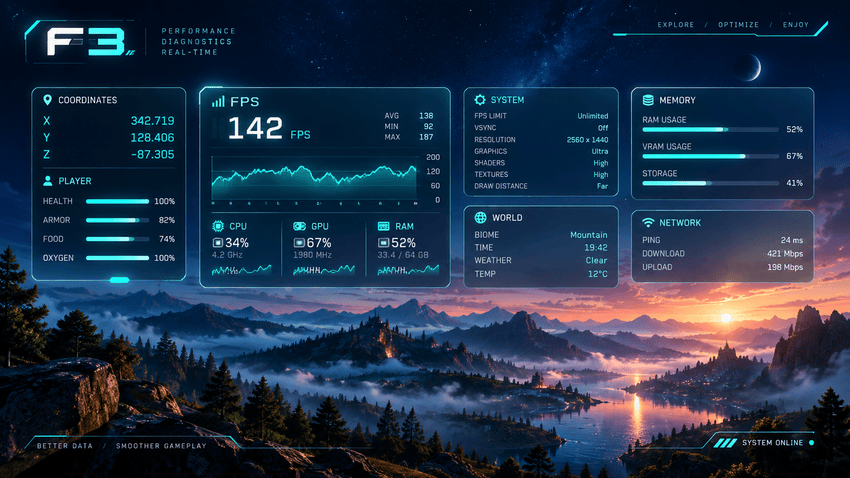
The vanilla Minecraft debug screen is an unreadable, overflowing wall of text that clutters your view and makes locating crucial coordinates or performance metrics frustrating.
Clean Debug Screen completely overhauls this interface into an elegant better F3 and F3 overlay featuring clean, collapsible cards for Position, World, Performance, Target blocks, and System specs.
Unlike alternatives that silently discard third-party lines, this mod captures and organizes every piece of information so you get clear, readable debug info without losing lines from other mods.
Choose between 4 distinct visual themes (Dark, Light, High Contrast, Minimal) with customizable scaling, margins, column layouts, and line-by-line visibility toggles.
Take advantage of the game-changing shortcut to copy debug report directly to your clipboard: an instant, markdown-formatted report containing your mod list, seed, FPS, and hardware specs ready for bug tickets.
Every single vanilla key combination—including F3+B, F3+G, F3+H, F3+T, and F3+A—remains 100% functional with zero keybinding conflicts.
Developed with the assistance of advanced AI pair-programming.
常见问题
Clean Debug Screen (Better F3 Overlay) 支持哪些 Minecraft 版本?
Clean Debug Screen (Better F3 Overlay) 支持 Minecraft Java 版 26.2–26.3,共 2 个版本,可用的加载器:NeoForge。下载时注意选择和你游戏版本一致的文件。
Clean Debug Screen (Better F3 Overlay) 怎么安装?
先用 PCL2 或 HMCL 启动器安装对应版本的 NeoForge,再把下载的 .jar 文件放进游戏目录的 mods 文件夹,重新启动游戏即可。开启了版本隔离的,mods 文件夹在 versions/版本名 下面。
Kaelll 的其他作品
查看全部 →
Vespera
体积云、彩色阴影、物理吸收水体——一个完整的现代光影包。

Gravemist
Gravemist 是一款适用于 Minecraft 26.2 的恐怖光影包:浓雾会将生物隐藏到最后一刻,火把光线忽明忽暗,而你在地下待得越久,画面就会悄然变得越发失真。

Inkboil
卡通光影,按二拍动画——画面保持流畅,同时每秒重绘十二次。

Lucky Geode
Crack fate open: 51 weighted outcomes and a luck system that genuinely bends the roll.
评论
登录后评论和评分