FFEntityDirt
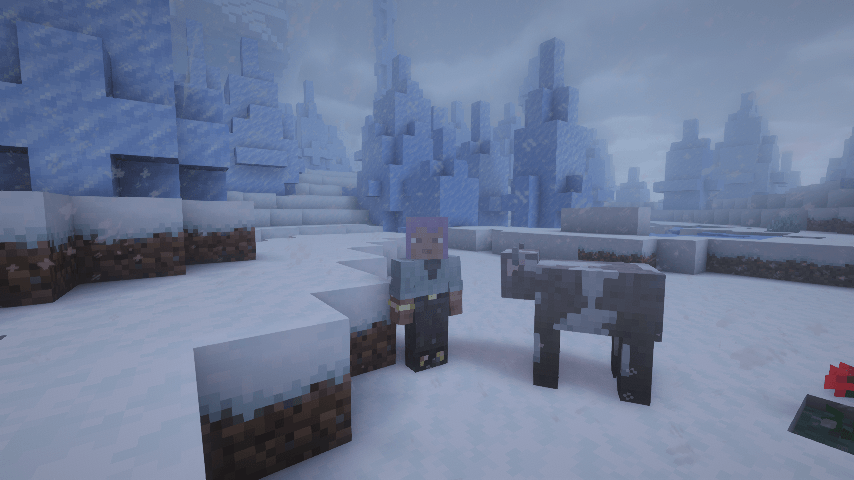
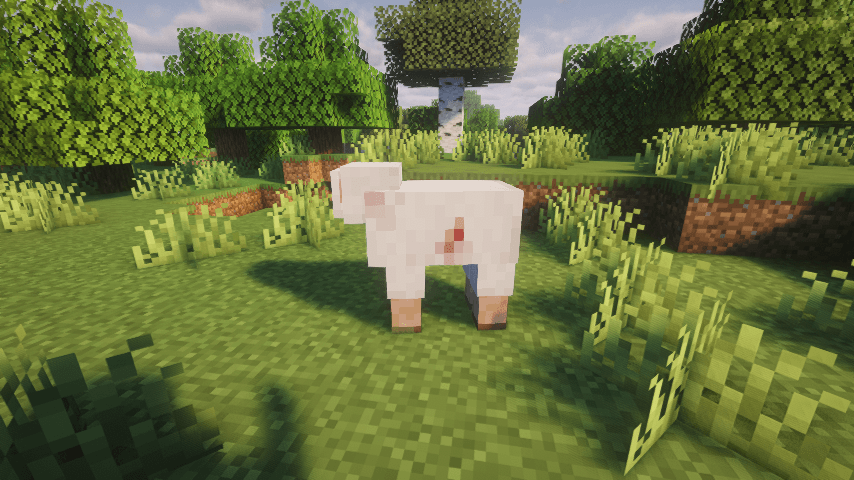
Entities/players are painted with dirt, damage, snow, explosion ash, particles, etc. Clean in water or a cauldron.
截图
介绍
FF Entity Dirt
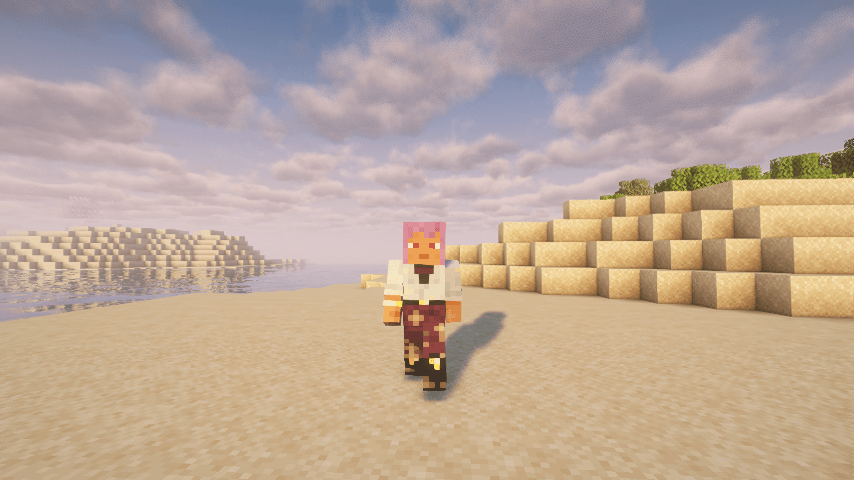
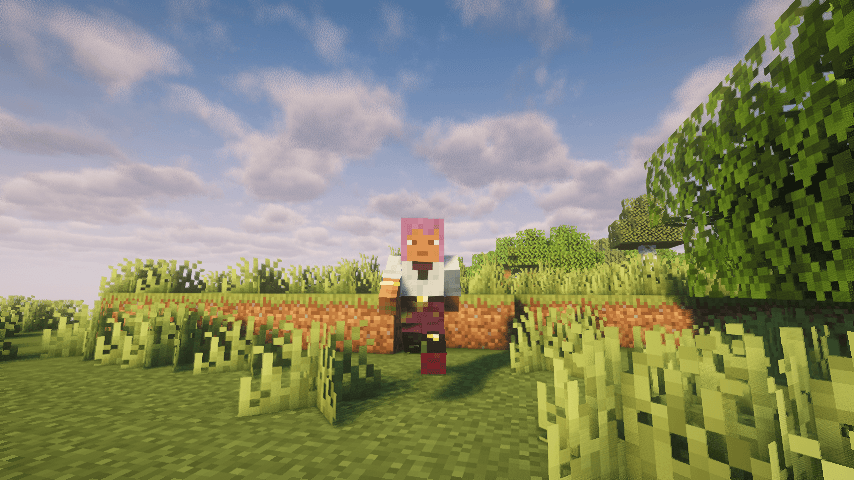
Mobs and players finally look like they’ve been somewhere! Tramp through mud and it cakes your legs, stand too close to a creeper and wear the scorch, wait out a snowstorm and wear a snowy hat. Then hop in a lake and watch it all wash away.
Needs FF Entity Painting (the build for your Minecraft version and loader) on the server and every client.
How it works
- Getting dirty: walking and running on natural ground like grass, mud, sand, snow and stone leaves dirt on your legs in the color of the ground. The faster you go, the higher it climbs, and hard falls splatter it up your whole body.
- Sticky situations: honey and slime blocks gum up your feet in amber or green, sculk leaves teal-black stains, and powder snow coats whatever sinks into it white.
- Lava wading: wade through lava with Fire Resistance and your legs come out charred black.
- Mining: digging flings specks of the block onto you.
- Soot: fire, lava and explosions leave you sooty. Blasts scorch the side facing them.
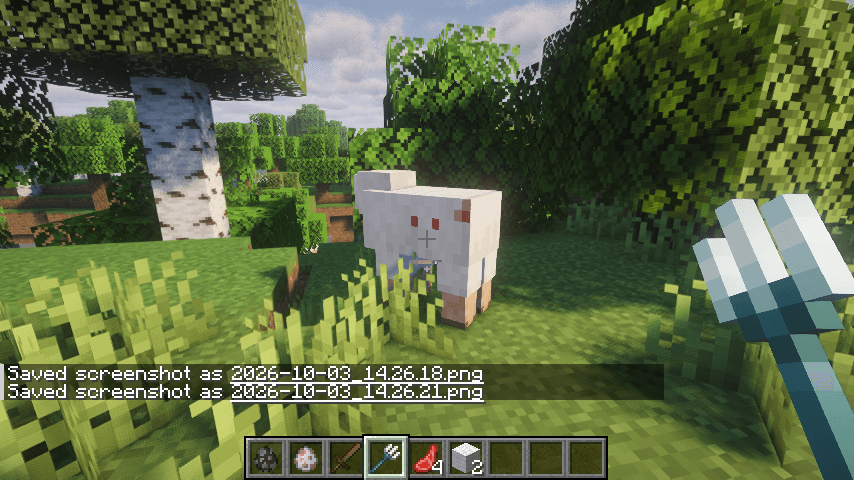
- Battle scars: every weapon leaves its own wound. Swords slash, axes gash, spears stab, tridents leave three holes, maces crush and fists bruise. Wolves bite, cats claw and bees sting. Hits land right where the attacker was looking, so a bonk on the head marks the head, and they go on a little messy instead of perfectly stamped. Marks fade over time and as you heal.
- Snow: stand out in a snowstorm and snow piles up on your head and shoulders. It melts once you head inside.
- Getting clean: swim, stand in the rain, or take a bath in a water cauldron.
- Drips: water and lava dripping from cave ceilings leave wet spots and scorch marks that fade over time. These only show on your own screen.
- Your art is safe: dirt sits on its own locked layers, so anything painted with FF Entity Painting stays untouched.
Configuration
You can adjust:
- Which mobs get dirty or marked, and which blocks leave dirt
- Dirt colors and how messy each block is
- How quickly dirt, soot, snow and marks build up, and how fast they wash off or fade
- Whether melee wounds land where the attacker aimed or at a random spot on the side facing it
- Which wound each weapon leaves, how messy wounds look, and how fast sticky blocks, powder snow and lava take hold
- Each effect (dirt, soot, blasts, mining, damage marks, snow, drips) can be switched on or off on its own
- Your own drip settings, including which particles paint mobs
Mod compatibility
- FF Entity Painting: required. Dirt, marks and snow show up as locked layers in its layer manager.
- Entity Model Features: mobs with EMF custom models don’t show dirt.
- Better Combat: its weapon types pick the matching wound, so daggers stab, claymores cleave and hammers crush.
- Epic Fight: wounds land where the weapon actually hit, every mob a sweep passes through is marked, off-hand weapons leave their own wounds, and Epic Fight’s weapon types pick the wound (NeoForge 1.21.1).
- Other weapon mods: modded weapons are recognized by their tags or their names, so a katana slashes and a warhammer crushes without any setup.
Version differences
FF Entity Dirt works the same on every supported version and loader.
For datapack makers
Tags let you choose which blocks leave dirt, which blocks are sticky, which blocks fling specks when mined, which blocks always stay clean, which mobs never get dirty or marked, and which wound every weapon, mob or projectile leaves. Click the Wiki link in the sidebar and open the Datapacks page for details.
For mod developers
Mods can add their own wound marks, restyle the built-in ones, and choose which weapons and mobs leave them, by tag or in code. Click the Wiki link in the sidebar for the API guide and examples.
What’s with the FF prefix?
It stands for Fyxe’s Features! It’s a clean way to easily find all of my mods when changing configs or creating packs. Mods that are a part of the “FF” system are usually smaller and unintrusive.
Feedback
If you have any ideas for improvements, questions, or concerns, I am open to communicating through email: [email protected]
常见问题
FFEntityDirt 支持哪些 Minecraft 版本?
FFEntityDirt 支持 Minecraft Java 版 1.21.1–1.21.11,共 2 个版本,可用的加载器:Fabric / NeoForge。下载时注意选择和你游戏版本一致的文件。
FFEntityDirt 怎么安装?
先用 PCL2 或 HMCL 启动器安装对应版本的 Fabric / NeoForge,再把下载的 .jar 文件放进游戏目录的 mods 文件夹,重新启动游戏即可。开启了版本隔离的,mods 文件夹在 versions/版本名 下面。
Fyxe 的其他作品
查看全部 →
Fyxe’s PBR Addons
为多种模组方块和物品提供 PBR 扩展,包含适用于 LabPBR 光影的法线贴图和高光贴图。
FFFoodSpoilageAndPreservation
一个带有食物保存方式的腐败模组。支持Cold Sweat、苹果皮和EMI。食物在腐烂过程中会损失饥饿值和饱和度。可配置性极高。

FFNutrition
A lightweight and configurable food nutrition system that works differently from "Spice of" mods and effects max health. A Fyxe's Features mod.

Fyxe’s Scary+
A spooky scary nightmare. Intended for those looking for a hardcore or horror experience.
评论
登录后评论和评分