
ZQ_pumpkin’s DND Editor for Curios & TiC3
A Chinese functional editor for building Curios accessories and TiC3 materials.
介绍
A Minecraft modpack configuration toolkit with visual in-game editors.
This mod is designed for modpack creation. It provides visual editing for item rules, Item Tags, Curios accessories, Tinkers’ Construct materials, and Origins-linked D&D attribute allocation.
Originally made for GluttyCraft: MythicPower. Other modpacks may use it after notifying the author.
Features
Rule Editor (default key: O):Create item-based rules in-game. Configure triggers, conditions, targets, effects, and special modules. Example: while carrying paper, attacking summons a zombie. Works with Item Descriptions and KubeJS for helper data.
Curios Integration: Tagged items can be forced into specified Curios slots and only trigger effects while equipped there.
Tinkers’ Construct 3 Material Editor: Generate KubeJS scripts for custom materials and parts. Edit traits, durability, and attach effects through tags.
Origins D&D Attributes:Extra attribute allocation UI linked with Origins. STR/CON/DEX/INT/WIS/CHA can be mapped to other attributes or used as rule conditions.
Status: Beta. Licensed CC BY-NC. Bug reports: QQ酱107861.
(Heads up: This is an AI-made mod with AI-made description , and the author is an anxiety-ridden, slightly unhinged Chinese elementary school teacher who is CRA~Z~Y~ and has only done a bit of performance optimization based on Spark reports. So please don’t be too harsh!)
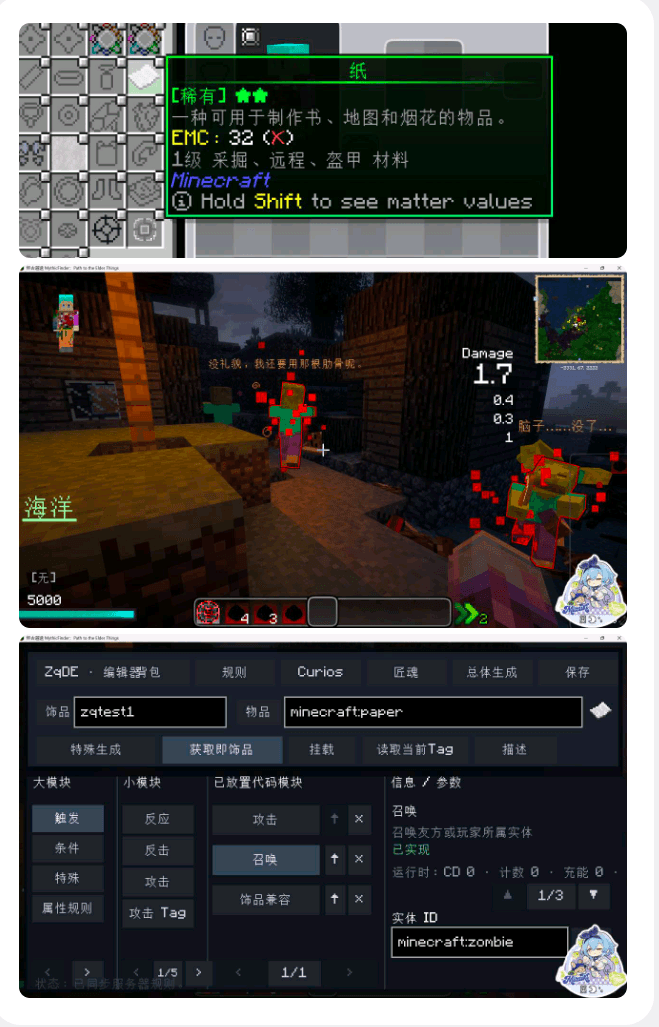
(GUI Language support: English, Chinese)
(of curse you can use this mod in your modpacks , But you should go to “留言板”(Message Board) in mcmod.cn to let me know)
Also named “开拓者核心” (Pathfinder Core) in Chinese.
常见问题
ZQ_pumpkin’s DND Editor for Curios & TiC3 支持哪些 Minecraft 版本?
ZQ_pumpkin’s DND Editor for Curios & TiC3 支持 Minecraft Java 版 1.20.1,可用的加载器:Forge。下载时注意选择和你游戏版本一致的文件。
ZQ_pumpkin’s DND Editor for Curios & TiC3 怎么安装?
先用 PCL2 或 HMCL 启动器安装对应版本的 Forge,再把下载的 .jar 文件放进游戏目录的 mods 文件夹,重新启动游戏即可。开启了版本隔离的,mods 文件夹在 versions/版本名 下面。

评论
登录后评论和评分