
LibreHUD
Lightweight, configurable HUD overlay showing coordinates, compass, biome, light level, and more - without opening F3.
介绍
LibreHUD brings the most useful parts of Minecraft’s F3 debug screen into a clean, always-visible overlay.
Press
Hto show/hide the HUD at any time. No dependencies beyond NeoForge.
Configure the position of the HUD on-screen and what you see when the HUD is enabled. The HUD can display the following: coordinates, chunk position, compass direction, biome, dimension, and light level – all individually toggleable via in-game config or the NeoForge config screen.
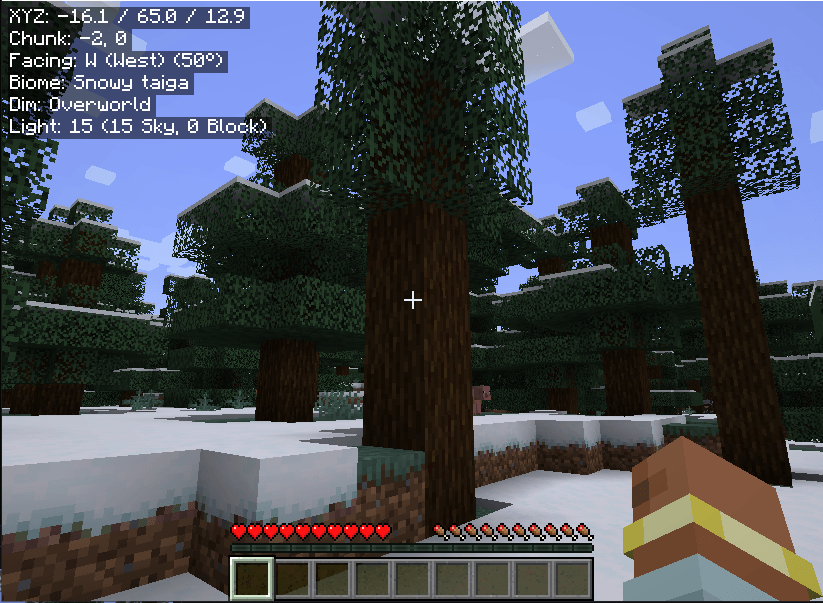
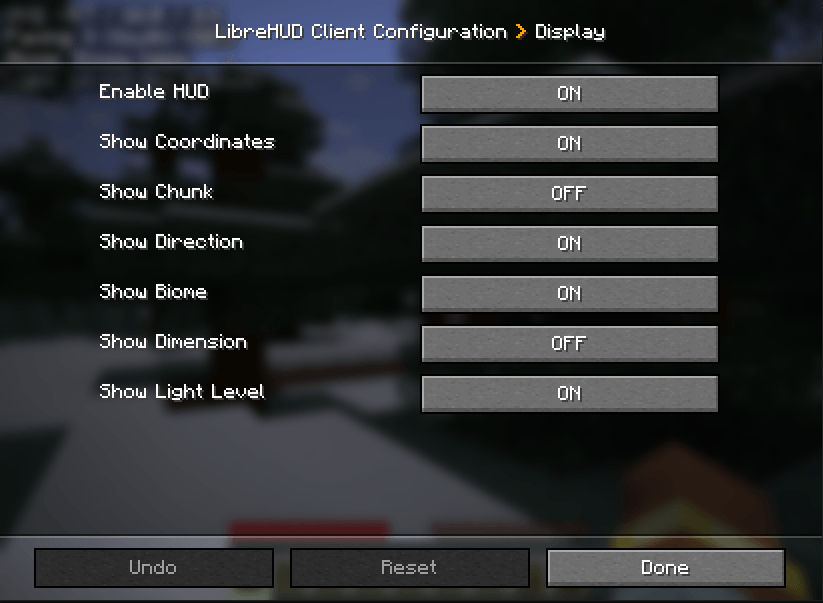
常见问题
LibreHUD 支持哪些 Minecraft 版本?
LibreHUD 支持 Minecraft Java 版 1.21.1,可用的加载器:NeoForge。下载时注意选择和你游戏版本一致的文件。
LibreHUD 怎么安装?
先用 PCL2 或 HMCL 启动器安装对应版本的 NeoForge,再把下载的 .jar 文件放进游戏目录的 mods 文件夹,重新启动游戏即可。开启了版本隔离的,mods 文件夹在 versions/版本名 下面。
评论
登录后评论和评分