
Modpack Core Essentials
Change game window title and icon. Add a welcome message to the screen when you first start the game. Very light. Easy to customize. Zero bloat.
介绍

A lightweight, client-side utility mod built for modpack creators.
Modpack Core Essentials gives modpack authors a clean set of tools to customize modpack without any performance overhead.
✨ Features ✨
🪟 Custom Game Window Title Set a custom title for the Minecraft window to match your modpack’s branding. Players will see your modpack’s name in their game window title.

🖼️ Custom Window Icon Replace the default Minecraft window icon with your own.

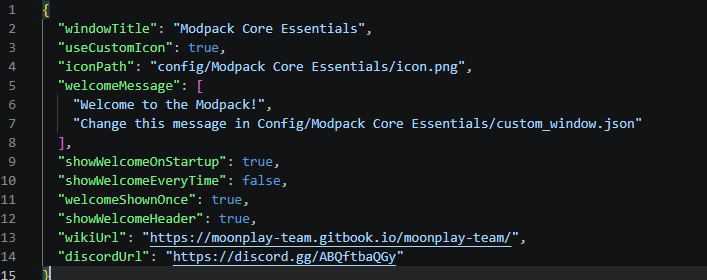
📋 Configurable Welcome Screen Display a welcome screen when players launch the game. You can configure it to appear only once (on first launch) or every time the game starts -> great for changelogs, server announcements, or greetings.

⚙️ Full ModMenu Integration Seamlessly integrates with ModMenu, providing an in-game config editor so you can tweak settings without leaving the game.

❤️ But also easy config file!
🔧 FAQ:
– Is this mod Client-Side Only?
- This mod runs entirely on the client. No need to install it on server.
– Why doesn’t the icon load when I click the reload button?
- Because you can’t “reload” a window icon. You need to restart the game.
– What size should the icon be?
- 64×64 or 32×32
🔗 Links
Built with ❤️ by the MoonPlay Team.
常见问题
Modpack Core Essentials 支持哪些 Minecraft 版本?
Modpack Core Essentials 支持 Minecraft Java 版 1.20.1–26.3,共 17 个版本,可用的加载器:Fabric / Forge / NeoForge。下载时注意选择和你游戏版本一致的文件。
Modpack Core Essentials 怎么安装?
先用 PCL2 或 HMCL 启动器安装对应版本的 Fabric / Forge / NeoForge,再把下载的 .jar 文件放进游戏目录的 mods 文件夹,重新启动游戏即可。开启了版本隔离的,mods 文件夹在 versions/版本名 下面。运行环境:仅客户端。
MoonPlayTeam 的其他作品
查看全部 →
Light Craft – FPS Boost Max
-> 尽可能大幅提升你的游戏内性能,并享受 OptiFine 的全部附加功能!效果天差地别!-> 26.3 现已发布 ✔
NewCraft 1 – Minecraft is boring? Never with NewCraft! Now with Quests!
Minecraft is boring? Never with NewCraft! Quests, New Biomes, Dungeons, Tech, Create, New Mobs and more!

NewCraft 2 | Minecraft is boring? Never with NewCraft!
Better than before! More things to do! Quests, New Biomes, Dungeons, Tech, Create, New Mobs, New Dimensions and more!

NewCraft [ FORGE ] – 1.18.1
Minecraft is boring? Never with NewCraft! The best Vanilla+ Modpack for Forge! 1.19 WILD UPDATE, New Biomes, Dangeons, Mobs and more!
评论
登录后评论和评分