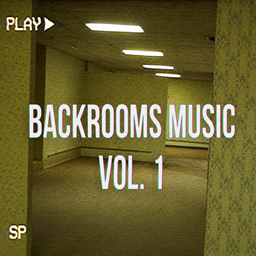
Backrooms Sound Pack
This Pack gives you Backrooms sounds which can be activatet through commands
介绍
Backrooms Custom Music Pack
Bring the eerie, atmospheric vibes of the Backrooms into your Minecraft world! This resource pack adds custom ambient tracks designed to enhance your survival, adventure, or custom map experiences.
How to Use
To play or stop the music tracks in-game, use the custom /playsound and /stopsound commands listed below.
Activate Music Tracks:
-
Level 0:
/playsound level0.music ambient @a ~ ~ ~ 10 1 -
Level 1:
/playsound level1.music ambient @a ~ ~ ~ 10 1 -
Level 2:
/playsound level2.music ambient @a ~ ~ ~ 10 1 -
Level 3:
/playsound level3.music ambient @a ~ ~ ~ 10 1 -
Level 4:
/playsound level4.music ambient @a ~ ~ ~ 10 1 -
Level 4.1:
/playsound level4_1.music ambient @a ~ ~ ~ 10 1 -
Level 5:
/playsound level5.music ambient @a ~ ~ ~ 10 1 -
Level 8:
/playsound level8.music ambient @a ~ ~ ~ 10 1 -
Level 27:
/playsound level27.music ambient @a ~ ~ ~ 10 1 -
The Hub:
/playsound the_hub.music ambient @a ~ ~ ~ 10 1
Stop Music Tracks:
-
Stop Level 0:
/stopsound @a ambient level0.music -
Stop Level 1:
/stopsound @a ambient level1.music -
Stop Level 2:
/stopsound @a ambient level2.music -
Stop Level 3:
/stopsound @a ambient level3.music -
Stop Level 4:
/stopsound @a ambient level4.music -
Stop Level 4.1:
/stopsound @a ambient level4_1.music -
Stop Level 5:
/stopsound @a ambient level5.music -
Stop Level 8:
/stopsound @a ambient level8.music -
Stop Level 27:
/stopsound @a ambient level27.music -
Stop The Hub:
/stopsound @a ambient the_hub.music -
Stop All Ambient Sounds:
/stopsound @a ambient -
Stop All Active Sounds:
/stopsound @a
Compatibility
This pack is configured with extended format support, making it compatible across multiple Minecraft versions without throwing red incompatibility warnings!
常见问题
Backrooms Sound Pack 支持哪些 Minecraft 版本?
Backrooms Sound Pack 支持 Minecraft Java 版 1.19–26.2,共 28 个版本。下载时注意选择和你游戏版本一致的文件。
Backrooms Sound Pack 怎么安装?
把下载的 .zip 文件(不用解压)放进游戏目录的 resourcepacks 文件夹,进游戏后在「选项 → 资源包」里把它移到右边启用。
tokio41 的其他作品
查看全部 →
Backrooms Story Mode Map
It´s a recreation of the famous Backrooms. The main focus of this world is the Enviroment cool Tasks and Story .
Garten of Banban Chapter 1
Chapter 1 of Garten of Banban
Backrooms Story Mode with mods+shader
An accurate Backrooms exprience with mods
评论
登录后评论和评分