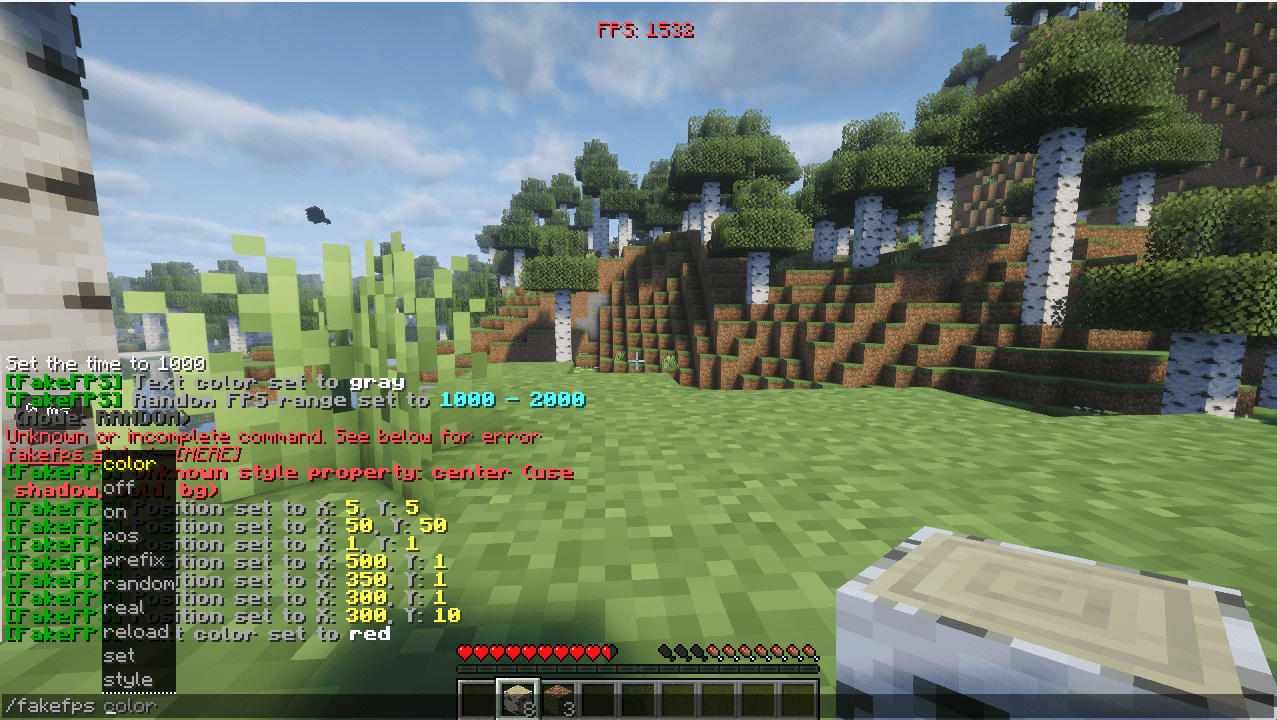
截图
介绍
⚡ Fake FPS — Customizable HUD FPS Counter
Want to flex 1000+ FPS in screenshots and videos?
Fake FPS is an ultra-lightweight, client-side Minecraft mod that displays a completely customizable, authentic-looking FPS counter directly on your HUD!
[!IMPORTANT]
Performance Note: This mod does NOT increase your actual FPS, nor does it decrease your performance. It is a purely visual HUD overlay that changes only the number displayed on your screen, with zero impact on game rendering, FPS, or tick rates.
🧩 Required Dependencies
To use this mod, ensure you have the following installed:
| Requirement | Required Version | Link |
| Required Mod | Fabric API | Download Fabric API on Modrinth |
(No other third-party libraries required! Fully standalone and self-contained.)
⚡ Real Performance Impact: None!
-
Does it increase FPS?
No. This mod does not alter Minecraft’s rendering pipeline, shaders, or engine. It will not boost your genuine hardware performance.
-
Does it decrease FPS or cause lag?
No. The mod executes in
O(1)constant time during standard HUD drawing. It creates no background threads, performs no heavy computations, and uses cached text rendering handles. Your real FPS and ping will remain 100% unaffected.
✨ Features
-
🎮 Customizable Fake FPS:
-
Fixed Mode: Display any custom number (e.g.
500,999,1440,2400,10000). -
Smooth Random Mode: Mimics realistic hardware fluctuations within your chosen minimum and maximum range with authentic micro-jitter—no sudden, unnatural jumps!
-
Real FPS Mode: Instantly toggle to show your genuine Minecraft frame rate.
-
-
🎨 Deep Visual Customization:
-
Colors: Built-in support for named colors (
green,white,yellow,red,aqua,gold,blue,purple,gray). -
Hex Codes: Any custom
#RRGGBBhex color (e.g.#FF007F,#00FFAA). -
Rainbow / Chroma Mode: Smoothly animated RGB rainbow hue cycle!
-
Vanilla Style: Optional text drop shadow, bold styling, or semi-transparent background box.
-
-
📐 Custom HUD Positioning:
-
Adjust the exact X and Y coordinates on your screen with
/fakefps pos <x> <y>. -
Automatically hides when the F3 debug screen or F1 HUD toggle is active.
-
-
💾 Persistent Settings:
- All configurations auto-save to
.minecraft/config/fakefps.jsonand persist across restarts.
- All configurations auto-save to
🕹️ In-Game Commands
All commands are 100% client-side and can be run in singleplayer or on any multiplayer server!
| Command | Description | Example |
|—|—|—|
| /fakefps | View current settings & clickable quick commands | /fakefps |
| /fakefps on | Enable the FPS counter | /fakefps on |
| /fakefps off | Disable the counter | /fakefps off |
| /fakefps toggle | Quick toggle on or off | /fakefps toggle |
| /fakefps set <number> | Set a fixed FPS value | /fakefps set 1200 |
| /fakefps random <min> <max> | Set smooth random range | /fakefps random 800 1440 |
| /fakefps real | Display your actual game FPS | /fakefps real |
| /fakefps color <color> | Change text color (name or hex) | /fakefps color rainbow |
| /fakefps pos <x> <y> | Set screen position offsets | /fakefps pos 10 10 |
| /fakefps prefix <text> | Change prefix label | /fakefps prefix FPS: |
| /fakefps style shadow <true\|false> | Toggle text drop-shadow | /fakefps style shadow true |
| /fakefps style bold <true\|false> | Toggle bold text | /fakefps style bold true |
| /fakefps style bg <true\|false> | Toggle background box | /fakefps style bg true |
| /fakefps reload | Reload config from file | /fakefps reload |
常见问题
Fake fps ultra 支持哪些 Minecraft 版本?
Fake fps ultra 支持 Minecraft Java 版 1.21.1–26.3,共 16 个版本,可用的加载器:Fabric。下载时注意选择和你游戏版本一致的文件。
Fake fps ultra 怎么安装?
先用 PCL2 或 HMCL 启动器安装对应版本的 Fabric,再把下载的 .jar 文件放进游戏目录的 mods 文件夹,重新启动游戏即可。开启了版本隔离的,mods 文件夹在 versions/版本名 下面。
VINAY_VERSE 的其他作品
查看全部 →
DAMAGE = OP LOOT
Every time you take damage, chaos begins. Instead of getting weaker… you get stronger. This mod rewards players with random overpowered loot whenever they take damage — complete with actionbar messages and particle explosions.

identity thief
Identity Theft is a multiplayer Fabric mod. Killing another player temporarily steals their skin and visible username while granting combat and movement buffs. The disguise lasts 60 seconds.

chicken boss
Adds a powerful God Chicken boss that attacks players by spawning creepers and iron golems.
评论
登录后评论和评分