Sol’s Ares Hud
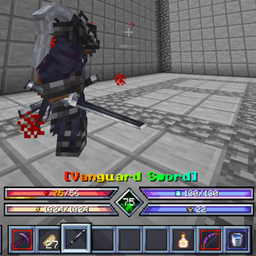
Shows Sol's Item Rarity borders and name colors on Ares HUD's custom hotbar.
介绍
Sol’s Ares Hud
A small compatibility addon that makes Sol’s Item Rarity and Ares HUD work together.
The problem
Ares HUD replaces the vanilla hotbar and the selected-item name with its own. Sol’s Item Rarity draws its rarity visuals on top of those vanilla elements, so once Ares HUD takes over, they disappear:
- The rarity-colored square border around hotbar items is gone.
- The held item’s name above the hotbar is no longer rarity-colored.
What this addon does
- Rarity borders on Ares HUD’s hotbar. Every hotbar and offhand item gets the exact same border Sol’s Item Rarity would draw: same style, same animation, same config options. It follows Ares HUD’s layout, scale and selection animation automatically.
- Rarity-colored item name. The name Ares HUD shows when you switch items uses Sol’s Item Rarity’s name colors (including chroma effects).
- No duplicate name. Prevents Sol’s Item Rarity’s own name from being drawn a second time at the vanilla position.
Everything is controlled by Sol’s Item Rarity’s existing settings (borders on/off, animated borders, colored names, hotbar border toggle). This addon has no config of its own. If Ares HUD’s hotbar is disabled, vanilla behavior is untouched.
Requirements
- Minecraft 1.20.1, Forge
- Sol’s Item Rarity 1.7+
- Ares HUD 2.0+
Client-side only. Does not need to be installed on a server.
Notes
- Does not edit or replace any other mod’s jar.
- Built against Ares HUD 2.0.5 and Sol’s Item Rarity 1.7.2. If a future update changes their internals, the border simply stops drawing (one error in the log); the game will not crash.
常见问题
Sol’s Ares Hud 支持哪些 Minecraft 版本?
Sol’s Ares Hud 支持 Minecraft Java 版 1.20.1,可用的加载器:Forge。下载时注意选择和你游戏版本一致的文件。
Sol’s Ares Hud 怎么安装?
先用 PCL2 或 HMCL 启动器安装对应版本的 Forge,再把下载的 .jar 文件放进游戏目录的 mods 文件夹,重新启动游戏即可。开启了版本隔离的,mods 文件夹在 versions/版本名 下面。
epic_lover 的其他作品
查看全部 →
Mobs Epicfied
修复 Epic Fight 生物卡在旧招式组的问题;为每种武器添加自定义连招、技能和配置选项。
Epic Fight Fist Fix
修复 Epic Fight 中空气物品总被判定为战斗优选物品的问题。

Better Combat × Epic Fight Compat
根据你的 Epic Fight 战斗模式状态,在 Epic Fight 和 Better Combat 之间自动切换战斗系统。

Epic Fight Guard Fix
Mixin fixes for Epic Fight's shield/weapon guard system (base GuardSkill, Weapons of Miracles' Perfect Bulwark, and Epic Fight Nightfall's parry) plus unarmed combat and other core bugs.
评论
登录后评论和评分