
Leaderstats
this mod displays you and your friends stats in game by running the command /showleaderboard .
截图
介绍

Leaderboards for any Minecraft statistic, with the leaders stood in your world.






What does this mod do?
Ranks your players by any statistic Minecraft already tracks. Deaths, jumps, distance
walked, time played, damage taken, diamond ore mined, zombies killed, deaths at the hands
of a creeper. If it shows up on the vanilla Statistics screen, you can build a board for it.
Read a board in chat with /leaderboard, or in the GUI that /showleaderboard and a bound
key both open. Put a board down in the world and the leaders stand on it wearing their own
skins.
Nothing has to be counted from scratch. The numbers come straight out of the world save, so
a board you make today already knows what everyone did last year.
Showcase
Commands
| Command | Does |
|---|---|
/leaderboard deaths [count] |
Deaths, in chat. Top 10 by default, 50 at most |
/leaderboard advancements [count] |
Advancements, same limits |
/leaderboard stat <type> <stat> [count] |
Anything else. Both arguments tab-complete |
/showleaderboard [type] [stat] |
Opens the GUI. Defaults to deaths |
Nobody needs to be op. Set a permission node in your server config if you want that.
The two argument form takes a stat type and a value, the same pair the game files use.
minecraft:custom and minecraft:jump. minecraft:mined and minecraft:diamond_ore.
minecraft:killed_by and minecraft:creeper. Tab completion narrows the second argument to
whatever the first one accepts, so you can feel your way there without looking anything up.
Advancements live under a made up type, statsboard:special, because the game has no
statistic for them.
The GUI
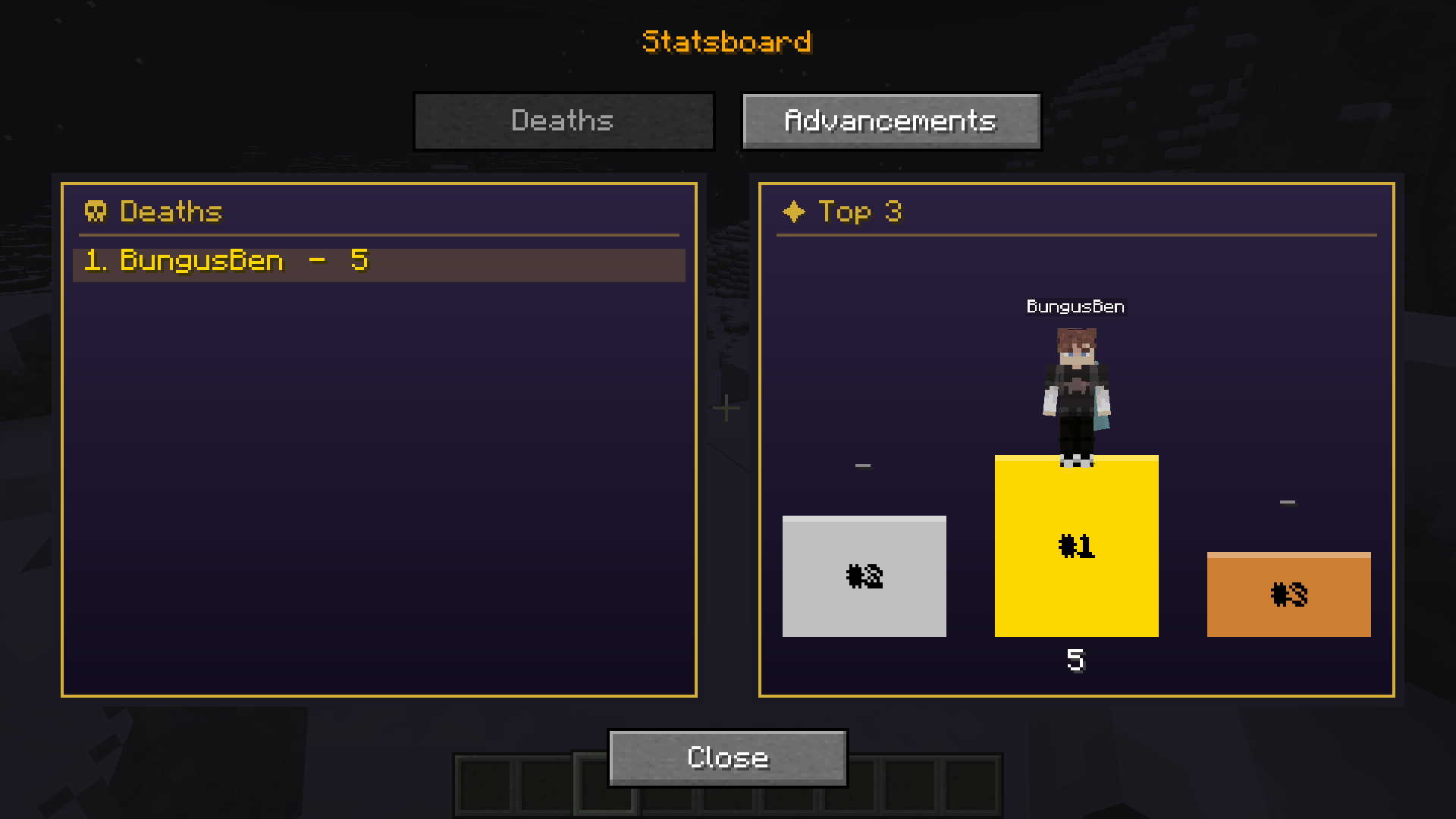
One statistic at a time. The full ranking scrolls down the left, the top three stand on a
podium to the right, skins and all.
Change stat… opens a picker with the same three tabs as the vanilla Statistics screen,
General, Items and Mobs, and a search box over the lot. Around eight thousand entries, so
search rather than scroll. Deaths and Advancements have their own buttons since those are the
two people ask for.
The board reasks the server every ten seconds, so one left open on a second monitor keeps up
on its own. Change it in config/statsboard.json:
{ "guiRefreshSeconds": 10 }Zero turns refreshing off and freezes the board at whatever it showed when you opened it. A
refresh leaves your scroll position alone, so a long list will not yank itself back to the top
while you are reading it.
Clicking any name on the board opens that player’s profile. See below.
There is an Open Leaderboard keybind in Options, Controls too. It is unbound out of the
box so it cannot steal a key you already use. Bind it and it runs the same command.
Profiles
Click a name in the ranking, or one of the figures on the podium, and you get that
player on their own: every statistic they have a number for, and a full-height model
of them stood next to it.
Same three tabs as the picker, General, Items and Mobs, with a search box over them.
Rows run highest first, which does mean General always opens on the distance stats,
since a walk measured in centimetres will beat a death count every time.
It refreshes on the same interval as the board, and a refresh leaves your scroll
position, your tab and whatever you had typed alone.
Players who are offline work too. Their numbers come off the save file rather than
the session, so the profile is as complete as it is for anyone stood next to you.
Very long profiles are cut at the top 2000 entries. Nothing on a normal world gets
near that, and the list is sorted before it is cut, so what you lose is the tail.
The board itself
Craft a Leaderboard Wand out of four iron ingots and right-click a face with it.
Two players appear where you pointed, full height, wearing their real skins. Out of the box
the left one has died more than anyone else and the right one has more advancements, which is
what the mod used to do and nothing else. Both columns are yours to change.
Right-click the board with the wand to open its settings. You can do that pointing at the
figures themselves, which is the obvious thing to try and the reason it works. Pick a column
to send it to the stat picker, or use the plus and minus to run one column, two or three. One
column stands on the block, three spread out across nine blocks, so leave room.
Sneaking always places a new board instead. Without that you could never put a second one
down within reach of the first.
Their name and their count float above their head and turn to face you as you walk round.
Counts are formatted the way the Statistics screen formats them, so distances read in
kilometres and play time reads as a duration rather than a pile of ticks.
Every five seconds the block checks the standings again, so the figures swap over on their own
while you watch. Die enough times and you will see yourself walk into first place.
What you actually planted is an invisible marker block. It has a small hitbox at the base, so
break that to take the board down.
Install
Goes on the server and on every client that wants the GUI or the board. /leaderboard
on its own works fine with a server-only install, it is only chat text.
- Fabric Loader for Minecraft 1.20.1
- Fabric API
0.92.2+1.20.1or newer inmods/ - This jar, same folder
Right-clicking a board without the mod client side gets you a line telling you so rather than
nothing happening.
Where the data lives
Nowhere new, mostly. Statistics come out of <world save>/stats/<uuid>.json and advancement
totals out of <world save>/advancements/<uuid>.json, both of which the game writes anyway.
A background thread rereads them once a minute and skips any file that has not changed.
Players who are online are read live instead, since the game only flushes those to disk every
few minutes.
That is why offline players rank. Everyone who has ever played on the world is on the board,
not just whoever is logged in.
<world save>/statsboard.json is still there but only holds names and skins now, captured
when somebody joins, so the board can draw a player who has not logged in for a month as
themselves. Older versions kept their own death and advancement counters in that file. Those
are gone and the game’s own numbers are used instead, so expect those two totals to move the
first time you run this on an existing world.
Recipe advancements are not counted. There are 1161 of them against 110 real ones, and nobody
thinks of a recipe unlock as an advancement.
Building
Ordinary Fabric Loom project. Needs JDK 17, not 21.
./gradlew buildJar comes out in build/libs/.
For a multiplayer test there is a dedicated server and two named clients:
./gradlew runServer
./gradlew runClientAlpha
./gradlew runClientBravo
Each gets its own directory under run/. The server one moved there from plain run/, so
an existing dev world and accepted EULA will not be picked up until you move them across.
It also needs online-mode=false in run/server/server.properties to let the offline
accounts in.
| Minecraft | 1.20.1 |
| Yarn mappings | 1.20.1+build.10 |
| Fabric Loader | 0.15.11 |
| Fabric API | 0.92.2+1.20.1 |
Tweaking
| What | Where |
|---|---|
| GUI refresh interval | guiRefreshSeconds, config/statsboard.json |
| How often the save files are reread | SCAN_INTERVAL_TICKS, StatScanner.java |
| How often the board refreshes | REFRESH_INTERVAL_TICKS, LeaderboardBlockEntity.java |
| How far apart the columns stand | COLUMN_SPACING, LeaderboardBlockEntityRenderer.java |
| Most columns on one board | MAX_COLUMNS, LeaderboardBlockEntity.java |
| Longest board anyone can ask for | MAX_LIMIT, StatQuery.java |
| Most stats one profile carries | MAX_PROFILE_ENTRIES, StatQuery.java |
| How near the wand looks for a board to edit | WAND_EDIT_RADIUS, WAND_REACH_RADIUS, LeaderboardInteraction.java |
| GUI colours, layout, row height | LeaderboardScreen.java |
A note if you are reading the source
StatKey.resolve() may only be called from the server thread. StatType keeps its
statistics in a plain IdentityHashMap that the server thread writes to whenever somebody
mines or crafts something for the first time, and getOrCreateStat mutates it. The client
never resolves a StatKey for this reason, and formats its own numbers through
StatValueFormatter rather than Stat.format, which shares one DecimalFormat across
every caller.
Both of those will work fine right up until they do not.
Links
NOT AN OFFICIAL MINECRAFT SERVICE. NOT APPROVED BY OR ASSOCIATED WITH MOJANG OR MICROSOFT.
常见问题
Leaderstats 支持哪些 Minecraft 版本?
Leaderstats 支持 Minecraft Java 版 1.20.1–1.20.6,共 6 个版本,可用的加载器:Fabric。下载时注意选择和你游戏版本一致的文件。
Leaderstats 怎么安装?
先用 PCL2 或 HMCL 启动器安装对应版本的 Fabric,再把下载的 .jar 文件放进游戏目录的 mods 文件夹,重新启动游戏即可。开启了版本隔离的,mods 文件夹在 versions/版本名 下面。
Bjamin06 的其他作品
查看全部 →
OurServer-Offical
a large, custom Forge modpack that combines adventure, exploration, technical, and creature-collecting mods.

Bog Off!
A server-side mod that gives regular players a personal vanish. You can hide other players from your own view, and they can still see you.
评论
登录后评论和评分