
截图
介绍
✨ Features
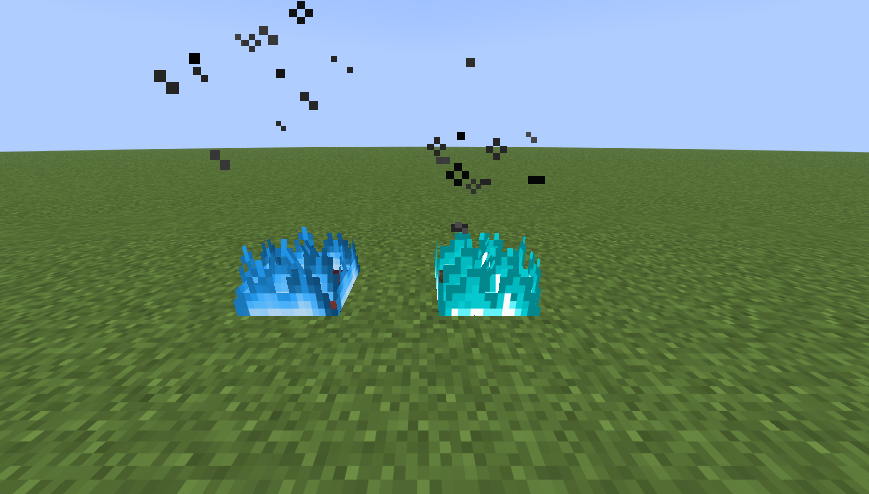
Blue Low Fire: Replaces the default orange fire with a blue flame that matches your Blue Crit & Sweep pack.
Low Vision Overlay: Specifically designed to stay at the bottom of your screen so you can keep track of enemies while burning.
Tactical Advantage: The bright blue stands out against ground textures, making it easier to see where fire has been placed during PvP.
🛠 Installation
- Download the .zip file.
- Open Minecraft and go to Options > Resource Packs.
- Drag, drop, and move the file to the Selected side.
👤 Credits
Created by NotGalib.
📜 Permissions
Videos & Modpacks: You are free to include this in any content withcredit to NotGalib.
Re-uploads: Strictly prohibited to ensure users get the correct version.
常见问题
Blue Low Fire 支持哪些 Minecraft 版本?
Blue Low Fire 支持 Minecraft Java 版 1.21.8–1.21.11,共 4 个版本。下载时注意选择和你游戏版本一致的文件。
Blue Low Fire 怎么安装?
把下载的 .zip 文件(不用解压)放进游戏目录的 resourcepacks 文件夹,进游戏后在「选项 → 资源包」里把它移到右边启用。
NotGalib 的其他作品
查看全部 →
No Wind Charge & Explosion Effects
Removes intrusive wind charge swirls and explosion particles for better visibility and performance.

Blue Sweep & Crit Particle
Blue sweep and crit particles for clean PvP.
Blue Low Fire
Blue fire with reduced height for maximum PvP visibility.
评论
登录后评论和评分