
Visual Weapons
Add visible weapon slots to your character and carry your weapons in style.
介绍
Visual Weapons
Don’t just carry your weapons in your inventory — wear them visibly on your character!
Visual Weapons adds weapon holsters to Minecraft, allowing you to display your equipment directly on your character.
With a weapon belt and various modules, you can equip your weapons and tools to suit your needs.
Features
-
Visible Weapons: Your equipped weapons are displayed on your character.
-
Customizable Holsters: Use different modules for different weapons and tools.
-
More Immersion: Give your character a unique, battle-ready look.
Controls and Usage
The key bindings can be changed in Minecraft’s Controls settings.
Default Key Bindings:
-
H: Swords
-
X: Tools
-
B: Pistols
-
N: Long guns, such as rifles
Installing and Removing Modules:
-
Right-click in your inventory to insert a module.
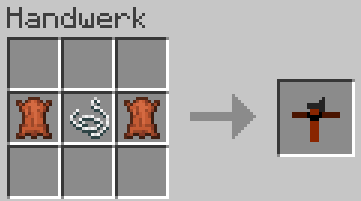
Crafting Recipes
Here you can find the crafting recipes for the items added by Visual Weapons.
Leather Belt
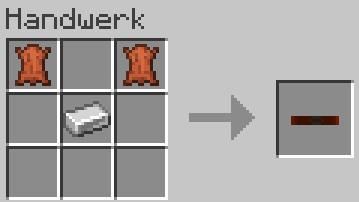
Weapon Belt
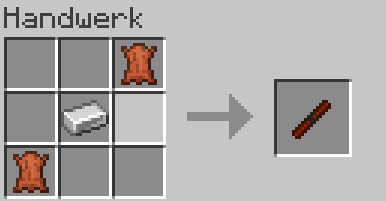
Sheath Module
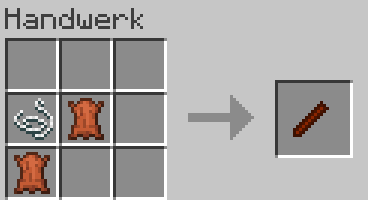
Holster Module
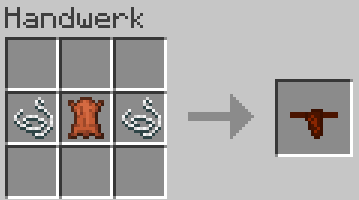
Tool Sling Module
Requirements
Minecraft Java Edition 1.21.1
NeoForge 21.1.235
Curios for Minecraft 1.21.1
常见问题
Visual Weapons 支持哪些 Minecraft 版本?
Visual Weapons 支持 Minecraft Java 版 1.21.1,可用的加载器:NeoForge。下载时注意选择和你游戏版本一致的文件。
Visual Weapons 怎么安装?
先用 PCL2 或 HMCL 启动器安装对应版本的 NeoForge,再把下载的 .jar 文件放进游戏目录的 mods 文件夹,重新启动游戏即可。开启了版本隔离的,mods 文件夹在 versions/版本名 下面。
评论
登录后评论和评分