
截图
介绍

Icy Lib
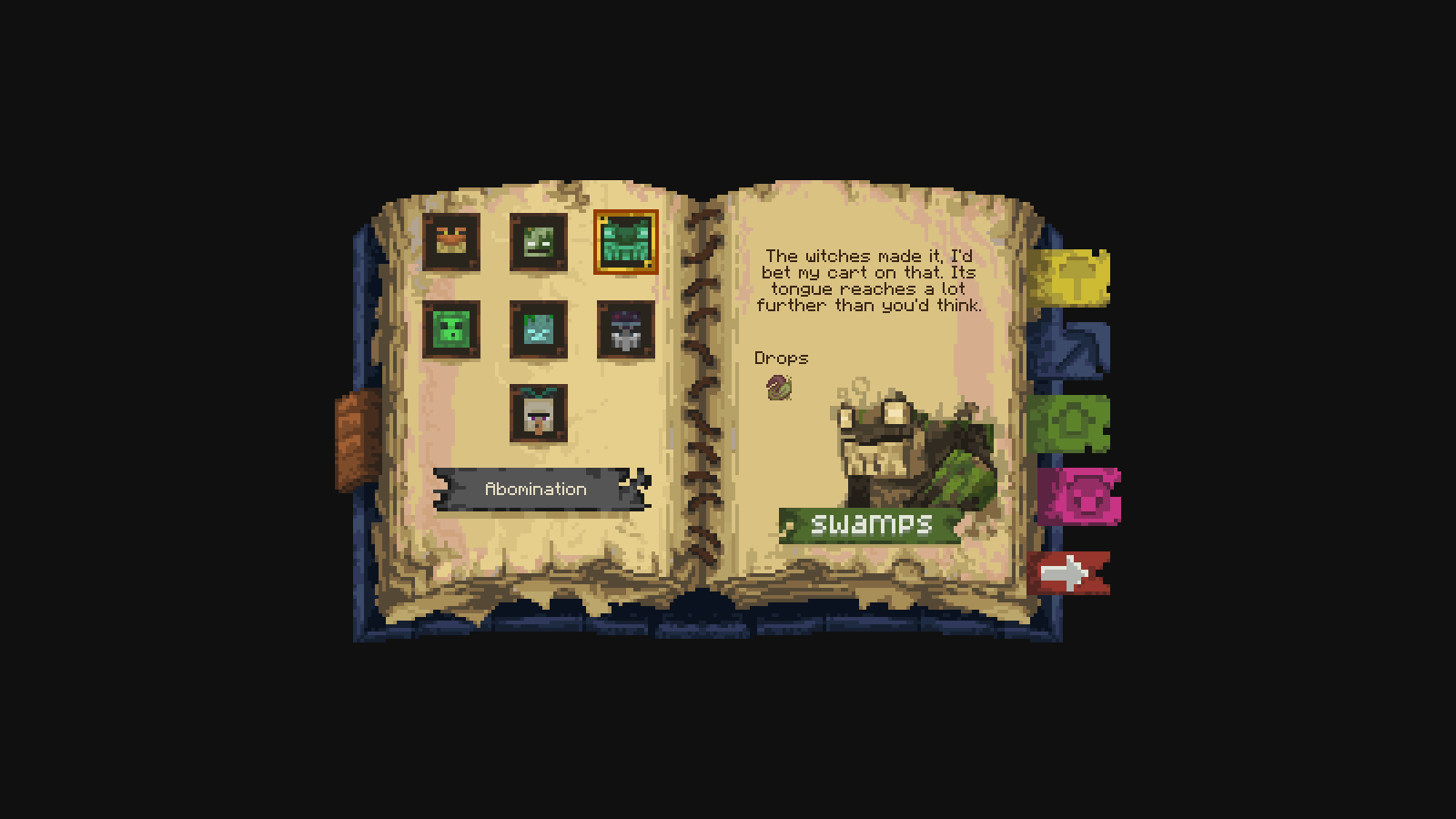
Icy Lib provides the guidebook system used by my mods, i have some plans to add some other functionality to this library too, like having some animation stuff, and I want to eventually port the port the Better Horse’s bonding system here. developers can use it to build their own books with custom artwork, though i wouldn’t recommend it since i will be changing things around in here when i eventually make a custom guidebook for Better Horses.
the library holds no artwork and JSON files for the book, it just reads those files and handles drawing the book and its interactive elements.
Making your own guidebook
If you want to make your own guidebook, give your book an ID such as mymod:guide. Its files belong in:
assets/mymod/icys_lib/books/guide/
Your book is made up of three main parts:
book.jsondefines the canvas size, texture folder, text styling, and layers that make up the interface.- Your PNG artwork supplies the book background, illustrations, buttons, tabs, and other visual pieces.
entries/<category>/<name>.jsonholds content for entry lists and selections, such as items, mobs, or structures.
Register a GuideBookItem pointing to your book’s ID to give players an item that opens it.
Building the pages
Books are drawn as an ordered list of layers. You can combine images, text, buttons, selectable tabs, entry lists, item displays, and recipe grids to make the layout your mod needs. its flexible, and you can arrange anything however you want.
ideally, artwork should use full-canvas PNGs with transparent backgrounds. Icy Lib finds the visible bounds and clickable areas from the image’s transparency, so most artwork layers do not need manually entered coordinates.
Text layers let you set the text area, alignment, size, and color. Text can use translation keys from your mod’s language files. You can also define a page curve so text and item displays follow the shape of your book artwork.
Tabs and changing content
Selections are stored as named values in the book’s state. For example, choosing a biome can set a biome value, and choosing a tab can set a tab value.
Layers can use when conditions to control when they appear. Texture names and text keys can include placeholders such as ${biome}, allowing the same layout to display different artwork and descriptions as the player makes selections.
Entry lists can also be filtered by those selections. Wildscapes uses this to show the structures and mobs belonging to the selected biome.
Items and recipes
Item lists can display selectable entries in a grid, with custom frames and item or texture icons.
Recipe layers display a 3×3 crafting grid defined in an entry’s JSON, alongside its result item. Ingredient slots can cycle through multiple item IDs. You can also change the surrounding layout depending on whether the selected entry has a recipe.
Testing your book
Use /icys_lib book mymod:guide to open your book directly while developing it.
Use /icys_lib debug to show clickable areas and canvas coordinates while adjusting your layout.

If you’d like to support my work, you can do so through Patreon or Ko-fi.


常见问题
Icy’s Lib 支持哪些 Minecraft 版本?
Icy’s Lib 支持 Minecraft Java 版 1.21.1,可用的加载器:NeoForge。下载时注意选择和你游戏版本一致的文件。
Icy’s Lib 怎么安装?
先用 PCL2 或 HMCL 启动器安装对应版本的 NeoForge,再把下载的 .jar 文件放进游戏目录的 mods 文件夹,重新启动游戏即可。开启了版本隔离的,mods 文件夹在 versions/版本名 下面。
Icywhenhot 的其他作品
查看全部 →
Icy’s Better Horses
Better Horses 通过改进移动、成长和实用功能,让马匹成为能长期陪伴玩家的伙伴。

Wavify
为沙滩、海洋和河流添加环境波浪!

Take a Seat!
20多种坐姿动画,带来沉浸式体验!
Wavify
为海滩、海洋和河流添加环境波浪效果!
评论
登录后评论和评分