
截图
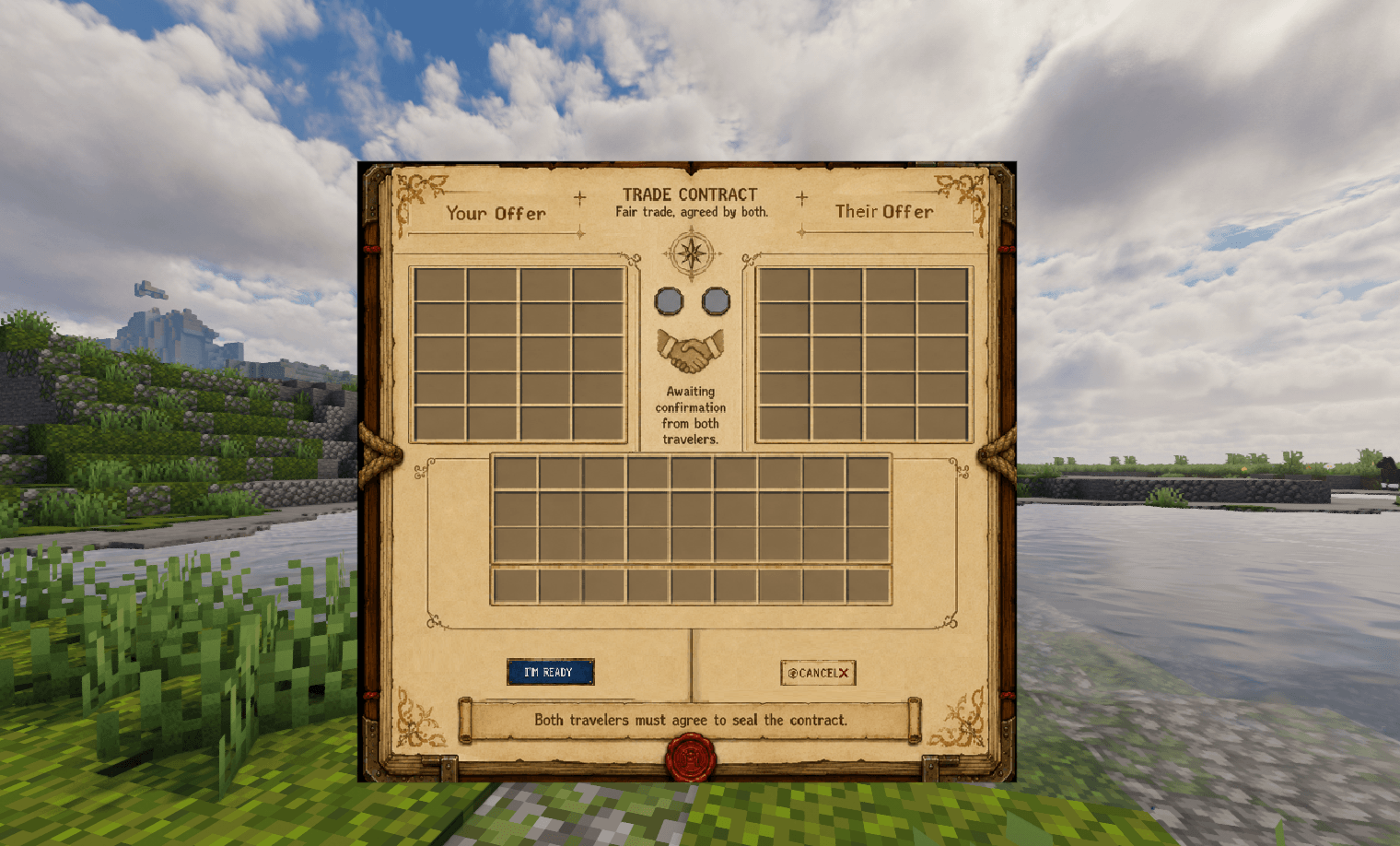
介绍
# SecureBarter for 26.1.2 Fabric is out!
SecureBarterV10 is the first properly packaged release of SecureBarter.
This version keeps trade behavior, while BEAUTIFIYING the GUI texture delivery.
## Highlights
– Added full FancyMenu-powered trade screen support.
– Added automatic client-side FancyMenu layout/asset installation.
– Added ready-state indicator lights in the two middle circles.
– Kept the mod safe for dedicated servers by avoiding a hard FancyMenu runtime dependency.
## Ready Indicator Lights – (Hard to test alone, let me know if it don’t work)
– Added functional ready-state indicators for the two gray circles in the middle of the contract UI.
– The player’s ready state and the other player’s ready state are now reflected visually.
– Circles turn green when the corresponding player is ready.
– Circles remain gray while waiting.
Inspired by popular Rust trading plugins, this mod eliminates the risk of dropping valuable items on the ground or getting scammed by other players. Trade safely with anyone, no matter how far away they are.
🌟 Key Features
Infinite Distance Trading: Initiate trades with any online player from anywhere in the world. No need to meet up or travel back to base.
📜 How to Use Commands
Trading is incredibly easy and requires just a couple of chat commands:
- Send a Request: Type /trade <player-name> to invite a friend or server member to trade.
- Accept the Request: The other player types /trade accept to open the secure trade window.
- Complete the Barter: Place your desired items into the UI slots, review the other player’s items, and click “Im Ready”
🐛 Bug Reporting & Feedback
SecureBarter is built to be rock-solid, but your feedback helps it grow! If you encounter any random errors, UI glitches, or potential exploits, please report them immediately here.
This next bit is the boring stuff
## GUI / FancyMenu
– SecureBarter now exposes the trade screen as:
`com.safeplayertrading.client.SecureBarterScreen`
– FancyMenu can target the SecureBarter trade screen directly.
– The SecureBarter screen is now intentionally blank/transparent.
– FancyMenu owns the visible contract/parchment art, labels, decorations, and visual button styling.
– Removed reliance on the vanilla chest background for the trade UI.
– Removed visible placeholder GUI textures from the trade screen.
## One-Jar FancyMenu Setup
– Bundled the FancyMenu contract image inside the SecureBarter jar.
– Bundled the FancyMenu layout file inside the SecureBarter jar.
– On client launch, if FancyMenu is installed, SecureBarter installs the needed files into:
`config/fancymenu/assets/securebarter_trade_contract.png`
`config/fancymenu/customization/com.safeplayertrading.client.securebarterscreen_layout_1.txt`
– SecureBarter also adds the screen target to:
`config/fancymenu/customizablemenus.txt`
– The FancyMenu image source now uses the working local path:
`[source:local]/config/fancymenu/assets/securebarter_trade_contract.png`
– This fixes broken/missing image references such as old placeholder paths or jar resource paths that caused purple/black missing textures.
## Packaging / Compatibility
– Built as:
`SecureBarterV10-26.1.2-fabric-port.3-SAFE.jar`
– Minecraft target:
`Minecraft Java 26.1.2`
– Loader:
Fabric`
– FancyMenu support targets:
`fancymenu-fabric-3.9.1
– FancyMenu is not hard-required inside `fabric.mod.json`.
– SecureBarter suggests FancyMenu instead of forcing it at runtime.
– This keeps dedicated server loading safer.
– Recommended CurseForge setup: mark FancyMenu as a required project relation on the CurseForge file/project page.
## Server Safety
– Removed the client mixin approach.
– Removed FancyMenu hard dependency from the runtime jar.
– Client-only FancyMenu setup runs only through the client entrypoint.
– Dedicated servers do not need FancyMenu installed.
– Dedicated server smoke test reached the normal EULA stop without crashing from FancyMenu dependency issues.
常见问题
SecureBarter 支持哪些 Minecraft 版本?
SecureBarter 支持 Minecraft Java 版 1.21.1–26.1.2,共 2 个版本,可用的加载器:Fabric / NeoForge。下载时注意选择和你游戏版本一致的文件。
SecureBarter 怎么安装?
先用 PCL2 或 HMCL 启动器安装对应版本的 Fabric / NeoForge,再把下载的 .jar 文件放进游戏目录的 mods 文件夹,重新启动游戏即可。开启了版本隔离的,mods 文件夹在 versions/版本名 下面。

评论
登录后评论和评分