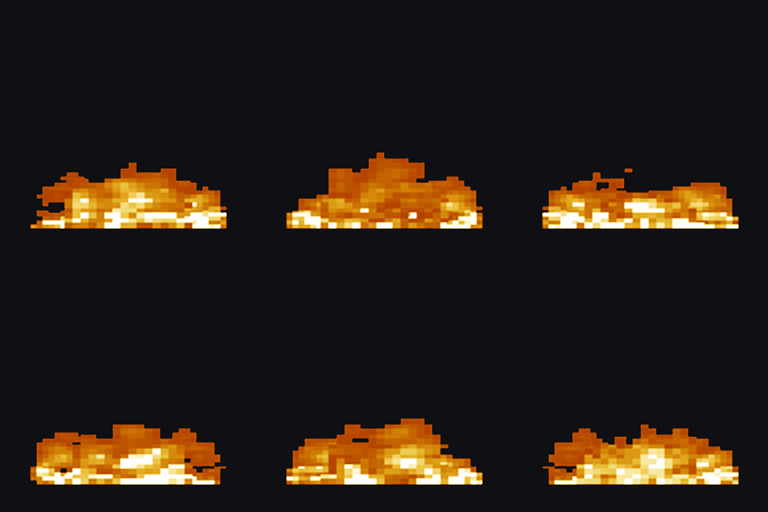
Low Fire Camera Overlay
A client-side resource pack that lowers the player's fire overlay, adds subtle edge embers, and keeps world fire vanilla.
介绍

Low Fire Camera Overlay
Low Fire Camera Overlay is a lightweight client-side resource pack for Minecraft: Java Edition. It reduces the fire overlay that covers the player’s camera while burning, adds a subtle animated ember effect near the screen edges, and keeps the center of the screen clear.
Features
- Lowers the on-screen fire overlay while the player is burning.
- Adds light animated embers near the screen borders.
- Keeps the center of the camera clear for better visibility.
- Preserves the normal vanilla fire appearance in the game world.
- Works in vanilla Minecraft; Fabric, Forge, NeoForge, and OptiFine are not required.
- Uses the original 16× Minecraft visual style.
Supported Minecraft versions
| Download | Supported releases |
|---|---|
| 1.16.x | 1.16–1.16.5 |
| 1.17.x | 1.17–1.17.1 |
| 1.18.x | 1.18–1.18.2 |
| 1.19.x | 1.19–1.19.4 |
| 1.20.x | 1.20–1.20.6 |
| 1.21.x | 1.21–1.21.11 |
| 26.x | 26.1–26.2 |
Each Minecraft series has its own release file. Download and enable only the file matching your Minecraft series. Versions 1.8.x through 1.15.x are not supported.
Installation
- Download the release matching your Minecraft version.
- Move the ZIP file into
.minecraft/resourcepacks. - Open Minecraft and go to Options → Resource Packs.
- Enable Low Fire Camera Overlay.
Do not enable more than one Low Fire Camera Overlay series pack at the same time.
常见问题
Low Fire Camera Overlay 支持哪些 Minecraft 版本?
Low Fire Camera Overlay 支持 Minecraft Java 版 1.16–26.3,共 40 个版本。下载时注意选择和你游戏版本一致的文件。
Low Fire Camera Overlay 怎么安装?
把下载的 .zip 文件(不用解压)放进游戏目录的 resourcepacks 文件夹,进游戏后在「选项 → 资源包」里把它移到右边启用。
Haider_x 的其他作品
查看全部 →
Luna shader
Luna 光影:优化了水面反射,呈现深蓝色调,并为末地传送门加入独特的旋转黑洞效果。

Aetheria Shaders
Aetheria Shaders 是 Complementary Reimagined 的一款华丽奇幻改版光影。拥有自定义维度氛围、发光的青绿色水体、银河主题的下界传送门、流动的熔岩,以及体积化的末地龙卷风。性能表现有保障。

Quanta Shader
快速呈现精美的《Minecraft》画面。柔和的阴影、动态云朵、波光粼粼的水面和绚丽天空,同时优化性能,畅玩高帧率游戏。

Vanilla Rebuild
保留 Minecraft 的经典风格,同时增强光照效果,呈现逼真的天空、体积云、柔和阴影,以及各维度独具特色的浓郁氛围。
评论
登录后评论和评分