Quick Deposit Plus
作者:Reik598
A Minecraft utility mod that adds quick-action buttons to chests for depositing, withdrawing, and sorting items in seconds.
介绍
中文介绍正在准备中,下面暂时显示原文。
📦 Quick Deposit
Quick Deposit is a utility mod for Minecraft that adds quick inventory actions when opening chests and containers, allowing you to move items in seconds without dragging stack by stack.
🚀 Main Features
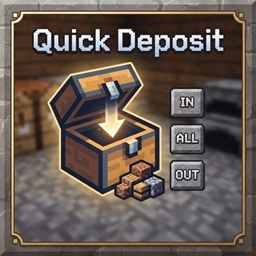
- IN (Smart Deposit): Deposits only items that already have a compatible stack inside the container. It does not fill empty slots (ideal for sorting without cluttering the chest).
- ALL (All In): Deposits everything possible from your inventory into the container. It first completes existing stacks and then fills empty slots.
- OUT (All Out / Withdraw): Pulls everything that fits from the container into the player’s inventory, respecting available space (prevents item duplication or loss).
- RST (Restock): Refills the player’s inventory stacks using items from the container. Very useful for getting back to the maximum stack size without messing things up.
🖥️ UI & User Experience
- Integrated buttons directly into the container GUI:
IN|ALL|OUT(+RST). - Compact and clean design for ultra-fast access.
- Designed to streamline looting and chest organization flows without opening extra menus.
⌨️ Keybinds
You can configure or change the keys from the options menu (Options → Controls):
- K = Smart Deposit (
IN) - L = All In (
ALL) - O = All Out (
OUT) - ; = Restock (
RST)
⚙️ Technical Behavior
- Inventory logic executed entirely on the server-side (server-authoritative).
- Secure client-server communication via a dedicated network packet.
- Specifically designed to prevent desyncs and duplication glitches during inventory operations.
📌 Compatibility
- Minecraft: 1.20.1
- Mod Loader: Forge (Tested on Forge 47.3.0)
- Mod ID:
quickdeposit
常见问题
Quick Deposit Plus 支持哪些 Minecraft 版本?
Quick Deposit Plus 支持 Minecraft Java 版 1.20.1,可用的加载器:Forge。下载时注意选择和你游戏版本一致的文件。
Quick Deposit Plus 怎么安装?
先用 PCL2 或 HMCL 启动器安装对应版本的 Forge,再把下载的 .jar 文件放进游戏目录的 mods 文件夹,重新启动游戏即可。开启了版本隔离的,mods 文件夹在 versions/版本名 下面。

评论
登录后评论和评分