Respawn Choices
Choose how you respawn after death, with configurable nearby respawning and customizable XP penalties.
截图
介绍
Respawn Choices
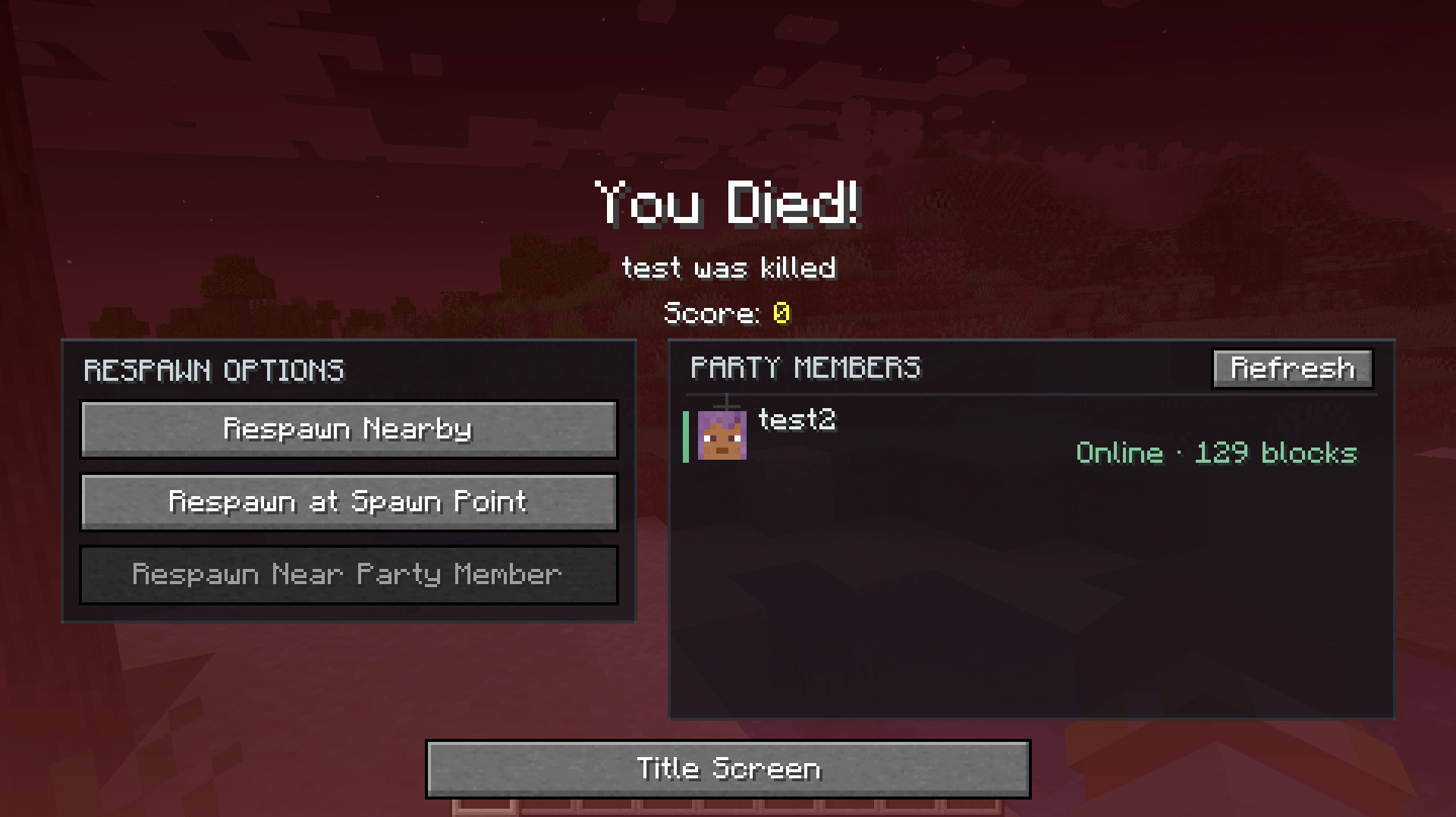
Respawn Choices expands Minecraft’s death screen with more ways to return to the world. Respawn near where you died, return to your normal spawn point, or regroup near an online party member with optional FTB Teams integration.
Built for modpacks and multiplayer servers, Respawn Choices combines configurable XP penalties, independent respawn cooldowns, and an adaptive location search with an inline death-screen interface.
Choose How You Respawn
Respawn Nearby
Return near your recorded death location.
The search starts with the server’s configured distance and height preferences. If no suitable location is found, it progressively searches closer to the reference position and expands the vertical range.
Candidate locations are checked for:
- Solid footing and enough headroom
- Block and entity collisions
- Dangerous blocks, lava, and disallowed fluids
- World-border boundaries
- Nether-roof restrictions
The search uses loaded chunks and a short processing budget to keep respawning responsive.
If all search passes fail, the final fallback is your recorded death location instead of your bed or world spawn. That final fallback may still contain the hazard that caused your death.
Respawn at Spawn Point
Use Minecraft’s normal respawn system, including:
- Beds
- Respawn Anchors
- World Spawn
- Dimension-specific respawning
- Compatible modded respawn points
This option remains available while Nearby or Party Member respawning is on cooldown.
Respawn Near Party Member
With FTB Teams installed, select an eligible online member of your party and respawn near them.
The party list appears directly on the death screen and includes:
- Player names and heads
- Distances calculated from your recorded death position
- Closest available members listed first
- Dimension and availability indicators
- Selection highlighting, scrolling, keyboard navigation, and a Refresh button
- Automatic server updates
Only members of your actual FTB Teams party are eligible. Allies and unrelated players are excluded. Dead players, spectators, and members blocked by dimension settings cannot be selected.
Party respawning uses the adaptive location search around the selected member. If no safe candidate is found after the search passes, the final fallback is your own recorded death location.
FTB Teams integration is optional. Without it, the original Nearby and Spawn Point choices remain available.
Configurable Respawn Cooldowns
Server owners can configure separate cooldowns for:
- Respawn Nearby
- Respawn Near Party Member
Both default to 0 seconds, meaning cooldowns are disabled.
Cooldowns are tracked independently for each player and begin after a successful use of that option. The death-screen buttons display the remaining time, and the server enforces the cooldown.
Use history persists across deaths, reconnects, and normal server restarts. Timers advance while the server world runs and pause when the world is stopped or paused.
Admin Commands
Admins with permission level 2 can view or change cooldowns during play:
/respawnchoices cooldown
/respawnchoices cooldown nearby <seconds>
/respawnchoices cooldown teammate <seconds>
/respawnchoices cooldown party <seconds>
/respawnchoices cooldown both <seconds>
party is an alias for teammate. Values range from 0 to 86,400 seconds.
Examples:
/respawnchoices cooldown nearby 60
/respawnchoices cooldown teammate 120
/respawnchoices cooldown both 0
Changes apply immediately and save to the world configuration. Existing timers adjust to the new duration based on the player’s most recent successful use.
Configurable XP Loss
Give each respawn option a different cost with independently configurable XP penalties:
- Base Death Penalty: Applied whenever a player dies.
- Nearby Respawn Penalty: Additional loss when choosing Respawn Nearby.
- Spawn Point Penalty: Additional loss when choosing the normal spawn point.
- Party Member Penalty: Reuses the Nearby penalty by default, with separate overrides available.
Each penalty supports percentage-based loss and flat XP-point loss.
For example, with a 20% death penalty and an additional 20% Nearby penalty:
1,000 XP → 800 XP after death → 640 XP after respawning nearby
Additional options include:
- Completely disabling the mod’s XP handling
- Respecting the
keepInventorygamerule - Optionally dropping the base death penalty as XP orbs
- Limiting dropped XP amounts
- Keeping respawn-specific penalties from becoming dropped XP
Normal inventory behavior is preserved.
Configuration
Settings are stored in the world’s server configuration:
serverconfig/respawnchoices-server.tomlServer owners can configure:
- Nearby and Party Member respawning availability
- Target distances and distance tolerances
- Initial vertical search ranges
- Search-attempt preferences
- Water handling and surface searches
- Party dimension restrictions
- Independent respawn cooldowns
- XP penalties and dropped-XP behavior
Distance and height settings define the initial search preferences. Adaptive search passes may move closer and expand the vertical range when necessary.
Existing legacy radius settings remain supported. No distance slider is required on the death screen.
Multiplayer and Compatibility
The server controls respawn destinations, party eligibility, cooldowns, and XP penalties.
Install the same current Respawn Choices build on both client and server.
The mod uses Minecraft’s normal respawn process and NeoForge events wherever possible. It requires no custom blocks, items, dimensions, or world generation.
XP handling can be disabled for packs using another grave, corpse, or death-management mod. Mods that replace Minecraft’s death screen or respawn system may require additional compatibility work.
Requirements
- Minecraft 1.21.1
- NeoForge
- Java 21
No additional library mods are required for the base features.
For party respawning, install FTB Teams and its required dependencies, including FTB Library and Architectury.
Modpack Usage
You may include Respawn Choices in modpacks. Configure respawn distances, XP costs, and cooldowns to suit your pack’s progression and difficulty.
常见问题
Respawn Choices 支持哪些 Minecraft 版本?
Respawn Choices 支持 Minecraft Java 版 1.21.1,可用的加载器:NeoForge。下载时注意选择和你游戏版本一致的文件。
Respawn Choices 怎么安装?
先用 PCL2 或 HMCL 启动器安装对应版本的 NeoForge,再把下载的 .jar 文件放进游戏目录的 mods 文件夹,重新启动游戏即可。开启了版本隔离的,mods 文件夹在 versions/版本名 下面。

评论
登录后评论和评分