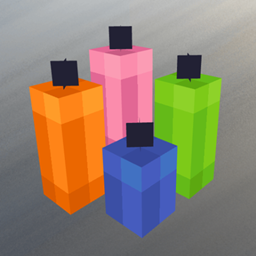
Mixed Candles
A Minecraft mod for NeoForge that lets you merge up to four candles of different colors into a single block.
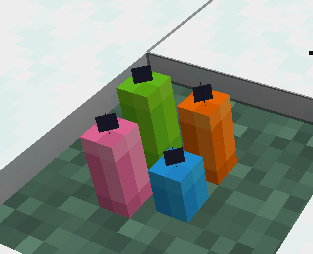
截图
介绍
Mixed Candles
A Minecraft mod for NeoForge that lets you merge up to four candles of different colors into a single block.
Ever wanted to combine your dyed candles into one multi-colored candle arrangement? Mixed Candles adds a mergeable candle block that stacks up to four candles of different colors — rendered exactly like vanilla’s stacked candles, including the staggered heights.
Features
- Merge candles: Place a dyed candle, then place more dyed candles of different colors into the same block — up to 4 candles per block.
- Vanilla-style heights: Combined candles use the same staggered heights as vanilla stacked candles (short, medium, tall), so a 3- or 4-candle block keeps the familiar look.
- Individual colors: Each candle keeps its own color and texture.
- Light & extinguish: Ignite the whole block with a flint and steel; extinguish it with an empty hand. The differences in height remain either way.
- Breaking drops: Breaking the block drops every candle as its own colored candle — nothing is lost.
- Persistent: Merged candles survive saving and reloading.
Requirements
- Minecraft 1.21.1
- NeoForge 21.1.235 (or a later 1.21.1 build)
Installation
- Download the latest
mixedcandles-*.jar. - Place the
.jarfile into your Minecraftmods/folder. - Start the game with the NeoForge 1.21.1 loader.
Usage
- Place a dyed candle (already available from the vanilla game).
- Merge by placing a dyed candle of a different color onto an existing mixed candle block — up to four candles in total. All candles in a block must be of different colors.
- Light the merged block using a flint and steel (or fire).
- Extinguish it by using an empty hand on the block.
- Break the block to collect each candle separately in its own color.
License
Mixed Candles is licensed under the MIT License.
Copyright (c) 2026 Snoops – Projects
常见问题
Mixed Candles 支持哪些 Minecraft 版本?
Mixed Candles 支持 Minecraft Java 版 1.21.1,可用的加载器:NeoForge。下载时注意选择和你游戏版本一致的文件。
Mixed Candles 怎么安装?
先用 PCL2 或 HMCL 启动器安装对应版本的 NeoForge,再把下载的 .jar 文件放进游戏目录的 mods 文件夹,重新启动游戏即可。开启了版本隔离的,mods 文件夹在 versions/版本名 下面。
Snoopypupser 的其他作品
查看全部 →
Create: Fallout
一款受《辐射》启发的机械动力扩展模组,添加标志性的 Nuka-Cola 物品、Sugar Bombs、瓶盖货币、战前消耗品,以及红火箭站和广播站等新的荒地建筑。

UC6 – Ultimate Create 6
🔧 建造,🌍 探索,⚡ 优化——一款以机械动力为核心的整合包,拥有更多结构、更佳性能和沉浸式体验!

Ultimate Create 7 – UC7
⚡ UC7——在这场魔法冒险中自动化生产、制作法术并完成任务,畅享流畅体验!🔮
Buying Chunks — FTB Chunks Addon
FTB Chunks 的附属模组,为服务器添加功能齐全的区块商店系统。管理员可以出售已认领的区块,玩家则能直接在 FTB Chunks 地图界面中浏览并购买。
评论
登录后评论和评分