
Redstone Timer Block
作者:MooCowBug
Unlike traditional redstone clocks that require complex circuitry, the Redstone Timer Block provides all timing functionality in a single, easy-to-use block. Its intuitive GUI eliminates the need for command blocks or complex redstone knowledge.
截图
介绍
中文介绍正在准备中,下面暂时显示原文。
Smart Operation
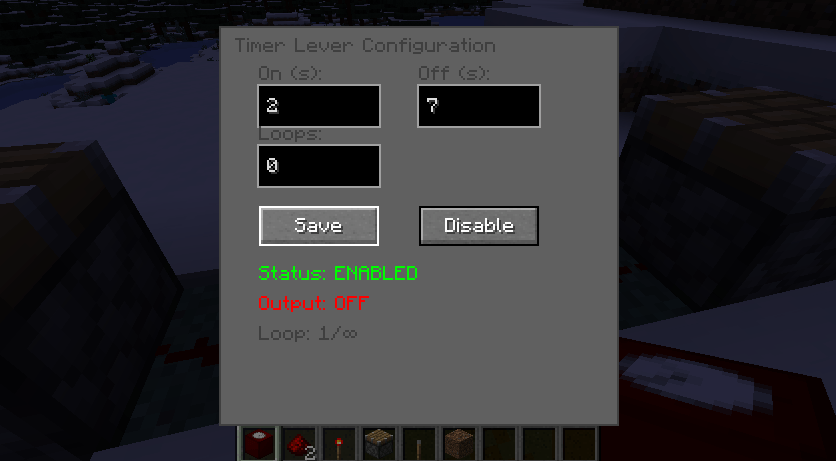
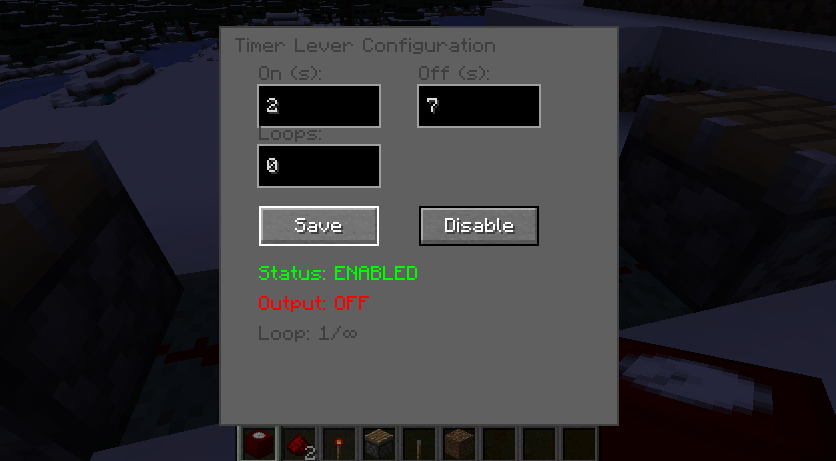
– Manual Control: Enable/disable the timer with a single click
– Auto-Disable: Automatically stops after completing the set number of loops
– State Persistence: Settings are saved and maintained between sessions
User-Friendly Interface
– Right-Click Configuration: Access settings by right-clicking the block
– Live Status Display: See current state (enabled/disabled), output status, and loop progress
Technical Capabilities
– Standard Redstone Output: Compatible with all redstone devices (pistons, dispensers, doors, etc.)
– 15-Level Signal Strength: Provides full redstone power when active
– Block Entity Storage: Maintains settings and state across world saves
– Network Synchronization: Reliable client-server communication
Why Choose Timer Lever?
Unlike traditional redstone clocks that require complex circuitry,
the Timer block provides all timing functionality in a single, easy-to-use GUI.
the Timer block provides all timing functionality in a single, easy-to-use GUI.
Its GUI eliminates the need for command blocks or complex redstone knowledge.
Perfect for: Redstone enthusiasts, automation builders, farm designers,
and anyone who wants precise timing control without the complexity of traditional redstone circuits.
This mod transforms the simple lever into a powerful automation tool,
bridging the gap between basic redstone and complex timing systems with an elegant,
user-friendly solution.
Version 1.0 had some bugs, I’ve fixed the GUI updates and also corrected the issue when breaking the
block so you can pick it up after it’s broken.
block so you can pick it up after it’s broken.
Please use Version 1.0.1 for better experience.
常见问题
Redstone Timer Block 支持哪些 Minecraft 版本?
Redstone Timer Block 支持 Minecraft Java 版 1.18.2,可用的加载器:Forge。下载时注意选择和你游戏版本一致的文件。
Redstone Timer Block 怎么安装?
先用 PCL2 或 HMCL 启动器安装对应版本的 Forge,再把下载的 .jar 文件放进游戏目录的 mods 文件夹,重新启动游戏即可。开启了版本隔离的,mods 文件夹在 versions/版本名 下面。
评论
登录后评论和评分