
截图
介绍
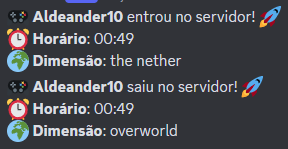
This mod offers a simple and effective way to monitor your server activity, sending instant notifications to a Discord channel whenever a player joins or leaves. Imagine having a real-time record of the delivery on your server, directly on your Discord!
How it works:
Installation is uncomplicated: just place the mod file in the mods folder on your server. The first time you start the server with the mod active, a configuration file called richpresence.toml will be automatically generated inside the config folder. This file is where the magic happens!
Settings:
Open the richpresence.toml file with a simple text editor (like Notepad) and locate the field for your Discord webhook link. To configure it correctly, you need to create a webhook in the Discord channel where you want to receive notifications. Copy the webhook URL generated by Discord and paste it into the corresponding field within richpresence.toml.
*All messages sent by the mod are in Brazilian Portuguese.
常见问题
Rich Presence Discord (BR) 支持哪些 Minecraft 版本?
Rich Presence Discord (BR) 支持 Minecraft Java 版 1.20–1.20.1,共 2 个版本,可用的加载器:Forge。下载时注意选择和你游戏版本一致的文件。
Rich Presence Discord (BR) 怎么安装?
先用 PCL2 或 HMCL 启动器安装对应版本的 Forge,再把下载的 .jar 文件放进游戏目录的 mods 文件夹,重新启动游戏即可。开启了版本隔离的,mods 文件夹在 versions/版本名 下面。
评论
登录后评论和评分