Auto Censorship
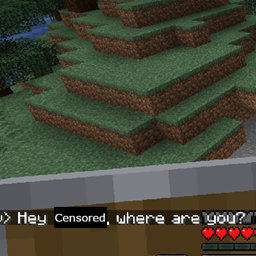
A client side mod to censor yourself so you dont accidentally say someones name on a server.
介绍
Have you ever wanted to play on a public Minecraft server with your friends, but you’re worried your going to accidentally say one of their names? Well so was I! This mod aims to correct any accidents typed in game chat. This mod is entirely client side and when you send any message in chat it will automatically replace any “banned” word in specified in your config with its coresponding replacement. Configuring this mod is super easy, all you have to do is open the config file and enter a list of banned words and their replacement. The first banned word coresponds to the first replacement and so on, you may need to enter a replacement multiple times for multiple banned words. All banned words are not case or punctuation sensitive so you should be mostly safe unless you try to push it.
常见问题
Auto Censorship 支持哪些 Minecraft 版本?
Auto Censorship 支持 Minecraft Java 版 1.20.1,可用的加载器:Forge。下载时注意选择和你游戏版本一致的文件。
Auto Censorship 怎么安装?
先用 PCL2 或 HMCL 启动器安装对应版本的 Forge,再把下载的 .jar 文件放进游戏目录的 mods 文件夹,重新启动游戏即可。开启了版本隔离的,mods 文件夹在 versions/版本名 下面。
评论
登录后评论和评分