Highlight ESP
This Mod Highlights Many Things Visible Throught Blocks, In Short It Is An ESP Mod
介绍
🔍 ESP — World Highlighter
ESP — World Highlighter is a lightweight client-side Minecraft Forge mod that highlights important blocks and entities with bright, distinct colors, making them easy to locate even through walls and terrain.
✨ Features
The mod currently highlights:
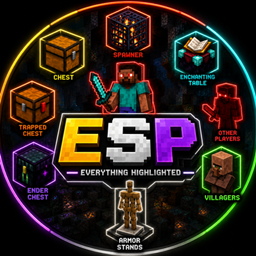
| Target | Color |
|---|---|
| 🟨 Chest | Yellow |
| 🟧 Trapped Chest | Orange |
| 🟪 Ender Chest | Purple |
| 🟦 Enchanting Table | Cyan |
| 🟥 Spawner | Orange-Red |
| 🔴 Other Players | Red |
| 🟢 Villagers | Green |
| ⚪ Armor Stands | White |
🎯 Highlights
-
👁️ See targets through blocks and terrain
-
🎨 Different color for each target type
-
⚡ Simple toggle system
-
⌨️ Press X to toggle highlighting
-
📏 Uses the player’s normal render distance
-
🖥️ Client-side Forge mod
-
🚀 Designed to be lightweight and performance-friendly
-
🌎 Works in singleplayer and multiplayer environments where permitted
🧱 Supported Targets
Blocks
-
Chests
-
Trapped Chests
-
Ender Chests
-
Enchanting Tables
-
Spawners
Entities
-
Other Players
-
Villagers
-
Armor Stands
⌨️ Controls
X — Toggle all highlights ON/OFF
The keybind can be changed through Minecraft’s Controls menu.
📦 Compatibility
Mod Loader: Minecraft Forge
Current Version: Minecraft 1.21.4
Additional Minecraft 1.21.x versions are planned.
⚠️ Server Compatibility
This is a client-side visual utility. Multiplayer servers may have rules restricting ESP or through-wall highlighting mods. Always check the rules of the server you are playing on before using the mod.
💡 Why use it?
Instead of installing separate mods for different types of objects, this mod combines multiple useful highlighting features into one lightweight Forge mod.
Find chests, spawners, enchanting tables, villagers, players, and other supported targets at a glance.
常见问题
Highlight ESP 支持哪些 Minecraft 版本?
Highlight ESP 支持 Minecraft Java 版 1.21.4,可用的加载器:Forge。下载时注意选择和你游戏版本一致的文件。
Highlight ESP 怎么安装?
先用 PCL2 或 HMCL 启动器安装对应版本的 Forge,再把下载的 .jar 文件放进游戏目录的 mods 文件夹,重新启动游戏即可。开启了版本隔离的,mods 文件夹在 versions/版本名 下面。
PlayMint_Chaos 的其他作品
查看全部 →
BattleForge AI
PvP Bot Mod 是一款竞技 PvP 练习与展示模组,专注于还原真实的战斗行为。 每场对战都有公平的开局流程,包括倒计时、装备配置和结果记录,让战斗更有条理,也方便重赛。
BattleForge AI
PvP Bot 模组是一个竞技 PvP 练习和展示模组,专注于真实的战斗行为。 每场比赛都使用公平的起始系统,包括倒计时、装备设置和结果追踪,因此战斗感觉有条理且可重复。
Auto Stun Slammer
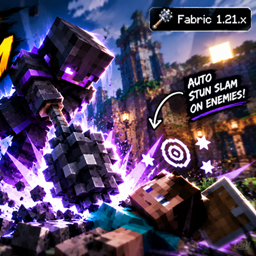
It automatically stun slams enemy if mace and axe are in hotbar

OreVisionnnn
This Mod Highlights All Ores In Minecraft So You Dont Miss Any Ore In Game. Subcribe My Youtube Channel Too "PlayMint Chaos"
评论
登录后评论和评分