GroundZero HUD
this mod adds a money HUD to players screen and fixes numbers on the scoreboard of 1.20.1
截图
介绍
GroundZero CashHUD – Client-Side HUD & Economy UI
Minecraft Version: 1.20.1
Mod Loader: Forge
Mod Type: Client-Side
Version: 1.0.2
Integration: GroundZero Crime Economy
📖 Description
GroundZero CashHUD is a lightweight client-side Minecraft mod designed to improve the user interface and provide a more immersive economy experience on modded survival and roleplay servers.
Originally developed for the GroundZero Zombie Survival RP Server, CashHUD introduces a customizable cash display, improved scoreboard visuals, and additional HUD customization.
The mod allows players to keep track of their physical money directly on their screen without constantly opening their inventory.
✨ Features
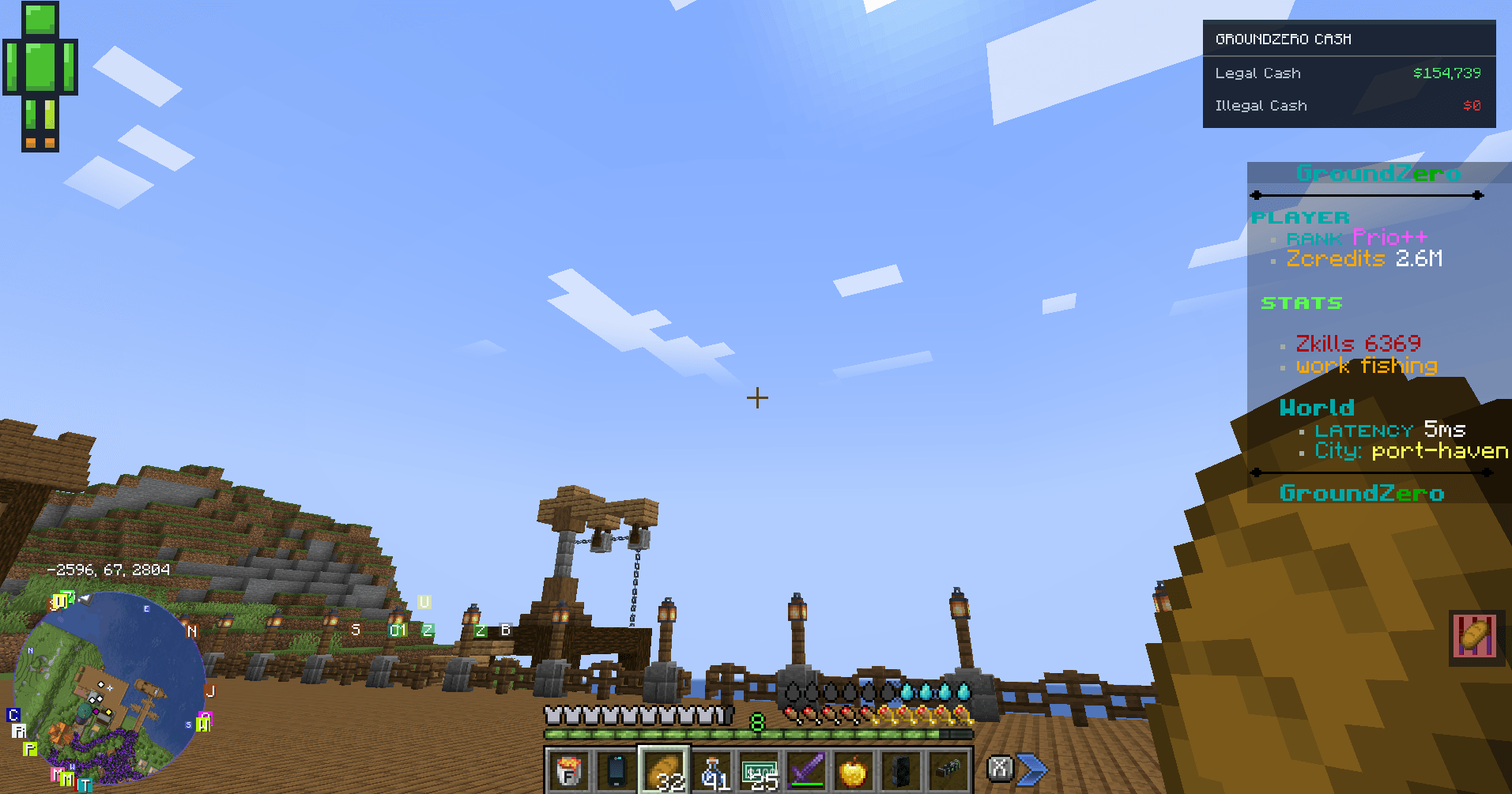
💰 Legal & Illegal Cash Display
-
Displays your total Legal Cash directly on your HUD.
-
Separately displays Illegal Cash.
-
Automatically updates when supported cash items are added to or removed from your inventory.
-
Supports physical cash-based economies and roleplay transactions.
-
Integrates with GroundZero’s economy items.
🎨 Improved Scoreboard
-
Removes unnecessary red scoreboard score numbers.
-
Preserves scoreboard text, colors, and team formatting.
-
Maintains the original scoreboard layout and line ordering.
-
Provides a cleaner, more modern interface without changing server-side scoreboard data.
⚙️ Customizable HUD
-
Toggle the CashHUD using the H key.
-
Open settings using
/cashhud settings. -
Adjust HUD size through the settings menu.
-
Enable or disable the cash display.
-
Settings are saved locally between sessions.
🍎 Nutritional Balance HUD Support
-
Customize the placement of supported Nutritional Balance indicators.
-
Move supported indicators to the bottom-right corner.
-
Keep their original position or hide them.
-
Helps reduce clutter when using multiple HUD elements.
🚀 Lightweight Client-Side Design
-
No server-side CashHUD installation required.
-
No additional server-side tick loops.
-
Cash values are calculated from supported inventory items.
-
Designed for modded and hybrid Forge servers.
-
Does not modify server economy balances or transactions.
🌍 Can Other Servers Use GroundZero CashHUD?
Yes! GroundZero CashHUD can also be installed on other Minecraft 1.20.1 Forge servers and modpacks.
However, the cash display is specifically designed around GroundZero’s supported physical currency items.
For full Legal Cash and Illegal Cash functionality, servers must use compatible GroundZero economy items and integrations.
Other servers can use the client-side HUD and scoreboard improvements, but custom economy systems are not automatically supported.
The mod does not automatically integrate with every Vault, Essentials, or third-party economy plugin.
📦 Dependencies & Compatibility
Required:
-
Minecraft 1.20.1
-
Minecraft Forge 47.x
-
GroundZero Crime Economy integration for supported illegal cash functionality
Supported Integrations:
-
GroundZero Crime Economy
-
GroundZero physical cash items
-
Nutritional Balance HUD
-
Minecraft vanilla scoreboard and supported TAB scoreboard formatting
Important: GroundZero CashHUD does not create money, modify player balances, or replace an economy plugin. It only displays supported information client-side.
🛠️ Commands & Controls
| Command / Key | Function |
|---|---|
H |
Toggle CashHUD |
/cashhud |
Enable or disable CashHUD |
/cashhud settings |
Open HUD settings |
🔒 Server Compatibility
GroundZero CashHUD is designed to work without modifying the server’s existing economy, permissions, or scoreboard systems.
It is suitable for survival, roleplay, zombie apocalypse, and economy-focused modpacks.
GroundZero CashHUD – A cleaner HUD. A more immersive economy.
常见问题
GroundZero HUD 支持哪些 Minecraft 版本?
GroundZero HUD 支持 Minecraft Java 版 1.20.1,可用的加载器:Forge。下载时注意选择和你游戏版本一致的文件。
GroundZero HUD 怎么安装?
先用 PCL2 或 HMCL 启动器安装对应版本的 Forge,再把下载的 .jar 文件放进游戏目录的 mods 文件夹,重新启动游戏即可。开启了版本隔离的,mods 文件夹在 versions/版本名 下面。
Xbeats 的其他作品
查看全部 →
GroundZero’s Zombie Apocalypse
一个模组化的僵尸末日服务器

GroundZero’s Racing + Automobility
This mod adds a race tablet and ways to host own races with in minecraft. this mod hooks into automobility
CosmeticSlot + Curious
This Mod Adds Cosmetic Armor Slots To Curious

Groundzero’s Voice Chat Bridge
this mod adds the bridge between our phone system and voice chat mod
评论
登录后评论和评分