
KeyCps
作者:itzslcs
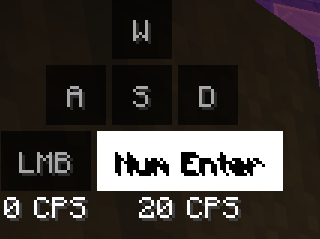
Keystrokes + CPS overlay that follows your key bindings, counts keyboard repeat, and is fully configurable in-game (Mod Menu supported).
截图
介绍
中文介绍正在准备中,下面暂时显示原文。
KeyCPS
A clean keystrokes and CPS overlay. It shows your movement keys, jump, attack and use, lit up as
you press them, with a live clicks-per-second count so you can watch your click speed while you play.
Features
- Keystrokes HUD: W, A, S, D, jump, attack and use, plus an optional sneak / sprint row. Rounded keys with a smooth press animation.
- Accurate CPS: every click is counted from input events, so even clicks shorter than one frame are caught.
- Keyboard repeat counting: bind attack or use to a keyboard key and hold it, and KeyCPS counts the keyboard repeat rate (aaaaaaa…).
- Follows your bindings: keys show what they’re actually bound to (AZERTY, attack on F, …).
- In-game settings: press Right Shift, or use Mod Menu. Size, colours, background and opacity, rounded corners, text shadow, rainbow text, CPS warning colour, per-key rate, Always LMB / RMB labels for keyboard-bound attack/use, and more.
- Movable HUD: starts in the top-left corner. Use Move HUD to drag it anywhere; it snaps to the edges and the centre.
- 14 languages: English, German, French, Spanish, Portuguese, Italian, Dutch, Polish, Turkish, Russian, Ukrainian, Chinese, Japanese, Korean.
Requirements
- Fabric or Quilt loader, plus Fabric API
- Mod Menu is optional
Client-side only. Supports 1.21 to 1.21.11 and 26.1 to 26.3. Download the file that matches your Minecraft version.
常见问题
KeyCps 支持哪些 Minecraft 版本?
KeyCps 支持 Minecraft Java 版 1.21–26.3,共 17 个版本,可用的加载器:Fabric / Quilt。下载时注意选择和你游戏版本一致的文件。
KeyCps 怎么安装?
先用 PCL2 或 HMCL 启动器安装对应版本的 Fabric / Quilt,再把下载的 .jar 文件放进游戏目录的 mods 文件夹,重新启动游戏即可。开启了版本隔离的,mods 文件夹在 versions/版本名 下面。运行环境:仅客户端。
评论
登录后评论和评分