Andrew’s Complex/Backroomss
A Mod that implements The Complex/Backrooms into Minecraft.
截图
介绍
REMAKE IS HERE: https://www.curseforge.com/minecraft/mc-mods/still-lifes-complex
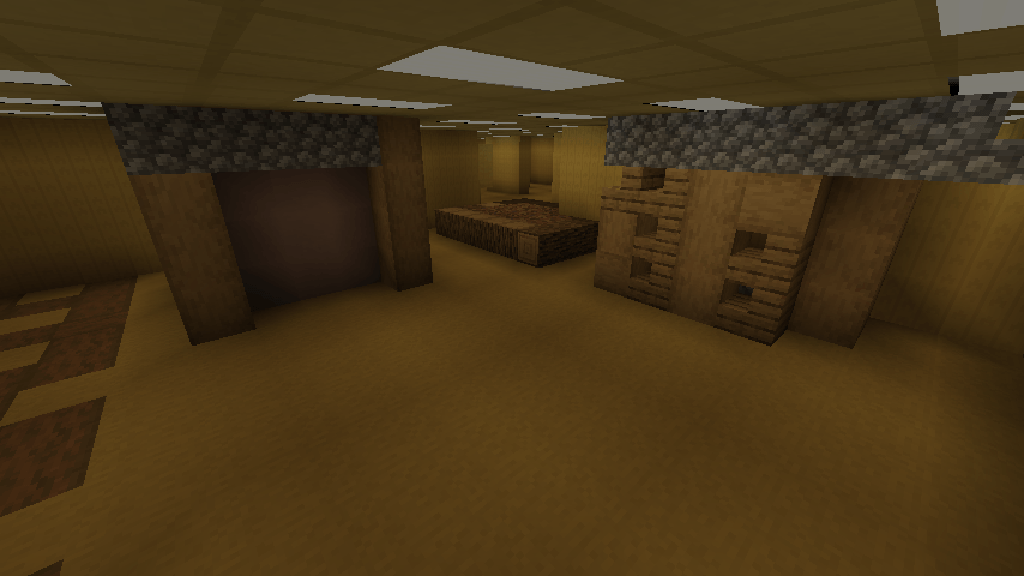
This Mod adds The Complex/Backrooms into Minecraft.
The way to enter in the Backrooms is by entering a Null Zone from the Overworld, then you’ll no-clip into The Complex.
The Backrooms have Rooms that seem to go on forever, It also does have furniture placed in strange locations, or just looks slightly wrong.
The Complex does also have special rooms like The Pitfalls, Remembered Village, and Origin.
The Pitfalls have pits in the carpet, and when falling into one of the pits, you’ll end up in The Pitfalls.
The Pitfalls is like the Backrooms but doesn’t have any lights and are more precise, you can go back the the Complex by finding a area of The Pitfalls that have holes in the ceiling, by going up into A hole, you end up back into the Backrooms.
The Remembered Village is an attempt of the Complex remembering a Village, ending up with a Village that looks very wrong.
And the Origin, which is the original picture of the Backrooms.
There is also the Foreign Music Area, it has white walls, spruce planks, and Note Blocks, this is where you can find Still Lifes and the Custom Music Discs.
You can exit The Complex by finding a Null Zone of a wall, this will be hard to do since the Null Zone looks exactly like a wall you can find in The Backrooms, meaning you could posiblly past by or miss a Null Zone.
You’re not exactly alone in The Backrooms, since there are Entitys can can be found in The Complex, The Bacteria and Copycat are apart of the Lifeform type, you can only find the Bacteria in The Backrooms, and the Copycat in The Pitfalls.
The Custom Music Discs and the Still Life entity isn’t avaliable for Survival in Version 1.
常见问题
Andrew’s Complex/Backroomss 支持哪些 Minecraft 版本?
Andrew’s Complex/Backroomss 支持 Minecraft Java 版 1.20.1,可用的加载器:Forge。下载时注意选择和你游戏版本一致的文件。
Andrew’s Complex/Backroomss 怎么安装?
先用 PCL2 或 HMCL 启动器安装对应版本的 Forge,再把下载的 .jar 文件放进游戏目录的 mods 文件夹,重新启动游戏即可。开启了版本隔离的,mods 文件夹在 versions/版本名 下面。
评论
登录后评论和评分