MoreInformation
A configurable client-side information HUD with optional mod integrations.
截图
介绍
MoreInformation
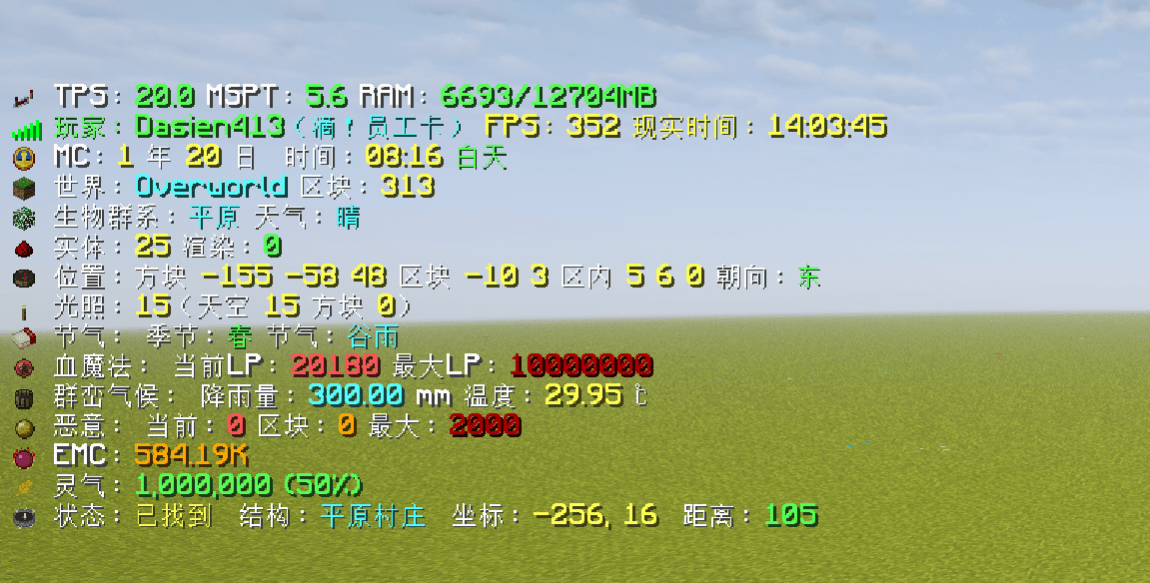
A Minecraft information HUD. By default it only shows TPS / MSPT / RAM and player info. Extra lines and mod integrations can be enabled in the config.
Default display
- TPS, MSPT, RAM
- Player name, FPS, real-world clock
Optional vanilla info
- Minecraft calendar time
- Dimension and loaded chunks
- Biome and weather
- Entity counts
- Coordinates and facing
- Light levels
Config
Config file: config/moreinformation-client.toml
hud.position:top_left,middle_left,bottom_left,top_right,middle_right,bottom_righthud.offsetX/hud.offsetY: pixel offset from the anchorhud.templates: per-line format. Use{placeholders}and&color codes (&agreen,&eyellow,&cred,&rreset;&&for a literal&)- Resetting an option restores the default format for the current language
Mod integrations
After installing the matching mod, turn on its switch under integrations. Missing mods will not crash the game.
| Mod | Option | What it shows |
|---|---|---|
| Ecliptic Seasons | showEclipticSeasons |
Season and solar term |
| Blood Magic (1.20.1 Forge only) | showBloodMagic |
Current / max LP |
| TerraFirmaCraft | showTerraFirmaCraft |
Rainfall and temperature |
| L2Hostility | showL2Hostility |
Player / chunk / max hostility |
| ProjectE | showProjectE |
Player EMC. Large values use units; hold Shift for the exact number |
| Nature’s Compass | showNaturesCompass |
Search status while locating a biome; hides the original HUD |
| Explorer’s Compass | showExplorersCompass |
Search status while locating a structure; hides the original overlay |
| ExplorersCompassEdited | showExplorersCompass |
Same as above |
| Nature’s Aura | showNaturesAura |
Aura strength around the current position (same math as the Aura Eye) |
常见问题
MoreInformation 支持哪些 Minecraft 版本?
MoreInformation 支持 Minecraft Java 版 1.20.1–1.21.1,共 2 个版本,可用的加载器:Forge / NeoForge。下载时注意选择和你游戏版本一致的文件。
MoreInformation 怎么安装?
先用 PCL2 或 HMCL 启动器安装对应版本的 Forge / NeoForge,再把下载的 .jar 文件放进游戏目录的 mods 文件夹,重新启动游戏即可。开启了版本隔离的,mods 文件夹在 versions/版本名 下面。
Dasien 的其他作品
查看全部 →
effortless structure unofficial port
通过以任意形状批量放置/破坏/使用方块/物品,并正确消耗物品和工具,来提高你的建造速度。它还包括阵列/镜像变换器、结构复制/粘贴、方块随机化器、权限控制等……

PortableSource
PortableSource replenishes Ars Nouveau source from Source Jars and storage networks.

more config for ae2
More CFG for AE2 lets you configure previously fixed limits for AE2 and its addons.

Mekanism villagers
An addon for Easy villagers and Mekanism
评论
登录后评论和评分