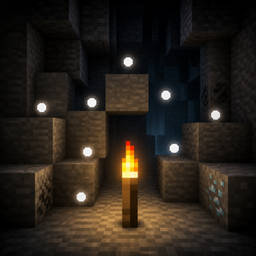
Torch Spots
Hold a torch and tap Shift to see floating dots on blocks where monsters can spawn.
介绍
# Torch Spots
**Torch Spots** helps you light up your base and caves safely by showing where hostile mobs can spawn.
Hold a torch, tap **Shift** quickly three times, and floating white dots appear on nearby spawnable blocks. Place torches until the dots disappear — then those spots are safe.
## Features
– Shows floating white dots on blocks where monsters can spawn
– Toggle overlay by holding a torch and tapping Shift 3 times quickly
– Works with Torch, Soul Torch, Redstone Torch, and Copper Torch (when available)
– Markers refresh as you move
– Spots disappear once the area is lit enough that mobs can no longer spawn there
– Compatible with Iris shader packs (optional)
## How to use
1. Hold a torch in your main hand or offhand.
2. Tap **Shift** quickly 3 times.
3. Floating white dots appear on nearby spawnable blocks.
4. Tap Shift quickly 3 times again (while holding a torch) to hide them.
## Requirements
– Minecraft (version matching the file you download)
– Fabric Loader
– Fabric API
## Notes
– Client-side overlay for spawn spotting while exploring and building
– Designed to make torch placement faster and clearer
## License
CC0-1.0 (Creative Commons Zero) — free to use, modify, and redistribute.
常见问题
Torch Spots 支持哪些 Minecraft 版本?
Torch Spots 支持 Minecraft Java 版 26.2–26.3,共 2 个版本,可用的加载器:Fabric。下载时注意选择和你游戏版本一致的文件。
Torch Spots 怎么安装?
先用 PCL2 或 HMCL 启动器安装对应版本的 Fabric,再把下载的 .jar 文件放进游戏目录的 mods 文件夹,重新启动游戏即可。开启了版本隔离的,mods 文件夹在 versions/版本名 下面。
ammyindy 的其他作品
查看全部 →
Auto Trade Refresh
为村民交易界面添加刷新和自动按钮,用于重掷附魔书和其他交易。
AOE Hammer
可升级的范围挖掘镐和铲,可挖掘3x3、5x5和9x9区域。按住Shift挖掘单个方块。
Ammyindy’s Backpacks
从皮革到下界合金的可穿戴背包,带有装甲变体、便携存储和可选容量升级。
Forgebound Chests
Upgrade vanilla chests into Copper, Iron, Gold, Diamond, and Netherite chests with huge storage, search, and sorting.
评论
登录后评论和评分