Good Enough Game Integration
Good Enough Game Integration (GEGI) Browse itch and Newgrounds web games, and play them, inside Minecraft.
截图
介绍
Good Enough Game Integration (GEGI)
Browse itch.io and Newgrounds web games, and play them, inside Minecraft.
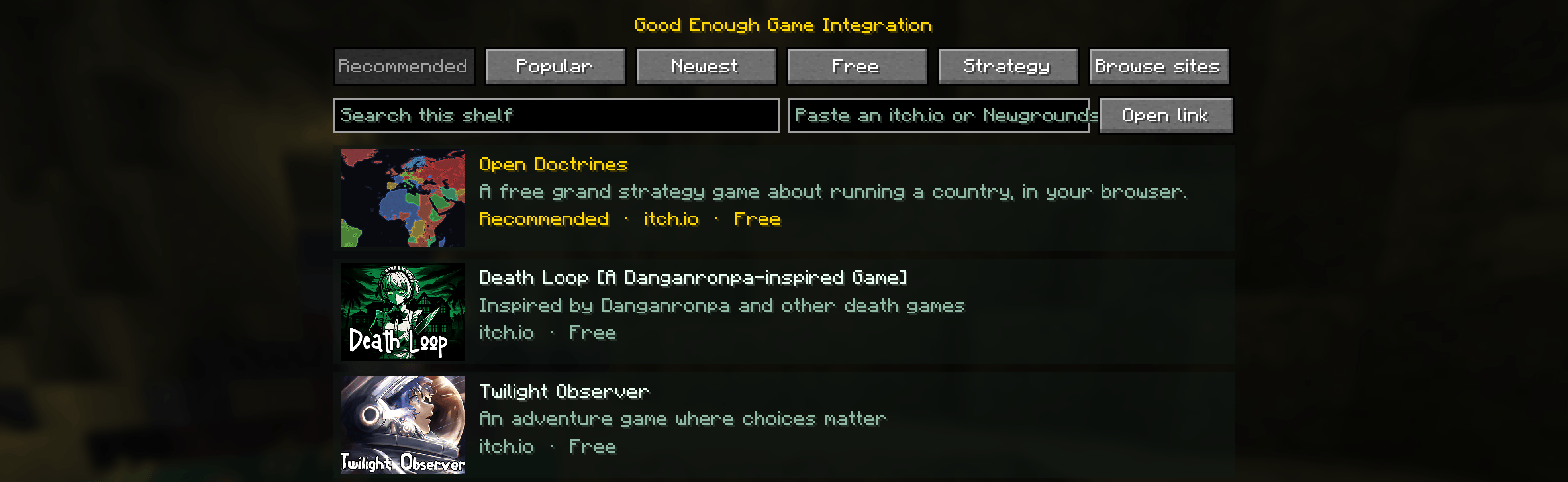
A GEGI button in Options, or /gegi in chat, opens a menu of web games:
recommended picks (Open Doctrines first), live shelves from itch.io, a search box,
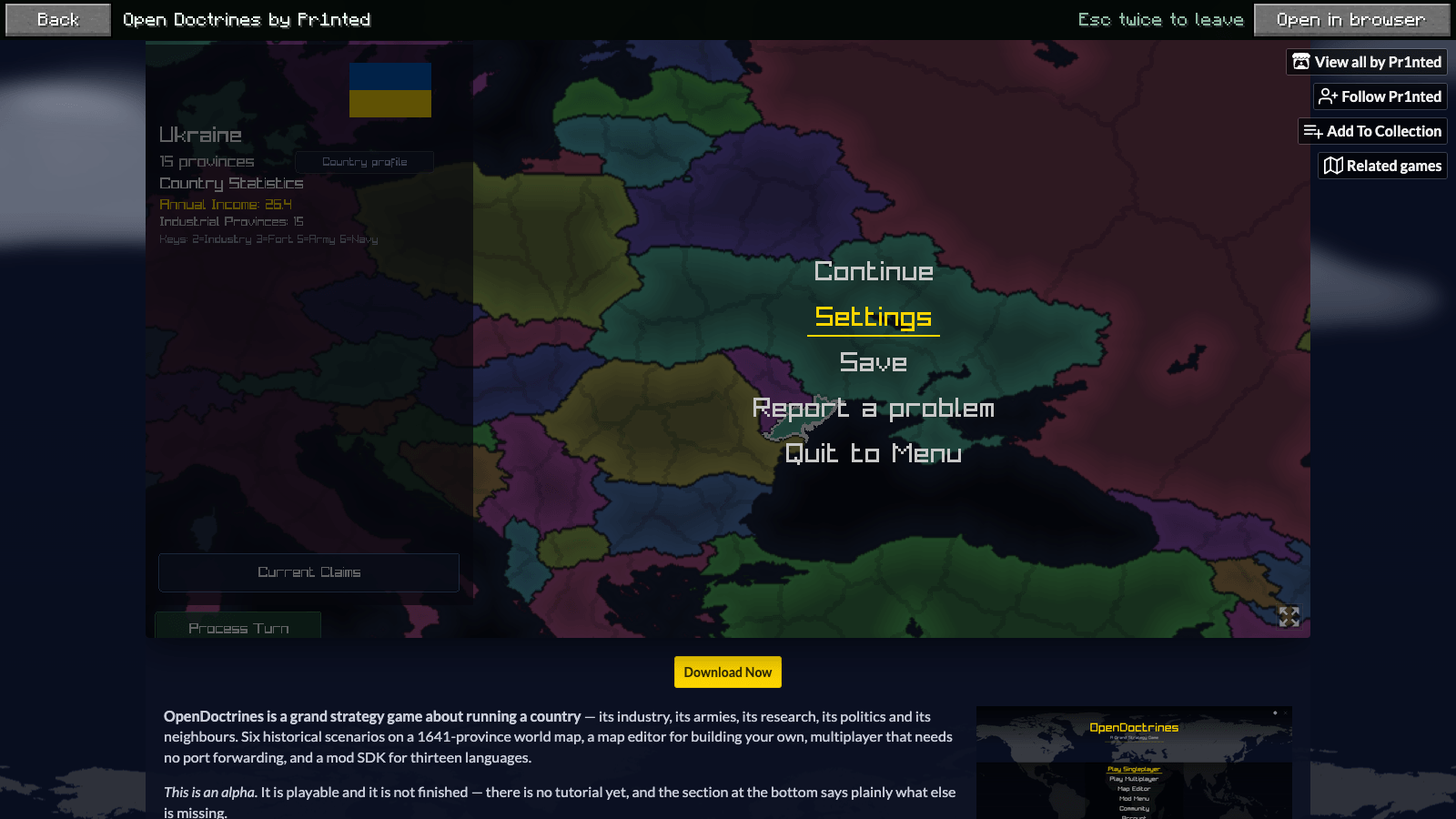
and a box for pasting any itch.io or Newgrounds link. Click a game and it plays right there, in
Minecraft’s window, keyboard and mouse included.
Minecraft 1.12.2 to 26.2 · Fabric · Quilt · NeoForge · Forge · Folia (server plugin) · MIT
Features
- The menu. Recommended, Popular, Newest, Free and Strategy tabs read from
itch.io’s own browse feeds, with thumbnails. A Browse sites tab links to the itch.io
and Newgrounds game pages. Search filters the current tab. - Games run in the game. GEGI carries its own Chromium: the page draws
into a Minecraft screen and every key, click and scroll goes to it. Escape belongs to
the game you are playing; press it twice to leave. Open in browser is always one
click away. - **Three ways in. The GEGI button at the top right of Options; typing
/gegi(or/arcade) in chat, handled on your side and never sent to the
server; and the Config button in your loader’s mod list (Mod Menu on Fabric and
Quilt, the built-in list on NeoForge and Forge). - No dependencies. Nothing to install besides the loader. There is no Fabric API,
Architectury or config library. Mod Menu support is there when Mod Menu is, and
unused when it is not. - Folia and Paper. A server has no screen, so the plugin’s
/gegi(or/arcade) sends the same
recommendations as clickable chat links.
Playing inside Minecraft
The first time you play, GEGI asks before downloading Chromium (about 100 MB,
300 MB unpacked: the jcefmaven natives, from
Maven Central or jcefmaven’s GitHub releases). Say no and games open in your own browser instead. Chromium is kept
per player, not per instance, so every Minecraft version and modpack shares one copy:
| OS | Where |
|---|---|
| Windows | %LOCALAPPDATA%\Gegi |
| macOS | ~/Library/Application Support/Gegi |
| Linux | $XDG_DATA_HOME/gegi or ~/.local/share/gegi |
Delete that folder to remove it. It also holds the browser profile, so an itch.io
login stays logged in.
Chromium runs in a separate process on Minecraft’s own Java (gegi-browser.jar,
inside the mod jar), with no window. It paints frames into shared memory, which the mod
uploads as a texture; input goes back over a pipe. The process exits with the game, and
a crash in a web page cannot take Minecraft down with it.
Where Chromium cannot start (Windows on ARM has no windowless Chromium build), the game
screen says why, and Open in browser opens the game in your own browser.
What it connects to
-
itch.io/games/.../platform-web.xml, itch.io’s public RSS feeds for its browse pages. -
img.itch.zone, for thumbnails. -
Maven Central or jcefmaven’s GitHub releases, once, when you agree to download Chromium.
-
The games you play, in Chromium, like any browser.
Nothing else. No accounts, no telemetry. Only itch.io and Newgrounds links open from
the menu; anything else is refused.
Newgrounds blocks automated requests to its listings, so the mod does not fetch
Newgrounds lists. It links to Newgrounds’ game pages, and any Newgrounds game link you
paste opens.
Install
| Loader | Jar | Needs |
|---|---|---|
| Fabric | gegi-fabric-26.2-<version>.jar |
Fabric Loader 0.19.3+ |
| Quilt | the Fabric jar | Quilt Loader |
| NeoForge | gegi-neoforge-26.2-<version>.jar |
NeoForge 26.2.0.88+ |
| Forge | gegi-forge-26.2-<version>.jar |
Forge 65.1.3+ |
| Folia / Paper | gegi-folia-26.2-<version>.jar in plugins/ |
Folia or Paper 26.2 |
Every other Minecraft version has the same jars with its own version in the name. One
port per minor version, on its last release:
| Minecraft | Java | Loaders |
|---|---|---|
| 26.2, 26.1.2, 1.21.11, 1.20.6 | 25 (26.x), 21 | Fabric, Quilt, NeoForge, Forge, Folia |
| 1.19.4, 1.18.2, 1.17.1, 1.16.5 | 17, 17, 16, 8 | Fabric, Quilt, Forge, Folia |
| 1.15.2, 1.14.4 | 8 | Fabric, Quilt, Forge |
| 1.13.2, 1.12.2 | 8 | Forge |
Loaders missing from a row did not exist for that Minecraft (NeoForge before 1.20.2,
Fabric before 1.14), or publish no API that old (Paper’s plugin API before 1.16.5).
The mod is client-side: it does nothing on a dedicated server and is not needed there.
Build
Every Minecraft version is its own Gradle build under versions/<minecraft>/, with
its own Gradle, plugins and Java, because the tools for 1.12.2 and for 26.2 cannot
share one build. They all compile the same core/ (Java 8, no Minecraft classes: the
catalog, itch.io feeds, link allowlist, strings, the menu’s model and the game’s side
of Chromium) and bundle the same browser/ helper.
cd versions/26.2
./gradlew build
Jars land in versions/<minecraft>/<loader>/build/libs/. The core and the helper also
build on their own from the top: ./gradlew :core:test :browser:smokeTest.
A version directory is MultiLoader-Template
for that Minecraft, with a Forge module and a Folia module added, and a port.json
that tells CI which loaders it has. Its common/ holds only what that Minecraft’s API
needs: the screens draw the core’s menu model, and the Options button, the command and
the tick hook are mixins, which is why no loader API is needed. Forge for 1.14.4 and
older ships no Mixin, so there the same three hooks are Forge events (ForgeEvents).
1.19.4 and older are one Unimined project per
version instead, with the same folders. 1.13.2 and 1.12.2 have no Mojang names, so their
code is written in Forge’s (MCP), and 1.12.2 runs on LWJGL 2: its screens are written
by hand rather than moved down from 1.14.4 by ci/port/downport.py.
CI
.github/workflows/ci.yml reads every versions/*/port.json, builds each version’s loaders,
then runs the real game for each:
- Fabric, NeoForge, Forge. The client starts headless with
MC-Runtime-Test and joins a world
(1.12.2 included). - Versions MC-Runtime-Test has no build for (1.13 to 1.15). HeadlessMC starts the
client with only GEGI installed, and the self-test creates its own world
(ci/client-selfdrive.sh). - Quilt. The same, installed with the Quilt installer (
ci/quilt-runtime.sh). - Folia. A Folia server of that version starts with the plugin and must log that it is enabled
(ci/folia-smoke.sh).
In the client jobs the mod runs its own self-test in the world
(GEGI_SELFTEST=1): it types /gegi, waits for the menu to draw, opens
Options, clicks the GEGI button and checks the menu opened again. Anything that
does not happen fails the job.
- Chromium.
./gradlew :browser:smokeTeststarts the helper exactly as the mod
does, loads a page, and checks that a click, a key press, a typed character and a
resize each reach it and come back as a frame. CI runs it on Linux (Java 8 and 25),
Windows and macOS.
New Minecraft versions
.github/workflows/port.yml checks every day for a Minecraft release newer than the
newest versions/<minecraft>. Once its loaders are out, ci/port/port.py copies the
newest port and moves it to the new game (loader versions, Java, Gradle, Loom,
ModDevGradle, and everywhere the version is written down) on a branch
port/<minecraft>, and the whole CI runs on it, real clients and self-test included.
A green run opens a pull request; a red one opens an issue that links the failing jobs.
Releasing
.github/workflows/release.yml publishes to Modrinth and CurseForge from a tag:
git tag -a v1.0.0 -m "What changed"
git push origin v1.0.0
The tag must match version in every versions/*/gradle.properties, and its message
becomes the changelog. The whole CI runs on the tagged commit first; only if it passes
are its jars uploaded, one file per Minecraft version and loader
(ci/release/publish.py): the mod to the mod projects, the Folia plugin to the plugin
projects. The Fabric jar is also tagged Quilt. Tokens are repository secrets
(MODRINTH_TOKEN, CURSEFORGE_TOKEN, BUKKIT_TOKEN) and project IDs are repository
variables (MODRINTH_MOD_ID, MODRINTH_PLUGIN_ID, CURSEFORGE_MOD_ID,
BUKKIT_PLUGIN_ID); a site without its ID is skipped. publish.py plan --jars <dir>
shows what would be uploaded, with no token.
License
MIT. See LICENSE.
GEGI is not affiliated with itch.io, Newgrounds or Mojang.
常见问题
Good Enough Game Integration 支持哪些 Minecraft 版本?
Good Enough Game Integration 支持 Minecraft Java 版 1.12.2–26.2,共 12 个版本,可用的加载器:Fabric / Forge / NeoForge / Quilt。下载时注意选择和你游戏版本一致的文件。
Good Enough Game Integration 怎么安装?
先用 PCL2 或 HMCL 启动器安装对应版本的 Fabric / Forge / NeoForge / Quilt,再把下载的 .jar 文件放进游戏目录的 mods 文件夹,重新启动游戏即可。开启了版本隔离的,mods 文件夹在 versions/版本名 下面。
评论
登录后评论和评分