
Spectator Night Vision
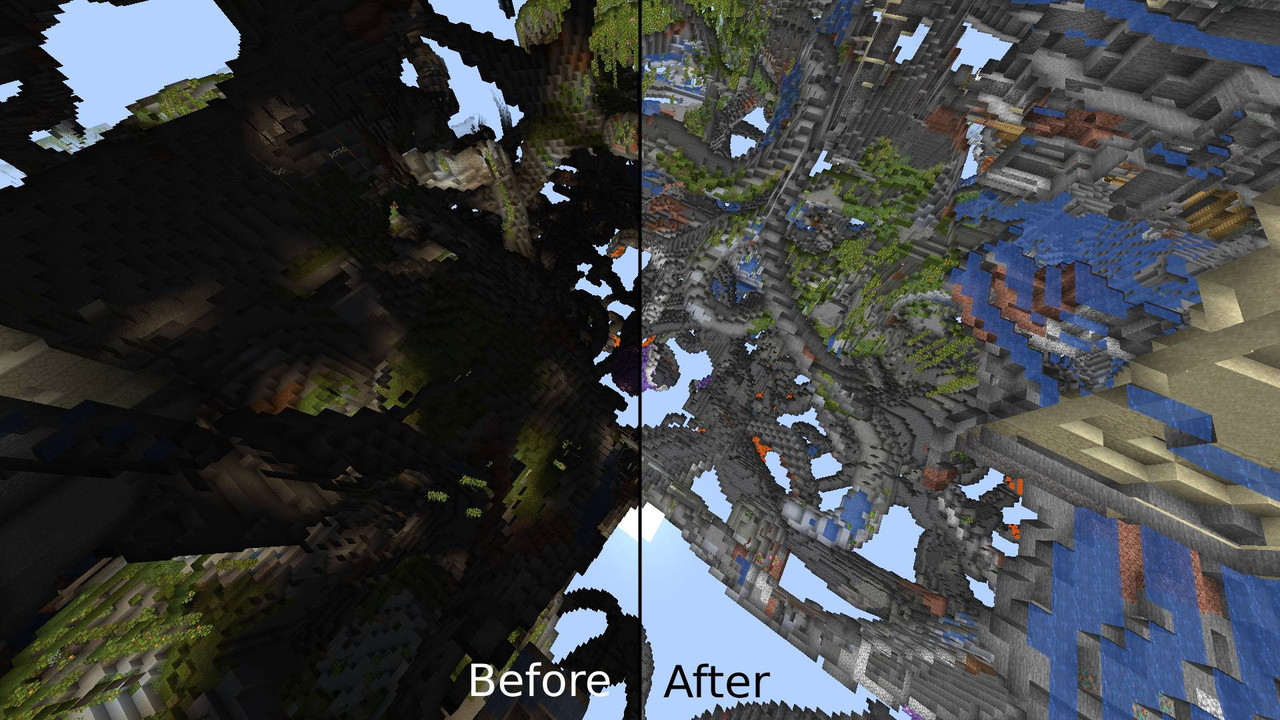
An easy-to-use and toggleable data pack that gives you night vision in spectator mode to make it easier to see!
截图


介绍
Spectator Night Vision (Toggleable)
Exploring in Spectator mode but struggling to see in the dark? This data pack gives you automatic night vision when switching to Spectator mode, making caves, ocean depths, and the Deep Dark much easier to explore. Unlike other night vision packs, this one is fully toggleable, so you can turn it on or off whenever you like.
Features:
- Toggleable Night Vision – Use
/trigger spec_nvto enable or disable it at any time. (Sometimes the “On” message won’t show due to the way the toggle mechanic works) - Toggleable for the entire server – Using /trigger spec_nv only applies to the player(s) who run the command. To enable/disable it for the entire server, do /function spectator_nv:on/off
- Automatic Activation – If enabled, night vision turns on when you enter Spectator mode and turns off when you leave.
- Lightweight & Performance-Friendly – Designed to work smoothly in both singleplayer and multiplayer.
- Server-Friendly – Works great for admins, moderators, or players who just want an easier time exploring.
- Automatic deactivation – Automatically deactivates when switching out of spectator or turning the pack off.
No more struggling to see in dark caves or underwater!\
 \
Enjoy!
常见问题
Spectator Night Vision 支持哪些 Minecraft 版本?
Spectator Night Vision 支持 Minecraft Java 版 1.20–26.2,共 23 个版本,可用的加载器:Fabric / Forge / NeoForge / Quilt。下载时注意选择和你游戏版本一致的文件。
Spectator Night Vision 怎么安装?
先用 PCL2 或 HMCL 启动器安装对应版本的 Fabric / Forge / NeoForge / Quilt,再把下载的 .jar 文件放进游戏目录的 mods 文件夹,重新启动游戏即可。开启了版本隔离的,mods 文件夹在 versions/版本名 下面。运行环境:客户端 / 服务端。
sniffercraft34 的其他作品
查看全部 →
Vanilla Connected Glass
无需 OptiFine、兼容任意资源包的连接玻璃!

Full Light
在 Minecraft 中使用 Optifine 或 Polytone 体验全亮效果!

No Fire Overlay
Removes the annoying fire overlay that takes up your screen
Too Much XP (TME)
Yeets the laggy XP orbs, whilst still maintaining a high level count
评论
登录后评论和评分