介绍
中文介绍正在准备中,下面暂时显示原文。
# TeleportCommandSet
Minecraft 1.16.5 Forge 36.2.34+ Mod – Teleport Command Set Mod.
## Installed
> “`
> Server-side:
> Can only install on server.
> Players can use “TpsCommand” without having to install this module.
>
> Client-side:
> Single-player Mode – Players can use “TpsFeature” and “TpsCommand”.
> Multi-player Mode – Players can use “TpsFeature”.
> “`
>
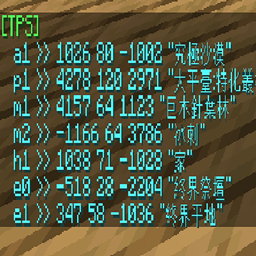
## TpsCommand
> ### Permission
> “`
> no need.
> “`
>
> ### Features
> “`
> 1. /tps list – show all <PosName> that you set. (is clickable to do /tps <PosName>, but requires ‘/execute’ permission.)
> 2. /tps set <PosName> <PosDesc> – set new <PosName> <PosDesc>. (PosName = name, PosDesc = description)
> 3. /tps rm <PosName> – remove <PosName>.
> 4. /tps <PosName> – teleport to <PosName>. (can teleport in different dimensions.)
> 5. /back
> “`
>
## TpsFeature
> ### Permission
> “`
> requires ‘/execute’ permission.
> “`
>
> ### Features
> “`
> 1. #list – show all <PosName> that you set. (is clickable to do #<PosName>)
> 2. #set <PosName> <PosDesc> – set new <PosName> <PosDesc>. (PosName = name, PosDesc = description)
> 3. #rm <PosName> – remove <PosName>.
> 4. #<PosName> – teleport to <PosName>. (can teleport in different dimensions.)
> “`
>
常见问题
TeleportCommandSet 支持哪些 Minecraft 版本?
TeleportCommandSet 支持 Minecraft Java 版 1.16.5,可用的加载器:Forge。下载时注意选择和你游戏版本一致的文件。
TeleportCommandSet 怎么安装?
先用 PCL2 或 HMCL 启动器安装对应版本的 Forge,再把下载的 .jar 文件放进游戏目录的 mods 文件夹,重新启动游戏即可。开启了版本隔离的,mods 文件夹在 versions/版本名 下面。
评论
登录后评论和评分