
More Bookmarks | JEI/EMI/REI addon
Save any search (iron, diamond sword, #logs, $tooltip, @mekanism, …) as a bookmark
截图
介绍
Client-side Minecraft 1.21.1 addon for Fabric and NeoForge. Save any EMI, JEI, or REI search — iron, #logs, $tooltip, @mekanism, or a compound query — then click the bookmark to put that text back in the search bar and show the filtered item index.
EMI, JEI, and REI are optional. Install any combination. If none is present, the mod loads and does nothing.
Features
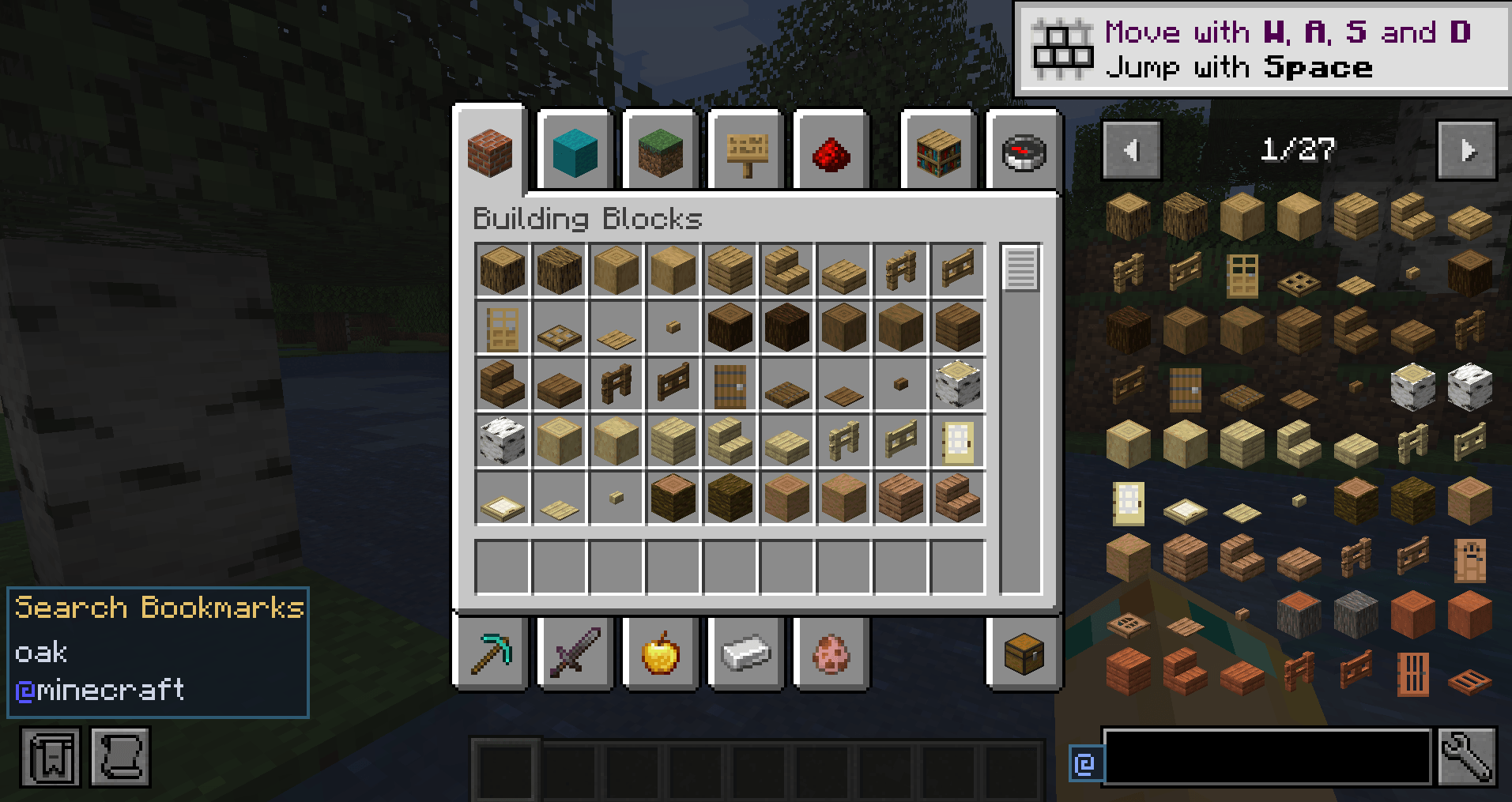
- Search-bar button — a small @ icon to the left of the recipe viewer’s search field.
- Popup — add the current search, apply a saved one, remove a single entry, or clear all.
- Search Bookmarks list — left of the item browser. Left-click applies the search and shows results; right-click removes it.
- Any search — not only @mod. Tag, tooltip, item-name, and compound queries all save. A config option can restrict bookmarks to @mod queries if you want the old behavior.
- Shared list — one file, config/morebookmarks-searches.json, used by EMI, JEI, and REI. An existing config/emi-mod-bookmarks.json is migrated once.
- Options — toggle the button, left panel, any-search vs @-only, panel rows, and Clear all. Fabric: Mod Menu. NeoForge: Mods list. Needs Cloth Config.
- REI favorites — saved searches can also appear as a REI favorite-entry type; click applies the query.
- Extra EMI screens — EMI overlay and bookmarks also attach to container/terminal screens EMI would otherwise skip (empty-slot containers and well-known AE2 / Ars Nouveau / Create-style packages). JEI and REI already overlay those screens.
How to use
- Open inventory, a chest, a crafting table, or a terminal.
- Type a search in EMI, JEI, or REI (iron, #logs, $tooltip, @mekanism, …).
- Click the @ button → Add current search as bookmark.
- Click a row under Search Bookmarks (or in the popup) to restore that query and filter the index.
- Remove an entry with the popup x, or by right-clicking it on the left list.
If a bookmarked mod is not installed, the bookmark stays; the viewer just returns no hits.
Install
Client-only. No server install. Java 21. Pick the jar that matches your loader:
- more-bookmarks-1.0.1.jar — Fabric (Quilt works if Fabric API is present). Requires Minecraft 1.21.1 and Fabric API.
- more-bookmarks-neoforge-1.0.1.jar — NeoForge. Requires Minecraft 1.21.1 and NeoForge.
Recipe viewer (optional, pick any combination): EMI, JEI, and/or REI. You need at least one of these for bookmarks to appear. None is required to launch the game.
Options screen (optional): Cloth Config. On Fabric, also install Mod Menu to open it from the mods list. Without Cloth Config, defaults apply and you can still edit the JSON files in config/.
Links
常见问题
More Bookmarks | JEI/EMI/REI addon 支持哪些 Minecraft 版本?
More Bookmarks | JEI/EMI/REI addon 支持 Minecraft Java 版 1.21.1,可用的加载器:Fabric / NeoForge。下载时注意选择和你游戏版本一致的文件。
More Bookmarks | JEI/EMI/REI addon 怎么安装?
先用 PCL2 或 HMCL 启动器安装对应版本的 Fabric / NeoForge,再把下载的 .jar 文件放进游戏目录的 mods 文件夹,重新启动游戏即可。开启了版本隔离的,mods 文件夹在 versions/版本名 下面。
Azturax 的其他作品
查看全部 →
Amplified Ore Generation
这个数据包强化了原版矿石生成,让矿石更加丰富,同时保留原版 Minecraft 的玩法和世界特色。

Autumn Birch
为白桦树增添秋叶。 带来恰到好处的季节氛围!

Nature’s Carpet
让你的草地多一分自然气息!

Nature’s Carpet: Twigs ‘n’ Leaves
Nature's Carpet: Twigs & Leaves 为森林地面增添生机,在草地纹理上添加散落的树枝和树叶,营造自然质朴的氛围。
评论
登录后评论和评分