Nvncncnccncnn
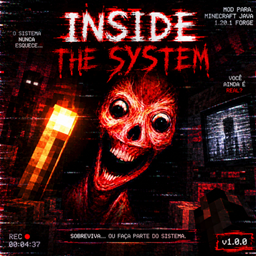
Psychological horror mod that distorts reality, corrupts visuals, and reveals hidden darkness
介绍
# INSIDE — The Hollow Reality
⚠️ **WARNING: Reality is not what it seems.**
—
## 📖 About
This is not just a mod. It is a corruption seeping into your world.
Drawing inspiration from analog horror, VHS distortion, and psychological unease, **INSIDE** slowly twists your Minecraft experience — blurring the line between the game and something much darker.
The static grows louder. The familiar becomes uncanny. And sometimes… the world watches back.
## ✨ Features
📼 **VHS & Analog Horror Visuals**
– Glitch effects, color decay, and screen distortion that intensifies the deeper you go
– Flickering lights, corrupted textures, and “signal interference” that feels alive
👁️ **Psychological Horror**
– Subtle world changes — blocks shift, sounds repeat, paths disappear
– Unsettling ambient audio and distorted music that creeps in when you least expect
– No cheap jumpscares — just a slow, creeping dread that never fully leaves
🔧 **Designed for Java Edition**
– Optimized for single-player and multiplayer
– Compatible with most popular horror & atmosphere-enhancing add-ons
– Fully configurable — adjust intensity or disable any feature
## ⚠️ Important Notes
– Best experienced with headphones 🎧 — sound is half the horror
– Recommended for players who enjoy slow-burn, atmospheric terror
– Not suitable for those sensitive to flickering visuals, distorted audio, or unsettling themes
## 🤝 Feedback & Updates
This project is growing — new distortions, secrets, and mechanics are on the way.
Your experience matters: share your stories, report anomalies, and help shape what comes next.
—
> *”Don’t trust the si
lence. The static never truly fades.”*
常见问题
Nvncncnccncnn 支持哪些 Minecraft 版本?
Nvncncnccncnn 支持 Minecraft Java 版 1.20.1,可用的加载器:Forge。下载时注意选择和你游戏版本一致的文件。
Nvncncnccncnn 怎么安装?
先用 PCL2 或 HMCL 启动器安装对应版本的 Forge,再把下载的 .jar 文件放进游戏目录的 mods 文件夹,重新启动游戏即可。开启了版本隔离的,mods 文件夹在 versions/版本名 下面。
评论
登录后评论和评分