介绍
Overview
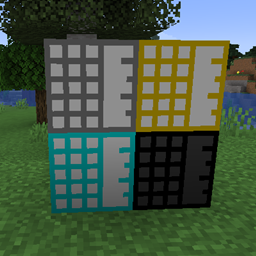
Welcome to the Crafticube Mod, your ultimate solution for managing complex crafting operations in Minecraft! The Crafticube is a unique block designed to simplify and streamline your crafting processes by providing temporary storage for both items and fluids.
Features
- Crafticubes: These specialized blocks come in different tiers, each offering a varying number of item slots and fluid tank sizes. Perfect for automation setups, Crafticubes are ideal for holding items and fluids temporarily during intricate crafting sequences.
- Fluid Management: Each Crafticube has four fluid tanks, allowing you to store and manage various fluids simultaneously. Piping in and out of these tanks is seamless, making fluid automation a breeze.
- Inventory Retention: When broken, Crafticubes can retain their contents, ensuring your precious items and fluids are not lost.
- No GUI Needed: Designed for automation, Crafticubes do not require a GUI, providing a more immersive and less intrusive experience. Easily check contents through integrated HUD mods like Jade or TOP. Using a Crafting Core on a Crafticube will also print out its contents in the chat.
Usage
- Crafting Crafticubes: Start by crafting a Crafting Core, then use it to create various tiers of Crafticubes, each tailored for different storage needs.
- Automation Ready: Integrate Crafticubes into your existing automation setups to enhance efficiency and streamline complex crafting operations.
Compatibility
The Crafticube Mod is designed to work seamlessly with other popular mods, enhancing your automation and crafting experience without conflicts.
Get Started
Download the Crafticube Mod today and revolutionize your crafting operations! For community support and the latest updates, visit our GitHub repository.
Installation
- Ensure you have the latest version of Forge installed.
- Download the Crafticube Mod from CurseForge.
- Place the downloaded file into your
modsfolder. - Launch Minecraft and enjoy the enhanced crafting experience!
Transform your crafting operations today with the Crafticube Mod, the ultimate solution for managing complex crafting tasks in Minecraft. Download now and start crafting smarter!
常见问题
Crafticube 支持哪些 Minecraft 版本?
Crafticube 支持 Minecraft Java 版 1.20.1–1.20.4,共 4 个版本,可用的加载器:Forge。下载时注意选择和你游戏版本一致的文件。
Crafticube 怎么安装?
先用 PCL2 或 HMCL 启动器安装对应版本的 Forge,再把下载的 .jar 文件放进游戏目录的 mods 文件夹,重新启动游戏即可。开启了版本隔离的,mods 文件夹在 versions/版本名 下面。

评论
登录后评论和评分