Padlocks&Auras
Protect your chests with PIN locks and remembered accesses, and customize your character with six cosmetic auras. Inspired by DeDsafio Minecraft by elDeD
介绍
Padlock & Auras
Protect your storage and give your character a unique look! Padlock & Auras combines PIN-protected containers with six cosmetic auras for Minecraft Java 1.20.1 on Forge.
Protect your belongings
Use a padlock on a supported container and choose a 1–4 digit PIN. Your password is sent privately to you in chat.
-
Remembered access: other players enter the correct PIN once to unlock future access to that padlock.
-
Owner keys: only the owner can remove a padlock with a key and recover it.
-
Fresh permissions: removing and replacing a padlock clears previously authorized guests.
-
Storage protection: locked containers resist breaking, explosions, piston movement and standard hopper or Forge inventory automation.
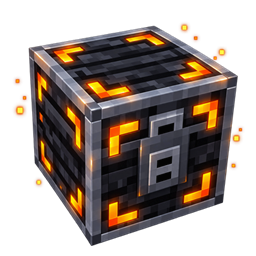
Supports vanilla single chests, double chests, trapped chests, barrels and shulker boxes. Locked chests receive a detailed black-and-orange metallic appearance with an animated lid. Removing the padlock restores their original appearance.
Six cosmetic auras
Choose from 67, Heart, Symphony, Matrix, Mystic Eye and Thunder.
Right-click an aura item to toggle its effect without consuming it. Combine multiple auras and use third-person view to see your character’s effects. Your equipped auras are remembered when you reconnect, change dimensions or respawn.
Items and crafting
Padlocks: craft five using five Phora Chips and four copper blocks:
C B C
B C B
C B C
C = Phora Chip · B = Copper Block
Reusable key: place a Phora Chip directly to the left of a copper ingot in the crafting grid.
Phora Chips and aura items have no crafting recipes. They are available in the mod’s creative tab or through /give commands, allowing map makers and server administrators to control their distribution.
Useful commands
-
/cya— Show help. -
/cya recetas— Unlock the padlock and key recipes in your recipe book. -
/cya auras off— Turn off all your auras. -
/cya unlock <x> <y> <z>— Remove a padlock administratively; requires operator permission level 2.
Requirements
-
Minecraft Java 1.20.1
-
Forge 47.4.28 or a later 47.x release
-
Java 17
-
Install on both the client and server for multiplayer.
No GeckoLib or other additional libraries are required.
English and Spanish translations are included. The mod uses standard Forge events and inventory interfaces; compatibility with every third-party mod or hybrid plugin server is not guaranteed.
Credits & acknowledgments
Author: JorFerLam
Special thanks to fulanito.
Inspired by DeDsafio Minecraft 4 by elDeD. This is an independent fan project.
Full resource credits and license notices are included in the mod.
Not an official Minecraft product. Not approved by or associated with Mojang or Microsoft.
常见问题
Padlocks&Auras 支持哪些 Minecraft 版本?
Padlocks&Auras 支持 Minecraft Java 版 1.20.1–1.21.1,共 2 个版本,可用的加载器:Fabric / Forge。下载时注意选择和你游戏版本一致的文件。
Padlocks&Auras 怎么安装?
先用 PCL2 或 HMCL 启动器安装对应版本的 Fabric / Forge,再把下载的 .jar 文件放进游戏目录的 mods 文件夹,重新启动游戏即可。开启了版本隔离的,mods 文件夹在 versions/版本名 下面。
评论
登录后评论和评分