
介绍
🟩 Full Description
Disclaimer
The characters featured in this mod are the property of Acquire Corp. and its related companies.
Please use this mod with an understanding of these rights.
If requested by the rights holders or related organizations, this mod will be removed.
The author is not responsible for any loss or damage caused by unauthorized redistribution of this mod.
Dependency
This mod requires GeckoLib.
Note: This product is not compatible with previous versions of trees or “Yorishokunin” (a type of craftsman). When using a multiplayer server, please plant and use newly created trees.
We apologize for the inconvenience, but please delete your old world and create a new one.
Due to ongoing changes and restructuring, these issues will be resolved as part of the migration to version 26.1.1 for both the Blue Student mod and the Tree of Yorishiro mod.
🟩 About This Mod
This mod adds a special item called Yorishiro Stone, which generates naturally on the surface.
Using this stone as a core material, you can craft various items that summon different types of Yorishiro.
(Screenshots x2 here)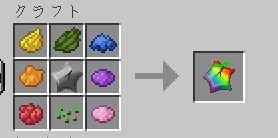
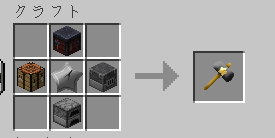
🟩 Current Yorishiro Features
🌳 Yorishiro Tree
The Yorishiro Tree allows you to raise five small characters called Chibishiro and send them on adventures.
- Chibishiro return after a certain amount of time
- They bring back rewards from their adventures
- The rewards depend on their trained stats
(Screenshot here)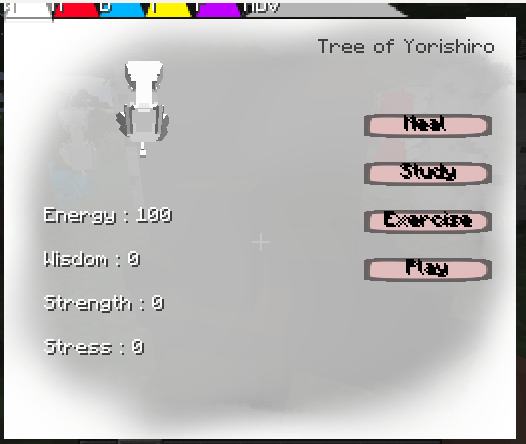
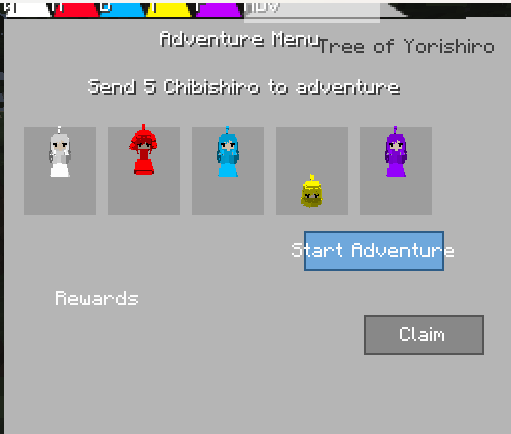
🔨 Yorisyokunin
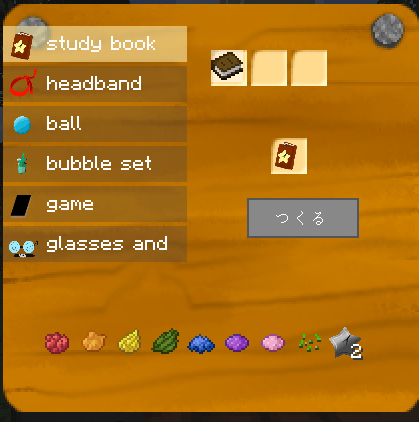
The Yorisyokunin is a Yorishiro that crafts items used for raising Chibishiro.
- Place the required materials into the three slots in the top-right of the menu
- Press “Craft” to create items
常见问题
TreeOfYorishiro 支持哪些 Minecraft 版本?
TreeOfYorishiro 支持 Minecraft Java 版 1.20.1–26.1.2,共 2 个版本,可用的加载器:Fabric / NeoForge。下载时注意选择和你游戏版本一致的文件。
TreeOfYorishiro 怎么安装?
先用 PCL2 或 HMCL 启动器安装对应版本的 Fabric / NeoForge,再把下载的 .jar 文件放进游戏目录的 mods 文件夹,重新启动游戏即可。开启了版本隔离的,mods 文件夹在 versions/版本名 下面。
LichtMeilleur 的其他作品
查看全部 →
Blue Student
This mod adds students from Blue Archive as friendly companion mobs.
The End Of Dragon
The Ender Dragon is not the end...

Polluted World
A Metro-inspired survival mod where the surface world is heavily polluted. Without a gas mask and filter, you'll take damage while exploring. The mod also adds several underground and surface structures to discover.
Resurrection Ark
Register and resurrect your owned mobs by paying 32 emeralds using a special block.
评论
登录后评论和评分