Cobblemon Incubator
A Cobblemon and Cobbreeding addon that adds a Egg Incubator with faster hatching, advanced filters, PC delivery, and Pasture automation.
截图

介绍

Turn Pokemon breeding into a polished, visual, and automatable workflow.
Cobblemon Incubator is an addon for Cobblemon and Cobbreeding that adds a
dedicated Egg Incubator machine. Insert an egg to incubate it faster, inspect its
breeding information, configure advanced filters, or connect the machine to a
Pasture and storage system for full automation.
A Complete Egg Incubation Machine
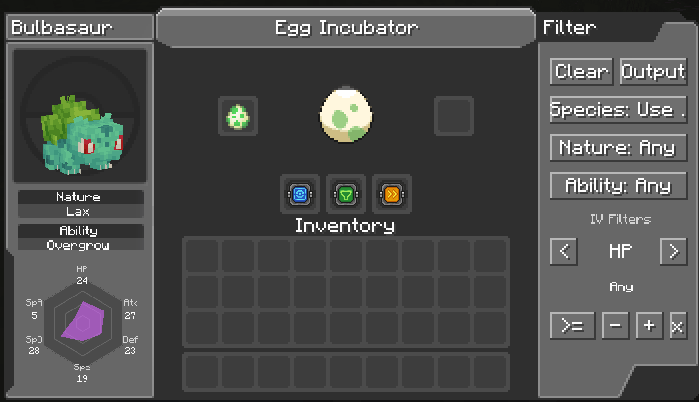
The Egg Incubator provides a custom interface inspired by Cobblemon’s PC screens.
While an egg is inside, the interface displays:
- The Pokemon’s 3D model
- Species
- Nature
- Ability
- All six IVs in a visual radar chart
- An animated egg showing incubation progress
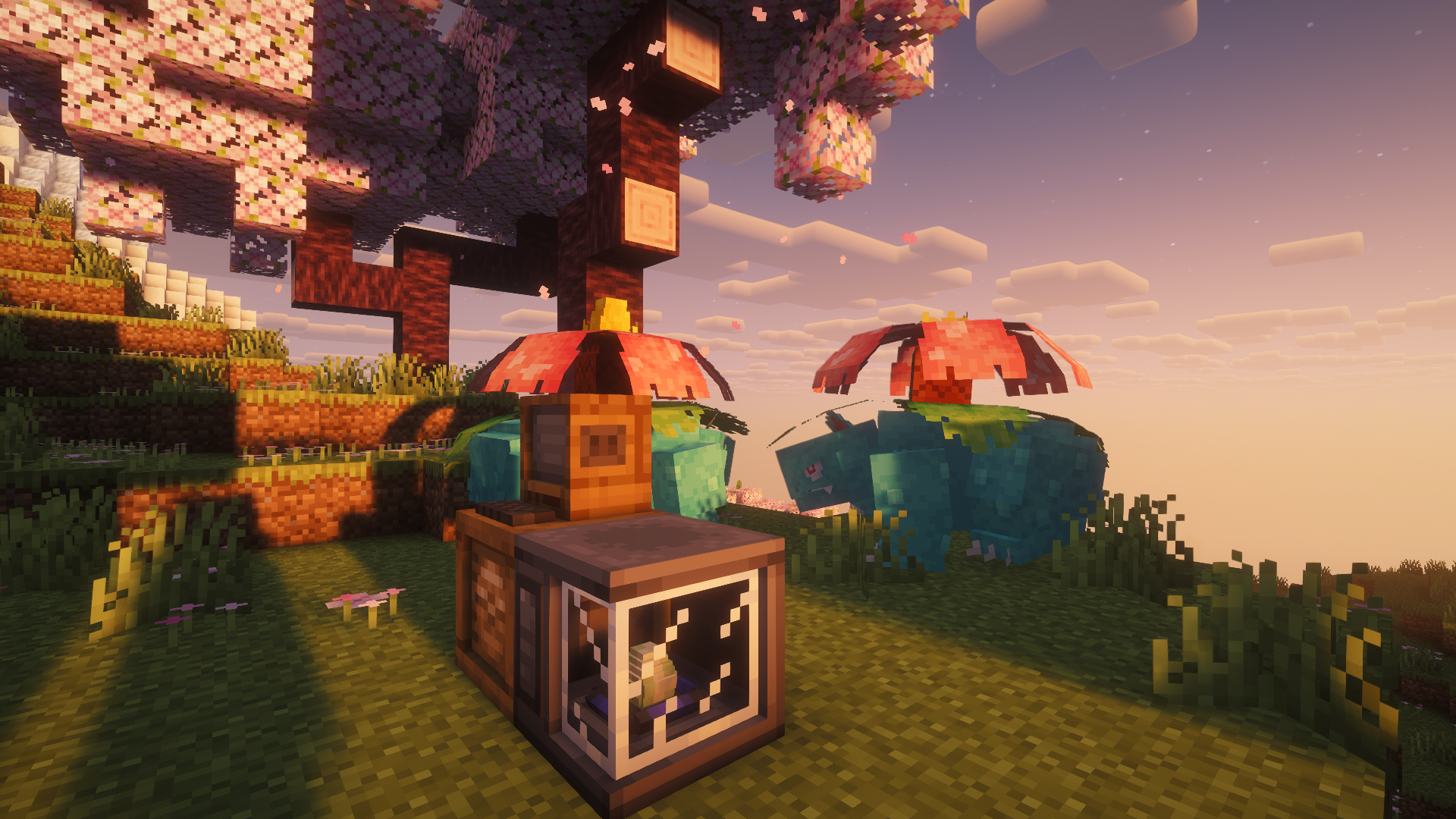
The block also changes visually when it contains an egg and lights up while its
interface is open.
Faster Incubation
Eggs incubate at 5x speed by default. Add a Speed Upgrade to reach **10x
speed** with the default configuration.
Server owners can customize both the base speed and the Speed Upgrade multiplier
in:
config/cobblemon_incubator.jsonThree Powerful Upgrades
Speed Upgrade
Multiplies the machine’s incubation speed, allowing eggs to finish much faster.
PC Upgrade
Right-click while holding the upgrade to bind it to your player. Once installed,
hatched Pokemon are sent directly to your PC.
The link uses your UUID, so changing your Minecraft name will not break it. When
a Pokemon is delivered, you receive a chat notification. Hover over the Pokemon’s
name to view its Nature, Ability, and IVs.
If you are offline or your PC is full, the egg safely falls back to the machine’s
output slot.
Filter Upgrade
Build precise breeding rules without requiring every field:
- Search and select a species
- Search and select a Nature
- Select an Ability
- Filter every IV using
>=,<=, or= - Choose any IV value from 0 to 31
After selecting a species, the Ability selector only shows abilities that species
can actually have, including hidden abilities.
Rejected eggs can either be moved to the output slot or deleted, depending on
your chosen action.
Pasture and Storage Automation
Place the Incubator directly against a compatible Pasture and it will
automatically collect available eggs whenever its input is empty.
Place a chest or another compatible inventory against the machine and completed
output eggs will be inserted automatically. Input and output automation works on
all six faces and respects sided inventory rules.
This enables complete production lines:
Pasture -> Egg Incubator -> ChestAdditional Features
- Three upgrade slots
- Dedicated creative-mode tab
- Searchable filter selectors
- Empty and occupied block models
- Active machine texture while in use
- Transparent glass rendering
- Directional placement
- Custom upgrade textures and tooltips
- English and Brazilian Portuguese translations
- Fabric and NeoForge support
Requirements
- Cobblemon
- Cobbreeding
- Architectury API
Fabric installations also require:
- Fabric API
- Fabric Language Kotlin
NeoForge installations also require:
- Kotlin for Forge
Compatibility
Supported loaders:
- Fabric
- NeoForge
Cobblemon Incubator must be installed on both the server and client.
Configurable Server Settings
Cobblemon Incubator includes a server-side JSON config that lets modpack makers customize how much control and information the Egg Incubator provides.
Configurable options include:
- Which egg data is shown in the incubator UI: Pokemon model, species, Nature, Ability, and IVs.
- Which upgrades are enabled: Speed Upgrade, PC Upgrade, and Filter Upgrade.
- Which filter types are available: species, Nature, Ability, IVs, reject action, and egg deletion.
- Whether the incubator can automatically pull eggs from adjacent Pastures.
- Whether the incubator can automatically push finished eggs into adjacent inventories.
- Base incubation speed and Speed Upgrade multiplier.
Gameplay rules are enforced server-side, and the incubator UI syncs with the server config so players only see the options available on that server.
{
  "baseSpeed": 5,
  "speedUpgradeMultiplier": 2.0,
  "display": {
    "pokemonModel": true,
    "species": true,
    "nature": true,
    "ability": true,
    "ivs": true
  },
  "upgrades": {
    "speed": true,
    "pc": true,
    "filter": true
  },
  "filters": {
    "species": true,
    "nature": true,
    "ability": true,
    "ivs": true,
    "rejectAction": true,
    "deleteRejectedEggs": true
  },
  "automation": {
    "autoInputFromPastures": true,
    "autoOutputToInventories": true
  }
}
Restart the game or server after editing the configuration.
常见问题
Cobblemon Incubator 支持哪些 Minecraft 版本?
Cobblemon Incubator 支持 Minecraft Java 版 1.21.1,可用的加载器:Fabric / NeoForge。下载时注意选择和你游戏版本一致的文件。
Cobblemon Incubator 怎么安装?
先用 PCL2 或 HMCL 启动器安装对应版本的 Fabric / NeoForge,再把下载的 .jar 文件放进游戏目录的 mods 文件夹,重新启动游戏即可。开启了版本隔离的,mods 文件夹在 versions/版本名 下面。运行环境:客户端和服务端都要装。
NBP 的其他作品
查看全部 →
Cobblemon Smartphone
一部集成 Cobblemon 的智能手机,提供便捷的便携功能,例如治疗队伍、打开电脑和末影箱。
Cobblemon KubeJS
Cobblemon KubeJS exposes Cobblemon data and events to KubeJS scripts.

Cobblemon Unique Legends
Unique Legends is a server-side Cobblemon addon that makes legendary, mythical, and Ultra Beast Pokémon truly unique per server. Everything configurable without requiring players to install the mod client-side.

Cobblemon Trainer Prestige
Unlock, equip, and show prestige titles in Cobblemon with a /prestige GUI, rarity tiers, auto-equip, title locking, and special titles for legendary, mythical, and Ultra Beast Pokemon.
评论
登录后评论和评分