介绍
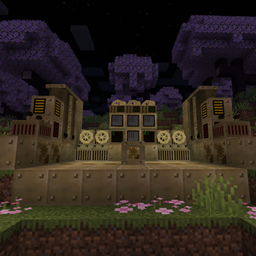
EFab – Unofficial is a modernized rewrite of McJty’s EFab mod for newer Minecraft versions. It is based on the original EFab concept: a steampunk-styled, JSON-driven crafting system intended primarily for expert-style modpacks.
This is an unofficial project. It is not affiliated with, endorsed by, or maintained by McJty. This project only rewrites EFab under the terms of the original MIT license.
If you have problems, bug reports, feature requests, or questions about this unofficial rewrite, please use this project’s GitHub issue tracker. Do not contact or bother the original author about this project.
What is EFab?
EFab is designed as a configurable crafting framework rather than a standalone content mod. On its own, it is intentionally limited. It becomes useful when a modpack defines custom EFab recipes and uses the machine structure to gate progression behind steam, liquids, gearboxes, processors, energy, upgrades, and other mechanics.
The modern rewrite keeps the core idea:
- JSON-based EFab recipes(datapack)
- JEI recipe display and transfer support
- Manual crafting with the EFab Grid
- Primitive automatic crafting with the Crafter
- Steam, fluid, gearbox, processor, FE, and upgrade-based requirements
- Monitor blocks for nearby crafting status
- API support for custom recipe requirements from other mods
Note: the original mod used the RF term for energy. This modern rewrite uses FE terminology.
Credit and Original Project
Original mod: EFab by McJty
Full credit for the original EFab concept, name, gameplay design, and original texture assets belongs to McJty and the original EFab project. This project is an unofficial continuation/rewrite made for newer Minecraft versions.
The original EFab project is released under the MIT license on both CurseForge and GitHub. This project follows the original MIT license and preserves the MIT license notice.
How This Project Differs From the Original
EFab – Unofficial is not a direct maintenance release from the original author. It differs from the original EFab project in the following ways:
- Updated for newer Minecraft, NeoForge, and modern modding dependencies.
- Rewritten and modernized codebase rather than a direct original-author update.
- Uses FE terminology for energy instead of the older RF terminology used by the original mod.
- Reimplements EFab gameplay features for compatibility with modern Minecraft versions.
- Compatible with CraftTweaker and KubeJS.
- Maintained separately by a different author, with separate bug reports, feature requests, and releases.
Textures and Assets
All textures currently used by this project come from the original EFab version.
If any artist would like to help redraw or replace the textures, please submit the work directly through a GitHub pull request. Before submitting, make sure the textures are entirely your own original work and that you are willing to release them under the MIT license.
Please do not submit textures derived from non-free, proprietary, or otherwise incompatible sources.
License
This project preserves the original MIT license notice from EFab.
The project remains under the MIT license. You may use this mod in any modpack.
Maintenance Notice
This modern rewrite used a significant amount of artificial intelligence assistance during the code rewrite process.
I currently do not have much time to maintain this mod. Bug reports and pull requests are welcome, but response times may be limited.
If another author is willing to take over long-term maintenance or continue the project, please also publish the continued work under the MIT license so the project remains open and compatible with the original EFab licensing.
Wiki: Github Readme
常见问题
EFab – Unofficial 支持哪些 Minecraft 版本?
EFab – Unofficial 支持 Minecraft Java 版 1.21.1,可用的加载器:NeoForge。下载时注意选择和你游戏版本一致的文件。
EFab – Unofficial 怎么安装?
先用 PCL2 或 HMCL 启动器安装对应版本的 NeoForge,再把下载的 .jar 文件放进游戏目录的 mods 文件夹,重新启动游戏即可。开启了版本隔离的,mods 文件夹在 versions/版本名 下面。
lyxccc_ 的其他作品
查看全部 →
Fantasy Pattern
Turn any JEI recipe into a single Fantasy Pattern and let your ME network craft it instantly — materials in, products out, no machines required.
ResearchTable – Unofficial
Allows pack maker to create research-based tech tree

Jrrp – Daily Luck
A lightweight NeoForge mod that adds /jrrp, a fun daily luck command for Minecraft servers. Players receive a daily 0-100 luck value with configurable messages, placeholders, localized config UI, and optional server commands based on luck ranges.

EFab-Create
Added compatibility with Create for EFab - Unofficial
评论
登录后评论和评分