
BetterCopycats
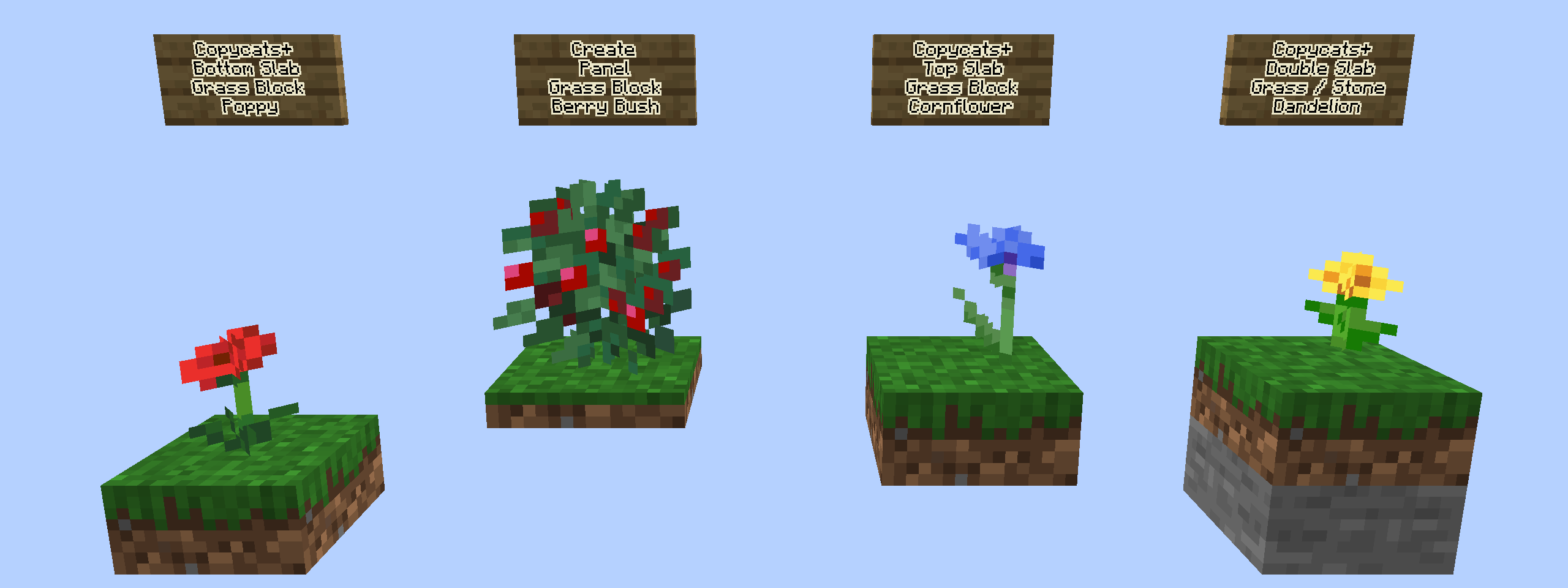
Lets flowers and other plants be placed on copycat blocks and slabs, including half a block lower on bottom slabs.
截图
介绍
BetterCopycats
Plant flowers on your copycat builds.
Create’s copycat blocks take on the look of whatever block you put in them, but plants never treated them that way. A copycat wearing a moss or grass skin is still a copycat as far as the game is concerned, so flowers, grass and bushes refuse to stand on it. BetterCopycats changes that: a plant can be placed on a copycat whenever the skin it is wearing could normally hold that plant.
It works with Create’s own copycats and with every copycat from Create: Copycats+.
What it does
- Plants on copycats. Flowers, grass, ferns, bushes and tall plants go on any copycat whose skin could hold them, like moss, grass or dirt. A copycat wearing stone still refuses them, the same as stone does in vanilla.
- Slabs look at the half you can see. On a Copycats+ double slab the top half counts, and on a single top slab its own skin counts. Stone below with moss on top takes flowers, moss below with stone on top does not.
- Half a block lower on bottom slabs. A plant on a bottom slab sits half a block lower so it stands on the slab instead of floating above it. The hitbox moves down with it, and you can target it from the side.
- Skin changes are handled. If you change the skin underneath to something that cannot hold the plant, the plant breaks and drops.
- Maps show the skin. Xaero’s Minimap and World Map show the skin of a copycat instead of the plain copycat color, so a moss-skinned roof shows up green on the map.
How it works in practice
| Copycat | Plant |
|---|---|
| Block wearing moss, grass or dirt | Can be placed |
| Block wearing stone | Cannot be placed |
| Double slab, stone below and moss on top | Can be placed |
| Double slab, moss below and stone on top | Cannot be placed |
| Bottom slab wearing moss | Can be placed, half a block lower |
| Top slab wearing moss | Can be placed |
Requirements
- Minecraft 1.21.1 with NeoForge 21.1 or newer
- Create 6.0.8 or newer
- Create: Copycats+ is optional. Without it only the copycats from Create itself are supported, and there are no slabs.
Install it on both the server and the client.
Config
The config file is config/bettercopycats-common.toml.
| Option | Default | What it does |
|---|---|---|
lowerPlantsOnBottomSlabs |
true |
Place plants half a block lower on bottom slabs. When off, plants cannot be placed on bottom slabs at all |
allowSaplings |
false |
Allow saplings on copycats. Growing trees replace the block below with dirt, which would destroy the copycat |
allowCrops |
false |
Allow crops, stems and nether wart on copycats. They grow at the slowest rate because the block below is not farmland |
plantBlacklist |
[] |
Block ids of plants that can never be placed on copycats |
mapSupport |
true |
Show copycat skins on the Xaero’s maps (client side) |
Compatibility
- Tested with Sodium and Flywheel, and on a dedicated server with two players.
- The Xaero’s support is written against Xaero’s Minimap 26.6.0 and World Map 1.47.0. It hooks internal methods of those mods, so an update to Xaero’s can stop it from working until BetterCopycats is updated.
- Maps pick up the new colors when Xaero’s re-reads a chunk, so areas you already mapped may take a while to change. Regions rebuilt from the world save are not covered.
Known limitations
- Plants that have a collision shape, like pitcher crops and lily pads, are not lowered.
- Mushrooms are not supported.
- The hitbox of a lowered two-block-tall plant is the vanilla full block shape moved down, so it is larger than the plant you see.
License
GPL-3.0-only.
常见问题
BetterCopycats 支持哪些 Minecraft 版本?
BetterCopycats 支持 Minecraft Java 版 1.18.2–1.21.1,共 4 个版本,可用的加载器:Fabric / Forge / NeoForge。下载时注意选择和你游戏版本一致的文件。
BetterCopycats 怎么安装?
先用 PCL2 或 HMCL 启动器安装对应版本的 Fabric / Forge / NeoForge,再把下载的 .jar 文件放进游戏目录的 mods 文件夹,重新启动游戏即可。开启了版本隔离的,mods 文件夹在 versions/版本名 下面。
YeahAkis 的其他作品
查看全部 →
Orpheus by Olympus
Precise control over vanilla Minecraft music: per-situation track lists, frequency, weights, playback keys and presets.

Proteus by Olympus
The UI library behind Olympus mods: a Modern or Classic look, an accent color and better toasts, shared by every mod that uses it.
评论
登录后评论和评分