介绍
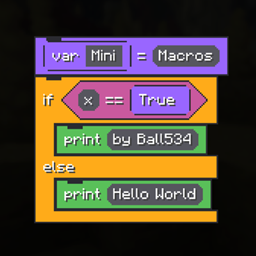
Mini Macros lets you build client-side macros out of drag-and-drop blocks and bind them to a key. No scripting language, no config files to hand-edit.
A macro is a set of block stacks on a canvas. Blocks in one stack run top to bottom; stacks side by side run at the same time and share their variables, so one can hold a key while another watches and types into chat.
How to use it
- Open the editor from Mods → Mini Macros → Config, or bind a key to Open Mini Macros under Options → Controls.
- Drag blocks from the store on the right onto the canvas. They snap above and below each other; dropped in open space they start a new stack.
- Ovals and hexagons drop into the matching holes. Right-click a block to duplicate it and everything below it; drag one back onto the store to delete it.
- Give the macro a name and a key, then Save. Press the key in-game to run it, press it again to restart it.
- Right Shift stops every running macro. Rebindable under Options → Controls.
Timing is in game ticks — 20 ticks is one second. Macros are saved to config/mini-macros/macros.json, and a single one can be copied to and from the clipboard with Ctrl+C / Ctrl+V in the editor.
Blocks
| Input | buttonDown w buttonUp w lookX 90 degrees over 20 ticks lookY -30 degrees over 10 ticks echo helloKeys are named like w, space, f3, shift, esc, mouse1. |
| Control | sleep 20 ticks loop 10 while if / else |
| Messages | print hello actionbar hello — client-side only, nothing is sent to the server. |
| Variables | i = 0 var i True False None${i} inside any text is replaced with the value. |
| Operators | + - * / % ** |
| Comparators | > < == >= <= != and or |
License
Copyright © 2026 Ball534. Mini Macros is free software under version 3 of the GNU General Public License — you may redistribute and modify it under those terms, and any copy you pass on must come with its source under the same license. Distributed with no warranty.
常见问题
Mini Macros 支持哪些 Minecraft 版本?
Mini Macros 支持 Minecraft Java 版 26.2–26.3,共 2 个版本,可用的加载器:Fabric。下载时注意选择和你游戏版本一致的文件。
Mini Macros 怎么安装?
先用 PCL2 或 HMCL 启动器安装对应版本的 Fabric,再把下载的 .jar 文件放进游戏目录的 mods 文件夹,重新启动游戏即可。开启了版本隔离的,mods 文件夹在 versions/版本名 下面。
BalI534 的其他作品
查看全部 →
Talking Villagers
一款服务端 Fabric 模组,为 Minecraft 村民赋予姓名、个性、家庭和政治关系;还能用自己的话与他们交谈,聊天由你自行运行的语言模型驱动。
simulatedadditions
Add-on for Create: Aeronautics that adds some features that I feel were missing

Save Our Dimensions
A server-side Fabric mod that snapshots and restores a single dimension's saved data while the server is running

Ball’s Hud Studio
A client side mod that adds editable GUI elements
评论
登录后评论和评分