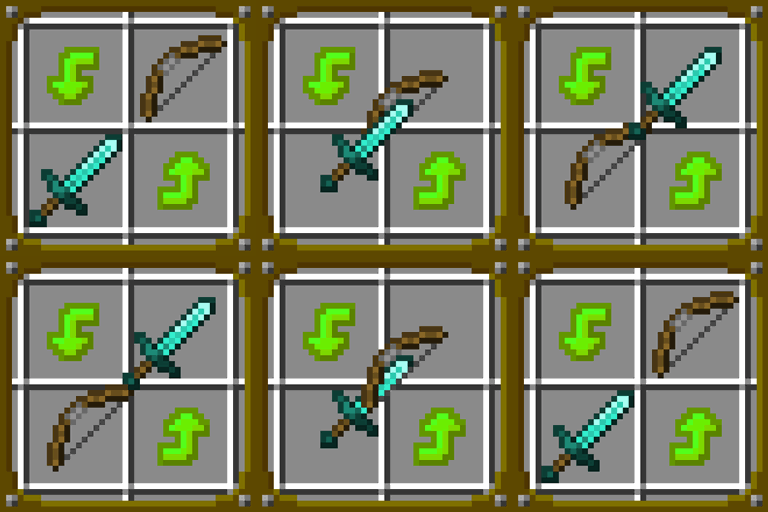
Quick Draw
Allows swapping items between main hand and user-defined fast access slots on the go.
介绍


Hotbar slots are not enough? Tired of opening inventory each time? Quick Draw is the solution!
Build, mine, fight with ease!
How to use:
> Set a sutiable hotkey for quick draw menu in hotkey settings (TAB by default).
> Define fast access slots in your inventory.
(Ctrl + Shift + Click – adds a slot, Ctrl + Shift + Alt + Click – removes a slot)
> Hold the quick draw menu hotkey to open the menu and hover over an item you want to switch your main hand item with.
> Release the quick draw menu hotkey and items will be switched (Just release the hotkey, do not click!)
FAQ:
Can i use this mod in a modpack?
> You can use this mod in any modpack.
Will you downgrade the mod to previous mc versions?
> Most likely i will downgrade it to 1.20.1
Will you port to other modloaders?
> Most likely i will port to Fabric
And just in case: Will this mod be clientside only?
> No, vanilla minecraft doesn’t provide tools to make this mod clientside only.
Config
> You can toggle whether fast access slots should always be rendered or only when ctrl+shift is held.
> You can set the color of fast access slots.
> You can set the color of selected/unselected sections in quick draw menu.


常见问题
Quick Draw 支持哪些 Minecraft 版本?
Quick Draw 支持 Minecraft Java 版 1.21,可用的加载器:NeoForge。下载时注意选择和你游戏版本一致的文件。
Quick Draw 怎么安装?
先用 PCL2 或 HMCL 启动器安装对应版本的 NeoForge,再把下载的 .jar 文件放进游戏目录的 mods 文件夹,重新启动游戏即可。开启了版本隔离的,mods 文件夹在 versions/版本名 下面。
FINDERFEED 的其他作品
查看全部 →
FDLib
我的模组实用工具合集
Qliphoth Awakening
新增多个拥有独特攻击方式和机制的 Boss。
Cinematic Cataclysm
为部分 L_Ender's Cataclysm Boss 添加开场过场动画。
Raids:Enhanced
在袭击中加入多个迷你 Boss
评论
登录后评论和评分