
ChunkWalker – The Chunk Loader
Keeps chunks loaded and simulating via an NPC that replays your recorded movement and actions.
截图
介绍
ChunkWalker
Record real player behavior and have an NPC replay it exactly — including chunk loading.
https://www.youtube.com/watch?v=BhB2M757Iis
What does this mod do?
ChunkWalker adds a controllable character to the game that does exactly what you showed it beforehand: walking, looking around, sneaking, swinging its arm, holding up a shield, flipping levers, opening doors — all through recording instead of manual configuration. On top of that, it permanently keeps the chunks around it loaded and simulating, whether or not a player is nearby.
No scripting, no datapack fiddling: pick up the tool, start recording, do whatever you want, stop the recording, assign it to the character — done.
Core Features
🎥 Record it, don’t program it
The recording tool captures every server tick: exact position and look direction, sneaking, arm swinging, held right-click (shield blocking, drawing a bow, …), item switches in hand, and right-click interactions with levers, buttons, doors, trapdoors, and fence gates. After stopping, a small name field pops up immediately — no command needed.
🚶 Faithful playback
The character replays the recording tick-for-tick and is collision-aware — if you later place a block in its path, it won’t walk through it. Optional loop playback.
🧙 Custom appearance
The character wears the actual Minecraft skin of any player and can be equipped with armor and items in both hands.
🗺️ Chunk loading
The actual namesake feature: the character keeps chunks in a configurable radius (0–6 chunks) permanently loaded and simulating via a ticket system.
🌐 Per-player language
Each player can choose, via /chunkwalker language <en|de>, which language they see ChunkWalker messages and the menu in — independent of their overall Minecraft client language. English and German are available.
🖱️ Control your way
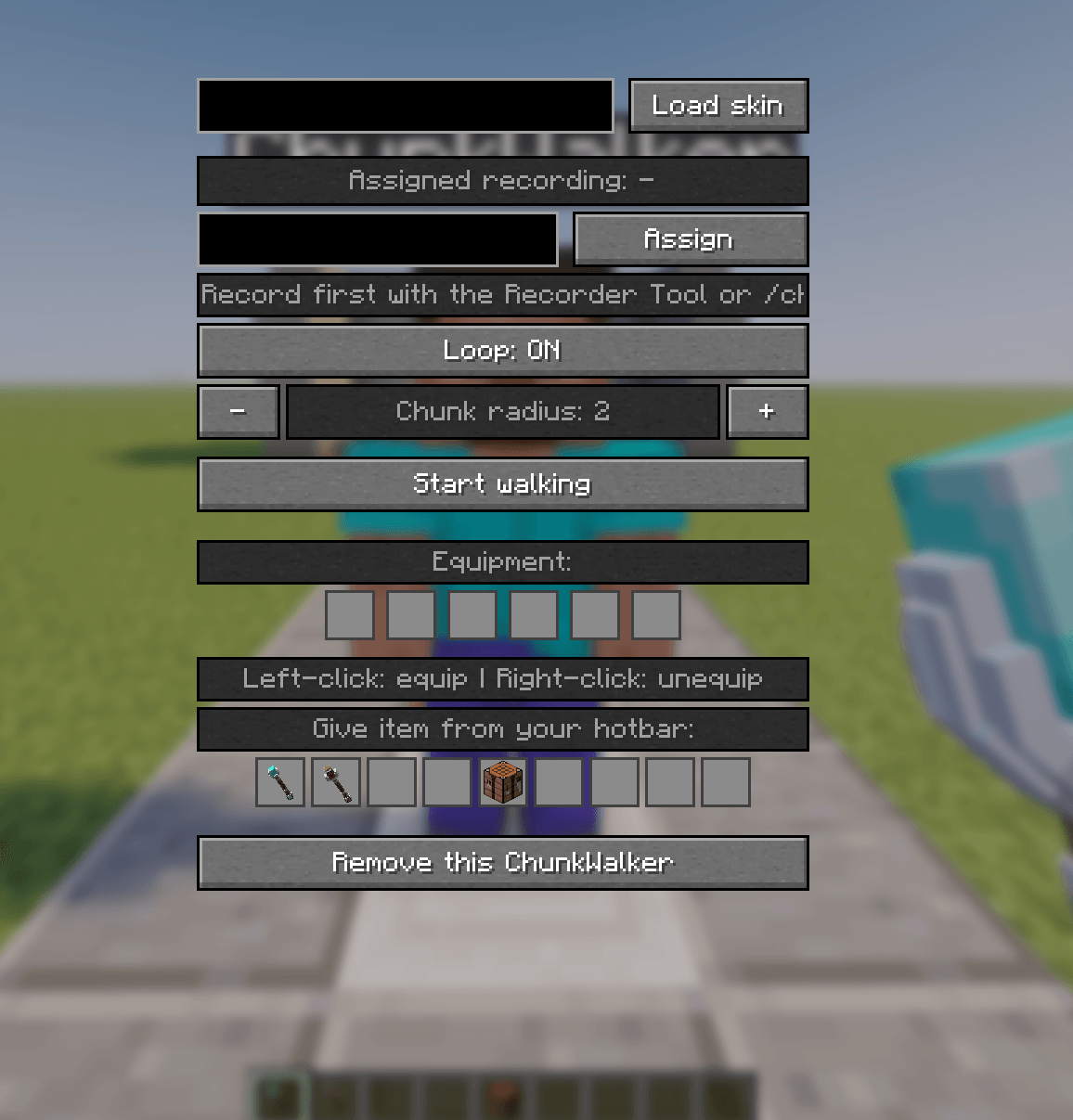
Everything is accessible both through a graphical menu (right-click with the wand) and through chat commands (/chunkwalker …).
⚙️ Configuration (for server owners)
config/chunkwalker.json is created automatically on first start:
json
{
  "defaultLanguage": "en",
  "maxWalkersPerPlayer": -1
}maxWalkersPerPlayer— how many ChunkWalkers a single player may own at once (server-wide, across all dimensions). -1 = unlimited (default).defaultLanguage— the language players get before they’ve made their own choice via /chunkwalker language. Defaults to English (en), can be set to de for predominantly German-speaking communities.
The two tools
| Tool | Purpose |
|---|---|
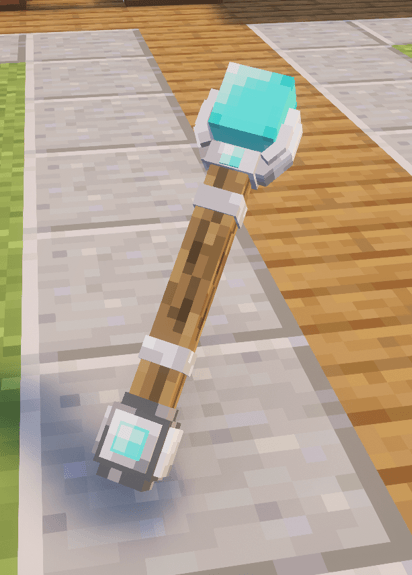
| ChunkWalker Wand | Spawns new characters and opens their configuration menu |
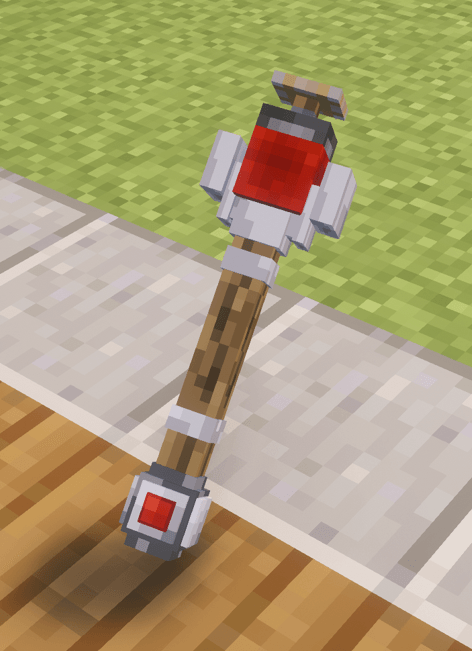
| Recording Tool | Starts/stops recording your own movements |
Both craftable, with custom-made 3D models.
Quick start
- Craft the recording tool, right-click to start recording
- Walk around, perform actions
- Right-click again → name field appears → enter a name, done
- Craft the ChunkWalker wand, right-click a block to spawn a new character
- Right-click the character to open its menu → assign a recording → load a skin (optional) → start walking
Usefull commands:
- /chunkwalker language <en|de> – choose your own ChunkWalker language
- /chunkwalker record start – start your own recording
- /chunkwalker record stop <name> – save the recording
- /chunkwalker record cancel – discard the recording
- /chunkwalker record list – list saved recordings
- /chunkwalker record delete <name> – delete a recording
- /chunkwalker record assign <target> <name> – assign a recording to a character
Crafting
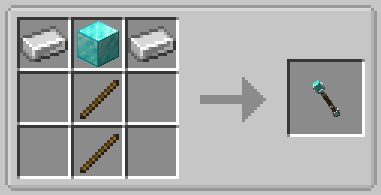
- ChunkWalker Wand — 2× iron ingot, 1× diamond block, 2× stick
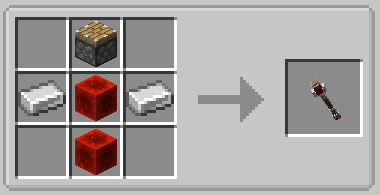
- Recording Tool — 1× piston, 2× redstone block, 2× iron ingot
Usable by every player
ChunkWalker is available to all players by default, not just operators — spawning, recording, configuring, all freely accessible. Server owners who want to limit the number of walkers per player can use maxWalkersPerPlayer in the config (see above).
Requirements
- Minecraft 26.2
- Fabric Loader + Fabric API
常见问题
ChunkWalker – The Chunk Loader 支持哪些 Minecraft 版本?
ChunkWalker – The Chunk Loader 支持 Minecraft Java 版 26.2–26.3,共 2 个版本,可用的加载器:Fabric / NeoForge。下载时注意选择和你游戏版本一致的文件。
ChunkWalker – The Chunk Loader 怎么安装?
先用 PCL2 或 HMCL 启动器安装对应版本的 Fabric / NeoForge,再把下载的 .jar 文件放进游戏目录的 mods 文件夹,重新启动游戏即可。开启了版本隔离的,mods 文件夹在 versions/版本名 下面。
评论
登录后评论和评分