介绍
中文介绍正在准备中,下面暂时显示原文。
Dependencies:
Requires you to install https://modrinth.com/mod/mysql-driver/version/9.1.0
Commands:
- /balance [player]: shows your balance if no player given, if not shows their balance
- /balancetop [page]: shows the leaderboard of balances
- /balancegive <player> <amount>: admin command, requires OP
- /pay <player> <amount>: transfers money
Config.json
/config/barrelshops/config.json
{
  "db-url": "jdbc:mysql://HOST:PORT/DB_NAME",
  "db-user": "USER",
  "db-password": "PASSWORD",
  "c1": "The balance a new player starts with",
  "onboarding-balance": 10,
  "c2": "Passive income over time, every X minutes a player gets $Y",
  "passive-income-interval-minutes": 30,
  "c3": "Set to -1 to disable passive income",
  "passive-income-amount": 5
}
You need to run the mod once, and set up the MySQL credentials, then start again the server.
Shop creation (Support with NBT: Enchantments, etc)
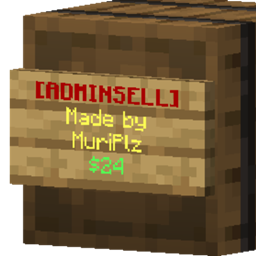
- Place a barrel
- Put inside the item you want to buy/sell, and the amount too, for example 15 apples.
- put a sign on any side of the barrel
- put in the first line [BUY], [SELL], [ADMINBUY] or [ADMINSELL] (admin shops require OP to set up or destroy)
- put in the last line (4th) the price, for example 124
- Done! the sign should be given some color and you can now put stock onto it or take it out (if non admin) and players will be able to use it!
常见问题
Barrel Shops 支持哪些 Minecraft 版本?
Barrel Shops 支持 Minecraft Java 版 1.21.1,可用的加载器:NeoForge。下载时注意选择和你游戏版本一致的文件。
Barrel Shops 怎么安装?
先用 PCL2 或 HMCL 启动器安装对应版本的 NeoForge,再把下载的 .jar 文件放进游戏目录的 mods 文件夹,重新启动游戏即可。开启了版本隔离的,mods 文件夹在 versions/版本名 下面。
muriplz 的其他作品
查看全部 →
Create: Big Contraptions
by muriplz
让你携带并渲染数据量庞大的机械装置。
139万
1 年前
Modrinth · CurseForge

Create: Lagless
by muriplz
通过一些小技巧,尽量降低运行 Create 模组的服务器 TPS 损耗。
1.2万
2 年前
CurseForge

Votifier for Neoforge
by Kryeit
适用于 NeoForge 平台的 Votifier 模组(原 Bukkit Votifier 的移植版)
9,080
1 年前
Modrinth · CurseForge

Votifier for Fabric
by Kryeit
适用于 Fabric 平台的 Votifier 模组(原版 Bukkit Votifier 的移植版)。
8,384
2 年前
Modrinth · CurseForge
评论
登录后评论和评分