MenuEasy
A fast and lightweight in-game utility menu that lets you execute useful commands and actions instantly with a single click.
介绍

MenuEasy
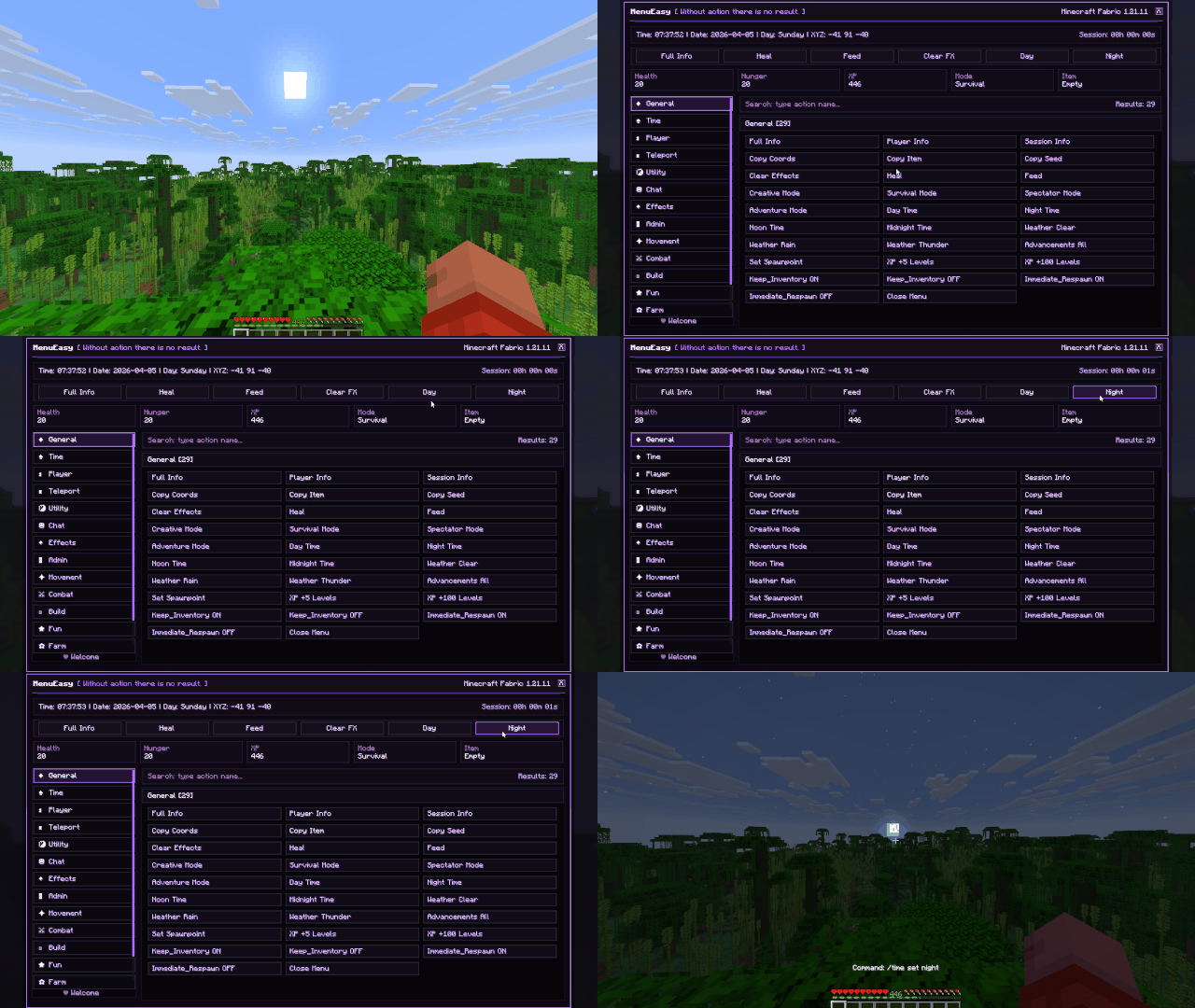
MenuEasy is a fast and lightweight in-game utility menu designed to make common commands and useful actions easier to access.
Instead of repeatedly typing commands into chat, MenuEasy gives you a clean interface where supported actions can be executed with a single click.
The idea is simple:
**Open • Click • Done**
⚡ | One-Click Actions
MenuEasy turns supported commands and actions into easy-to-use buttons.
Instead of remembering and typing commands manually, simply open the menu and choose the action you need.
This makes repetitive tasks faster and more comfortable.
🖱️ | Simple In-Game Menu
Everything is organized inside a dedicated in-game interface.
The menu is designed to be:
– Easy to understand
– Quick to navigate
– Fast to use
– Clean and compact
No complicated configuration process is required for normal use.
⌨️ | Less Command Typing
Minecraft commands are powerful, but repeatedly typing them can become inconvenient.
MenuEasy provides a more visual way to access supported actions.
Instead of:
Open Chat → Type Command → Check Syntax → Execute
you can simply use:
Open Menu → Click Action
🛡️ | Commands That Require Permission
Some MenuEasy actions use Minecraft commands that require administrator or operator permissions.
In singleplayer, you can enable commands by using:
Esc → Open to LAN → Allow Commands: ON → Start LAN World
Actions that depend on commands will only work when Minecraft allows your player to execute them.
🎨 | Clean Interface
MenuEasy uses a simple and modern interface designed to keep useful actions easy to find.
The visual style focuses on clarity without filling the screen with unnecessary information.
Quick access should feel quick.
🪶 | Lightweight
MenuEasy focuses on one purpose:
making useful commands and actions easier to access.
It does not try to become a large gameplay overhaul or complicated administration system.
The result is a small utility mod that stays focused on convenience.
🖥️ | Client-Side Utility
MenuEasy is designed as a client-side utility mod.
Its interface runs on the player’s client while supported actions interact with Minecraft through the normal command system.
Because of this, command permissions still apply when required.
🧭 | Useful for Different Playstyles
MenuEasy can be useful when:
– Testing worlds
– Building
– Using Creative Mode
– Managing singleplayer worlds
– Frequently using commands
– Quickly accessing common actions
It is especially useful for players who prefer buttons and visual controls instead of repeatedly typing commands.
✨ | Simple by Design
MenuEasy was built around a straightforward idea:
Useful actions should be easy to access.
No command memorization.
No repeated typing.
No unnecessary steps.
Just open the menu and choose what you need.
⚙️ | Everything in One Place
MenuEasy combines:
Quick Actions • Command Shortcuts • Visual Controls • Fast Access • Clean Interface
The goal is simple:
Turn repetitive commands into quick, comfortable actions.
—
- Mod Loader: Fabric
- Environment: Client-Side
- Developed by: CryonLabs
- Tenvoria: Author / Alternate Identity
- License: ARR — All Rights Reserved
常见问题
MenuEasy 支持哪些 Minecraft 版本?
MenuEasy 支持 Minecraft Java 版 1.21.11–26.3,共 2 个版本,可用的加载器:Fabric。下载时注意选择和你游戏版本一致的文件。
MenuEasy 怎么安装?
先用 PCL2 或 HMCL 启动器安装对应版本的 Fabric,再把下载的 .jar 文件放进游戏目录的 mods 文件夹,重新启动游戏即可。开启了版本隔离的,mods 文件夹在 versions/版本名 下面。
CryonLabs 的其他作品
查看全部 →
QuarryUltra
QuarryUltra – a versatile Minecraft mod that lets blocks automatically generate resources, materials, and items with customizable outputs.

Farfuits
A simple farming technology mod that automatically creates, plants, harvests and manages farms from 3x3 to 15x15 using a single smart farming block.
TeleEasy
A lightweight teleportation mod that allows you to instantly travel to where you are looking, featuring target previews, customizable controls, and fast long-distance movement.

VitHud
A clean and lightweight HUD mod that displays essential gameplay information without cluttering your screen.
评论
登录后评论和评分