
介绍
My Bossfight Music
MyBossMusic is a lightweight client-side mod that allows you to replace Minecraft’s default boss music with your own custom OGG tracks.
Simply place your music files in the mod’s music folder and configure which boss should play each track. The mod automatically detects bosses, starts your custom music when a battle begins, and stops it when the fight ends.
Features
-
🎵 Play custom OGG music during boss fights.
-
📁 Easy file-based configuration.
-
🎮 Client-side only.
-
🔧 Supports custom boss music for compatible mods through the configuration.
Perfect for creating a more cinematic and immersive boss battle experience.
How to use this mod?
Configuration
When you launch the game with this mod installed, a folder named mybossmusic will be created in your Minecraft game directory. Inside it, you will find:
-
configuration.cfg -
musicfolder -
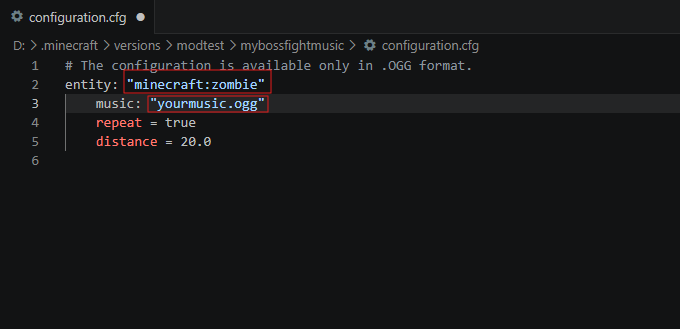
To assign custom music to a mob, place your .ogg music file into the music folder. Then open configuration.cfg and enter the exact name of the music file for the desired mob, as shown in the screenshot.
Mod Compatibility
This mod is compatible with entities from other mods, such as Ice and Fire.
To assign custom music to a modded entity, enter its full entity ID (for example, iceandfire:fire_dragon) in the entity field of configuration.cfg.
Notes
-
Only OGG audio files are supported.
-
Your Minecraft instance (modpack) path must not contain Cyrillic (non-Latin) characters. Use English characters only for the folder names in the game path; otherwise, the mod may not work correctly.
常见问题
My Bossfight Music 支持哪些 Minecraft 版本?
My Bossfight Music 支持 Minecraft Java 版 1.20.1,可用的加载器:Forge。下载时注意选择和你游戏版本一致的文件。
My Bossfight Music 怎么安装?
先用 PCL2 或 HMCL 启动器安装对应版本的 Forge,再把下载的 .jar 文件放进游戏目录的 mods 文件夹,重新启动游戏即可。开启了版本隔离的,mods 文件夹在 versions/版本名 下面。
评论
登录后评论和评分