Stack64 Taker
Click support for taking exactly 64 items from oversized stacks. Useful with stack-size-increasing mods such as Bigger Stacks.
介绍
Stack64 Taker adds configurable inventory shortcuts for Minecraft Forge 1.20.1.
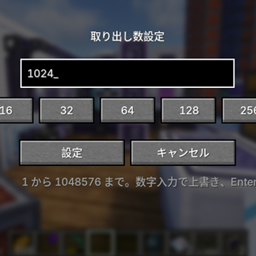
Use the configured Take amount key over a slot to take the selected number of items. The default is 64, and the amount can be changed with the Set take amount key.
This is useful in modpacks that raise item stack limits with mods such as Bigger Stacks, while still wanting an easy way to create a vanilla-sized stack.
- Supports normal menu slots and AE2 storage-terminal virtual slots.
- Supports amounts from 1 through 1,048,576.
- Merges into a compatible stack already carried by the cursor.
- Both shortcut actions are configurable in Minecraft’s key bindings screen.
- Retains the complete behavior of the 1.2.4 baseline.
- Rejects stale custom requests after the player changes menus.
- Blocks out-of-range vanilla container clicks before they reach slot lookup.
- Performs server-side validation only on the server thread.
- Rate-limits recovery synchronization and warning logs.
- Requires both client and server installation.
The client detects the shortcut, but the server performs the actual inventory change. This avoids ghost items and keeps multiplayer inventories authoritative.
This mod is intentionally tiny. It does not change stack sizes by itself. Pair it with a stack-size mod such as Bigger Stacks.
The current implementation targets Forge 1.20.1 and uses runtime Minecraft method names, matching Forge’s production environment.
gradle clean test build --no-daemon
The built jar will be in:
build/libs/
GitHub Actions runs the same Java 17 ForgeGradle build for pushes and pull requests.
MIT
常见问题
Stack64 Taker 支持哪些 Minecraft 版本?
Stack64 Taker 支持 Minecraft Java 版 1.20.1,可用的加载器:Forge。下载时注意选择和你游戏版本一致的文件。
Stack64 Taker 怎么安装?
先用 PCL2 或 HMCL 启动器安装对应版本的 Forge,再把下载的 .jar 文件放进游戏目录的 mods 文件夹,重新启动游戏即可。开启了版本隔离的,mods 文件夹在 versions/版本名 下面。
syarukasu 的其他作品
查看全部 →
AE2 Crafting Optimizer
为 Forge 1.20.1 和 NeoForge 1.21.1 优化 AE2 合成计划,支持 BigInteger 数量和机器集成。ACO 2.0 为 Alpha 快照版。
Advanced Quantum Engineering
Advanced Quantum Engineering 为 Advanced AE 添加升级版量子计算机部件,采用原版量子计算机的多方块结构系统。
Advanced Assembly Computing
适用于 Forge 1.20.1 的 Neo ECO AE 实体向量合成附属模组

AE2 Lightning Tech Unofficial port
已归档的非官方移植版。请使用官方的AE2 Lightning Tech项目以获得Minecraft 1.20.1支持。
评论
登录后评论和评分