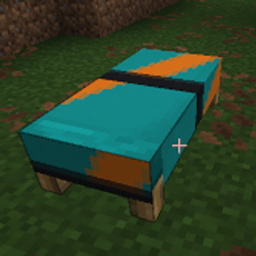
Better Banner Beds
Apply banner patterns to beds. Patterned beds keep their design when placed, picked up, or broken.
介绍
Better Banner Beds
Apply banner patterns to beds. Patterned beds keep their design when placed, picked up, or broken.
Requires: Minecraft 26.1.2 · NeoForge 26.1.2.76+
How to use
Smithing table
- Leave the left (template) slot empty
- Put your bed in the middle slot
- Put a banner with patterns, or a banner pattern item, in the right slot
- Take the finished bed from the result
Using a patterned banner copies all of its layers onto the bed. Using a banner pattern item applies that pattern in white.
Loom
Works like dyeing a banner, but with a bed:
- Put a bed in the banner slot
- Put a dye in the dye slot
- Optionally add a banner pattern item
- Choose a pattern and take the result
You can add more patterns the same way until the bed reaches the usual banner layer limit (6).
What to expect
- Patterns show on the blanket of the placed bed
- Both halves of the bed share the same design
- Breaking or picking up the bed keeps the patterns
- Hovering the bed item lists the applied patterns in the tooltip
常见问题
Better Banner Beds 支持哪些 Minecraft 版本?
Better Banner Beds 支持 Minecraft Java 版 26.1.1–26.2,共 3 个版本,可用的加载器:NeoForge。下载时注意选择和你游戏版本一致的文件。
Better Banner Beds 怎么安装?
先用 PCL2 或 HMCL 启动器安装对应版本的 NeoForge,再把下载的 .jar 文件放进游戏目录的 mods 文件夹,重新启动游戏即可。开启了版本隔离的,mods 文件夹在 versions/版本名 下面。
artofscripting 的其他作品
查看全部 →
Infinite Inventory
一款添加魔法袋的 Minecraft 模组,真正拥有无限储物空间。
Artust Item Duplicator
物品复制器
MC Money
一个货币模组,添加了硬币、用于安全存储的个人银行,以及一个可配置的商店,包含 200+ 物品供买卖。
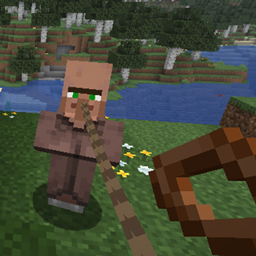
Universal Lead (Leashable Villagers & Mobs)
Attach standard Minecraft Leads to villagers, turtles, pandas, bats, fish, and other passive mobs that vanilla arbitrarily blocks.
评论
登录后评论和评分